
1. Okwu mmalite
Thank you for choosing the WMF LONO 900W Toaster. This manual provides essential information for the safe and efficient operation, maintenance, and care of your appliance. Please read these instructions thoroughly before first use and keep them for future reference.
2. Ntuziaka nchekwa
- Always ensure the toaster is placed on a stable, heat-resistant surface, away from flammable materials.
- Do not operate the toaster near water or other liquids.
- Etinyela ihe ndị e ji ígwè rụọ n'ime oghere e ji esi nri.
- Unplug the toaster from the power outlet when not in use, before cleaning, or if a malfunction occurs.
- Emetụla ebe dị ọkụ aka. Jiri aka ma ọ bụ mkpọ.
- Ezubere ngwa a maka iji ndị mmadụ (gụnyere ụmụaka) nwere ike anụ ahụ, mmetụta uche ma ọ bụ nke uche, ma ọ bụ enweghị ahụmịhe na ihe ọmụma, ma ọ bụrụ na enyereghị ha nlekọta ma ọ bụ ntụziaka gbasara iji ngwa ahụ site n'aka onye na-ahụ maka nchekwa ha.
- Ekwesịrị ilekọta ụmụaka ka ha hụ na ha ejighi ngwa eji egwu egwu egwu.
- Ekpuchila toaster mgbe ị na-arụ ọrụ.
- Bread may burn, therefore toasters must not be used near or below curtains and other combustible materials. They must be supervised when in use.
3. Ngwaahịa gafereview
The WMF LONO Toaster is designed for efficient and even toasting of bread slices. It features two wide slots, adjustable browning control, and various functions for optimal results.

Image 1: The WMF LONO 900W Toaster, showcasing its sleek stainless steel and black design with two toasting slots.
Isi ihe:
- Ebe a na-ata nri: Oghere abụọ sara mbara maka ụdị achịcha dị iche iche.
- Ihe eji ebu ibu: Lowers bread into the toaster and initiates the toasting cycle.
- Ọkpọ oku njikwa browning: Adjusts the desired level of toast browning (settings 1-7).
- bọtịnụ njikwa: Defrost, Reheat, and Cancel functions.
- Tray Crumb nke mbughari: Na-anakọta crumbs maka nhicha dị mfe.
- Ebe a na-ekpo ọkụ nke e jikọtara ọnụ: For warming rolls and pastries.

Foto 2: nso nso view of the toaster's control panel, showing the browning control dial and the defrost, reheat, and cancel buttons.

Image 3: The removable crumb tray of the WMF LONO Toaster, shown partially pulled out for cleaning.
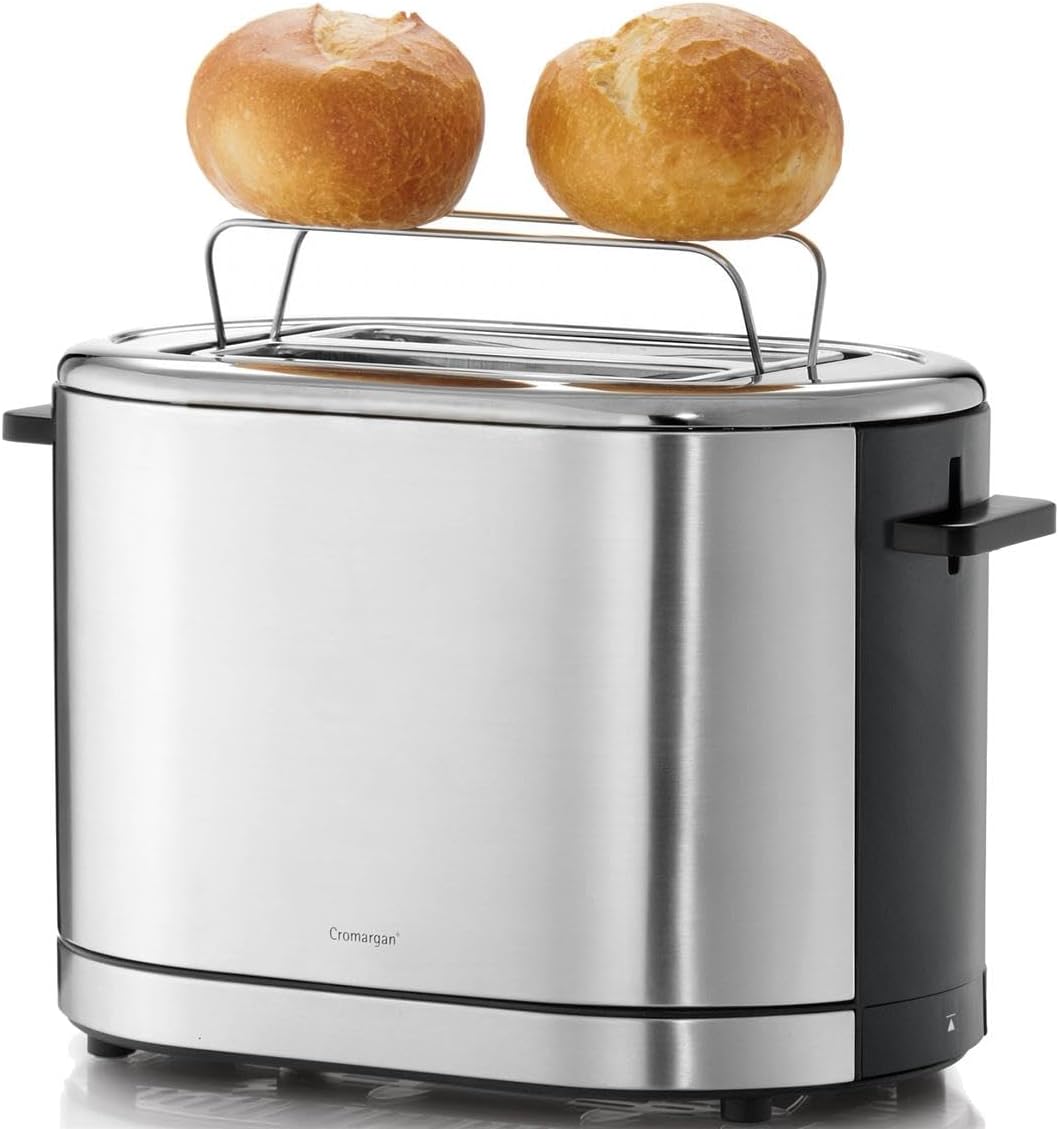
Image 4: The WMF LONO Toaster with its integrated warming rack extended, holding two bread rolls for warming.
4. Nhazi
- Mepee ihe toaster ma wepụ ihe nkwakọ ngwaahịa niile.
- Place the toaster on a clean, dry, stable, and heat-resistant surface. Ensure there is adequate ventilation around the appliance.
- Before first use, operate the toaster without bread for a few cycles at the highest browning setting to burn off any manufacturing residues. This may produce a slight odor, which is normal. Ensure the area is well-ventilated.
- Allow the toaster to cool down completely after the initial burn-off cycles.
5. Ntuziaka ọrụ
5.1. Achịcha iji mee achịcha
- Plug the toaster into a suitable power outlet (220-240V, 50/60Hz).
- Place up to two slices of bread into the toasting slots.
- Họrọ ọkwa nchara ị chọrọ site na iji akara akara browning (1 maka ọkụ, 7 maka ọchịchịrị).
- Press the carriage lever down until it locks into place. The toasting cycle will begin, and the indicator light will illuminate.
- Once the selected browning level is reached, the toast will automatically pop up, and the toaster will switch off.

Image 5: Two slices of bread placed inside the toasting slots of the WMF LONO Toaster, ready for operation.
5.2. Defrost Ọrụ
Jiri ọrụ a mee achịcha e kpọnwụrụ akpọnwụ.
- Place frozen bread into the slots.
- Họrọ ọkwa agba aja aja nke ịchọrọ.
- Press the carriage lever down, then press the Ndidi button (snowflake icon). The defrost indicator light will illuminate.
- The toaster will automatically adjust the toasting time to account for defrosting.
5.3. Reheat Function
Jiri ọrụ a mee ka achịcha e ghere eghe kpoo ọkụ n'enweghị ịgba aja aja ọzọ.
- Place cold, toasted bread into the slots.
- Press the carriage lever down, then press the Tinyegharịa ọkụ button (wavy lines icon). The reheat indicator light will illuminate.
- The toaster will briefly warm the bread and then automatically pop it up.
5.4. Kagbuo Ọrụ
Iji kwụsị usoro ịcha achịcha n'oge ọ bụla, pịa bọtịnụ Kagbuo button (circle with diagonal line icon). The toast will pop up immediately.
5.5. Using the Warming Rack
The integrated warming rack is ideal for warming rolls, croissants, or pastries.
- Gently push the warming rack lever upwards until the rack is fully extended.
- Debe ihe ndị ahụ ka e kpoo ha ọkụ n'elu ihe e ji echekwa ihe.
- Debe njikwa agba aja aja ka ọ dị ala (dịka ọmụmaatụ, 1 ma ọ bụ 2).
- Press the carriage lever down to start the warming cycle.
- Monitor the items closely to prevent burning. Press the Cancel button when warmed to your preference.
- After use, push the warming rack lever downwards to retract the rack.
6. Nlekọta na nhicha
Ịsacha ihe mgbe niile na-eme ka arụmọrụ ya dịkwuo mma ma na-eme ka ihe e ji esi nri gị dịgide ogologo oge.
- Mgbe niile, gbanyụọ ihe nchacha ahụ ma hapụ ya ka ọ jụọ oyi kpamkpam tupu e hichaa ya.
- Akara Crumb: Pull out the removable crumb tray from the bottom of the toaster. Empty the crumbs and wipe the tray clean with a damp cloth. Ensure it is dry before reinserting.
- Mputa: Jiri nwayọ hichaa elu mpụta, damp cloth. Do not use abrasive cleaners or scouring pads, as these can damage the stainless steel finish.
- Ejila mmiri ọkụ ma ọ bụ mmiri mmiri ọ bụla ọzọ mikpuo toaster.
- Do not attempt to clean the inside of the toasting slots with any tools or your fingers.
7. Nchọpụta nsogbu
- Anụ toaster anaghị agba ọkụ: Ensure the power cord is securely plugged into a working outlet. Check if the carriage lever is fully pressed down and locked.
- Bread is unevenly toasted: This can sometimes occur due to variations in bread type or thickness. Try adjusting the browning level.
- Smoke coming from toaster: Unplug immediately. This usually indicates crumbs or food particles are burning inside. Allow to cool, then clean the crumb tray thoroughly. If food is stuck in the slots, unplug and carefully remove it with non-metallic tongs.
- Carriage lever does not stay down: Ensure the toaster is plugged in. The lever will not latch if the toaster is not receiving power. If it still doesn't latch, there might be a mechanical issue; contact customer support.
8. Nkọwapụta
| Ụdị | WMF |
| Nọmba nlereanya | 0414090011 |
| Ụdị ngwaahịa | Toaster |
| Oriri ike | 900 W |
| Voltage | 220 - 240 V / 50/60 Hz |
| Ọnụọgụ nke Mpekere | 2 |
| Ọkwa agba aja aja | 7 |
| Agba | Ọlaọcha/Oji |
| Ihe onwunwe | Cromargan Stainless Steel |
| Akụkụ (L x W x H) | 12.6 x 9.06 x 7.68 sentimita asatọ (ihe dị ka 32 x 23 x 19.5 cm) |
| Ibu Ibu | 3.49 pound (1.59 n'arọ) |

Image 6: Diagram showing the dimensions of the WMF LONO Toaster: approximately 19 cm height, 29.5 cm length, and 16.5 cm width.
9. Akwụkwọ ikike na nkwado
WMF products are manufactured with high-quality materials and undergo strict quality control. For information regarding warranty terms and conditions, or for technical support, please refer to the warranty card included with your purchase or visit the official WMF websaịtị. Biko dowe akwụkwọ ikike ịzụrụ ihe ọ bụla.