
Okwu mmalite
The Seiko NR435P is an analog alarm clock designed to provide a pleasant wake-up experience with its selection of 31 melodies. This clock features a quartz movement for accurate timekeeping and offers various alarm settings. This manual provides detailed instructions for setting up, operating, maintaining, and troubleshooting your Seiko NR435P clock.

Foto 1: N'ihu view of the Seiko NR435P Analog Melody Alarm Clock. This image displays the clock's face, hands, and the overall pink and white design.
1. Nhazi
1.1 Ntinye batrị
- Chọta ebe batrị dị n'azụ elekere.
- Mepee mkpuchi nke batrị batrị.
- Insert three (3) AA alkaline batteries, ensuring the correct polarity (+/-) as indicated inside the compartment.
- Mechie mkpuchi nke batrị batrị nke ọma.

Foto 2: N'azụ view of the Seiko NR435P clock, showing the battery compartment and control switches.
1.2 Isetịpụ oge
- Turn the time setting knob, usually located on the back or side of the clock, to adjust the hour and minute hands to the current time.
- Ensure the time is set accurately, especially for AM/PM if applicable (though this is an analog clock, some internal mechanisms might differentiate).
2. Ntuziaka ọrụ
2.1 Ịtọ ntọala mkpu
- Locate the alarm setting knob or dial, typically on the back or front of the clock.
- Rotate the alarm setting knob to move the alarm hand to your desired wake-up time.
- Ensure the alarm ON/OFF switch (often a small slider on the side or back) is in the "ON" position.
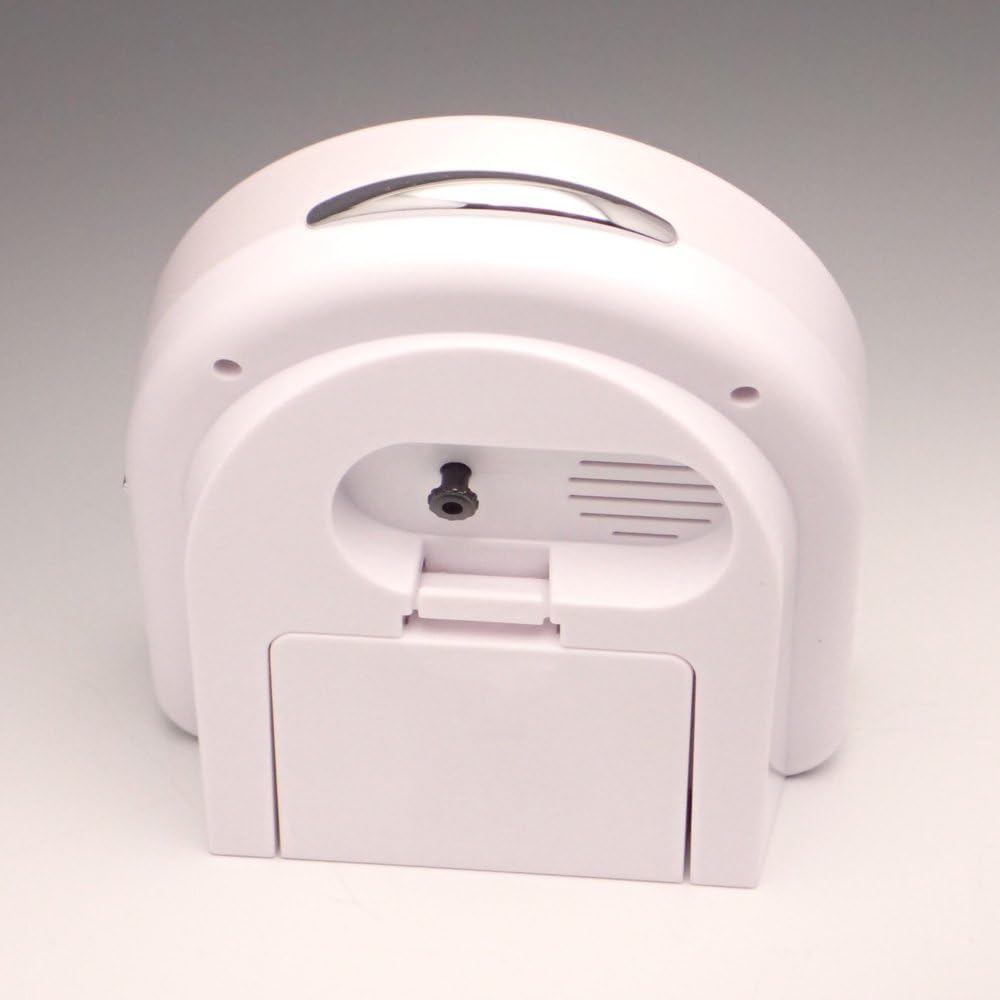
Foto 3: Akụkụ view of the Seiko NR435P clock, highlighting the alarm ON/OFF switch.
2.2 Selecting Melodies
The Seiko NR435P features 31 different melodies for its alarm function. These can be selected in three patterns:
- Daily Rotation: The clock can play a different melody each day of the month.
- Mood-Based Selection: Choose a pattern that suits your mood.
- Favorite Song: Set the alarm to play a specific, preferred melody.
Refer to the controls on the front of the clock (Figure 4) to cycle through melody options and select your desired pattern. The specific labels for these controls may be in Japanese, but typically involve a button or switch to advance through songs or modes.

Foto 4: Close-up of the front controls on the Seiko NR435P clock, used for melody selection and other functions.
2.3 Mgbanwe olu
The alarm volume can typically be adjusted using a switch or dial on the clock. Available settings usually include:
- Ọkara
- dara ụda
- Super Loud
Adjust the volume to a level suitable for your needs. Note that a "super quiet" setting may not be available.
2.4 Ọrụ snooze
To temporarily stop the alarm and activate the snooze function, press the large button located on the top of the clock. The alarm will sound again after a short interval. To fully turn off the alarm, slide the alarm ON/OFF switch to the "OFF" position.
3. Nlekọta
3.1 Nhicha
Wipe the clock's surface with a soft, dry cloth. Do not use abrasive cleaners, solvents, or chemical sprays, as these can damage the finish and internal components.
3.2 nnọchi batrị
Replace the batteries when the clock's display dims, the melodies sound weak, or the clock stops functioning. Always replace all three AA batteries at the same time with new ones. Dispose of used batteries according to local regulations.
4. Nchọpụta nsogbu
| Nsogbu | Ihe nwere ike ime | Ngwọta |
|---|---|---|
| Clock not functioning / Alarm not sounding. | Dead or incorrectly installed batteries. Alarm switch is OFF. | Replace batteries with new AA alkaline batteries, ensuring correct polarity. Ensure the alarm ON/OFF switch is in the "ON" position. |
| Alarm melody sounds distorted or weak. | Ike batrị dị ala. | Replace batteries with new AA alkaline batteries. |
| Oge ezighi ezi. | Incorrect time setting. Weak batteries. | Re-set the time using the time setting knob. Replace batteries if they are old or weak. |
| Difficulty understanding melody selection controls. | Controls are labeled in a foreign language. | Experiment with the buttons/switches on the front of the clock to cycle through melodies and patterns. Typically, one button advances the melody, and another selects the mode. |
5. Nkọwapụta
- Nọmba nlereanya: NR435P
- Akara: SEIKO
- Agba: Pink
- Ụdị ngosi: Analọg
- Ntughari: Quartz (+/- 30 seconds per month)
- Atụmatụ pụrụ iche: 31 Melody Alarm, Snooze Function
- Isi mmalite ike: Battery Powered (3 x AA alkaline batteries)
- Akụkụ ngwaahịa: 5.4"W x 5.1"H x 2.8"D (13.6 x 12.9 x 7.1 cm)
- Ibu nkeji: 0.35 n'arọ (350 grams)
- Ihe: Plastic
- Ojiji ime ụlọ/n'èzí: Ime ụlọ
- Mba onye si: China

Foto 5: The Seiko NR435P clock held in a hand, illustrating its compact size and dimensions.
6. Akwụkwọ ikike Ozi
This product is covered by a manufacturer's warranty. Please refer to the warranty card included with your purchase for specific terms, conditions, and duration. Keep your proof of purchase for warranty claims.
7. Nkwado ndị ahịa
For further assistance, technical support, or inquiries regarding your Seiko NR435P clock, please contact Seiko customer service. Contact information can typically be found on the official Seiko websaịtị ma ọ bụ na nkwakọ ngwaahịa.