
Okwu mmalite
The Arctic-Pro Tower Fan with Remote Control is designed to provide wide-range air distribution for your home or office. Standing 42 inches high, its modern design and minimal footprint ensure it fits seamlessly into most environments without occupying excessive space. Engineered for efficient airflow with reduced noise, this fan features 80-degree oscillation to circulate air effectively. It includes a convenient remote control and a digital screen for easy operation.

Figure 1: Arctic-Pro Digital Screen Oscillating Tower Fan with visible airflow and remote control.
Ntuziaka nchekwa
- Kwapụ ihe ikuku na-agbapụta mgbe niile site na ihe nkwụnye ọkụ eletrik tupu ị na-ehicha, na-arụzi, ma ọ bụ na-akwagharị.
- Ejila waya maọbụ plọg mebiri emebi rụọ ọrụ fan ahụ. Ọ bụrụ na eriri maọbụ plọg ahụ emebie, kpọtụrụ ndị ahịa.
- Keep fingers, hair, and loose clothing away from the fan blades and openings during operation.
- Adịnyela fan n'ime mmiri ma ọ bụ ihe mmiri ndị ọzọ.
- Gbaa mbọ hụ na etinyere fan ahụ n'elu kwụsiri ike, dị larịị ka ọ ghara ịfetụ.
- Ejila fan na mmiri ma ọ bụ damp ebe dị iche iche, dịka ụlọ ịsa ahụ ma ọ bụ ebe a na-asa ákwà.
- Ezubere ngwa a maka iji ndị mmadụ (gụnyere ụmụaka) nwere ike anụ ahụ, mmetụta uche ma ọ bụ nke uche, ma ọ bụ enweghị ahụmịhe na ihe ọmụma, ma ọ bụrụ na enyereghị ha nlekọta ma ọ bụ ntụziaka gbasara iji ngwa ahụ site n'aka onye na-ahụ maka nchekwa ha.
Ihe ngwugwu
Please ensure all parts are present before assembly. Open both ends of the box to locate all components.
- Tower Fan Unit
- Pedestal (for 42-inch configuration)
- Ntọala (ọkara abụọ)
- Njikwa anya
- Screws for Base Assembly
- Ụdọ ọkụ
Ntọlite & Mgbakọ
Nchịkọta na-ewekarị nkeji iri atọ ruo iri anọ na ise.
- Jiri nlezianya wepụ ihe niile dị na igbe ahụ.
- Assemble the two halves of the base by aligning them and pressing firmly until they snap together.
- Choose your desired height configuration:
- 42-Inch Configuration: Attach the pedestal to the assembled base, then secure the tower fan unit onto the pedestal.
- 32-Inch Configuration: Attach the tower fan unit directly to the assembled base.
- Secure the fan unit to the base/pedestal using the provided screws.
- Tinye eriri ọkụ n'ime oghere eletrik ọkọlọtọ.

Figure 2: The Arctic-Pro Tower Fan can be configured at two different heights.
Ntuziaka ọrụ
The Arctic-Pro Tower Fan can be operated using the control panel on the unit or the included remote control.
Control Panel & Remote Functions
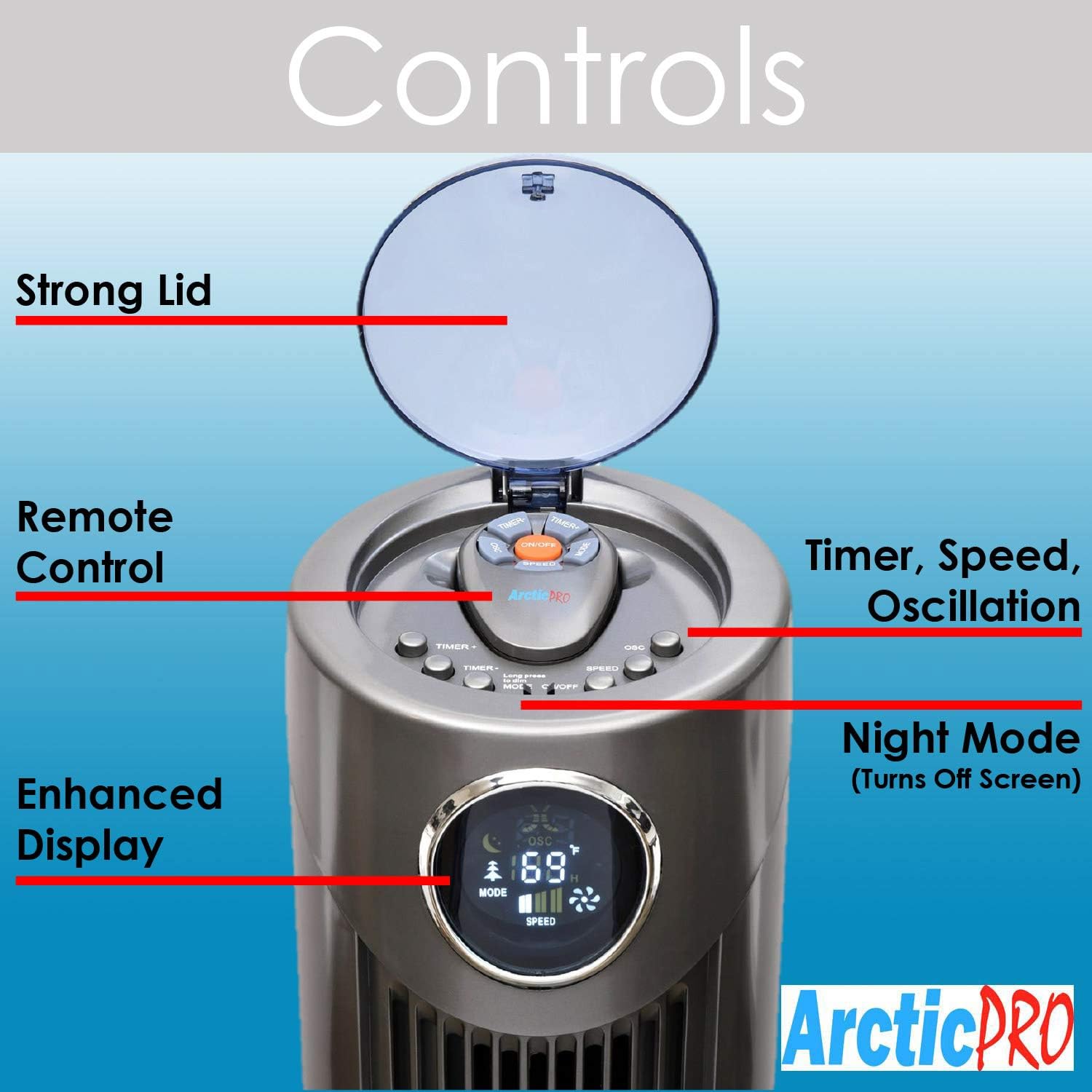
Ọgụgụ 3: Zuru ezu view of the fan's control panel.
- Gbanyụọ/ Gbanyụọ: Pịa bọtịnụ ike dị na njikwa njikwa ma ọ bụ remote ka ịgbanwuo ma ọ bụ gbanyụọ fan.
- Ntọala ọsọ: The fan features 3 speed settings. Press the Speed button to cycle through Low, Medium, and High.
- Ụdịdị: The fan offers Sleep, Nature Wind, and Normal Wind modes. Press the Mode button to switch between these settings.
- Mgbanwe: Press the Oscillation button to activate or deactivate the 80-degree oscillation feature, circulating air throughout the room.
- Ụdị abalị: To turn off the digital screen for sensitive sleepers, hold down the Mode button for 5 seconds. To illuminate the screen again, press the Mode button once.
- Ọrụ ngụ oge: Activate the timer function to automatically shut off the fan after a set period, up to 12 hours. Press the Timer button to cycle through available time increments.
Njikwa anya
The convenient remote control allows you to operate all fan functions from a distance. It can be stored on top of the fan for easy access.

Figure 4: The fan's remote control and integrated handle.
Nlekọta
Ịsacha mgbe niile na-eme ka arụmọrụ kacha mma na ogologo ndụ nke fan gị.
- Nchacha mpụta: Wipe down the exterior surfaces of the fan with a soft, damp akwa . Ejila ihe nchacha abrasive ma ọ bụ ihe mgbaze.
- Ime nhicha: For deeper cleaning, there is a screw on the back that holds the back plate. Remove the screw, take off the back plate, and gently clean the internal components with a soft brush or vacuum cleaner attachment to remove dust buildup. Ensure the fan is completely dry before reassembling and operating.
- Kwupụ oge niile fan tupu ihicha ma ọ bụ mmezi ọ bụla.
Nchọpụta nsogbu
- Onye ofufe anaghị agbanwu:
- Gbaa mbọ hụ na etinyere eriri ọkụ n'ime oghere eletrik na-arụ ọrụ.
- Lelee ma oghere ahụ na-enweta ike site na itinye na ngwaọrụ ọzọ.
- Verify that the power button on the unit or remote has been pressed.
- Ikuku ikuku adịghị ike:
- Mee ka ntọala ọsọ fan dịkwuo mma.
- Clean the fan's air intake and exhaust vents to remove any dust or obstructions.
- Mkpọtụ na-adịghị ahụkebe:
- Ensure the fan is placed on a stable, flat surface.
- Check for any foreign objects that may have fallen into the fan's vents.
- Perform interior cleaning to remove dust buildup that might cause rattling.
- Njikwa anya anaghị arụ ọrụ:
- Replace the batteries (requires 2 AAA batteries).
- Ensure there are no obstructions between the remote and the fan's sensor.
Nkọwapụta
| Njirimara | Nkọwa |
|---|---|
| Ụdị | Arctic-Pro |
| Aha Nlereanya | 2103 |
| Agba | Agba ntụ |
| Akụkụ ngwaahịa | 12"D x 12"W x 42"H |
| Ibu Ibu | 9.85 pound |
| Isi Iyi Ike | Igwe ọkụ eletrik |
| Ọnụọgụ nke ọkwa ike | 3 |
| Mgbanwe | 80 ogo |
| Atụmatụ pụrụ iche | Adjustable Height, Lightweight, Oscillating, Remote Controlled, Timer |
| Ngwa gụnyere | Ime ime |
| Batrị achọrọ | 2 batrị AAA (maka ime ime) |

Figure 5: Dimensions of the Arctic-Pro Tower Fan.
Akwụkwọ ikike & Nkwado
This Arctic-Pro fan comes with a Limited Warranty of 120 Days from the date of purchase.
For any questions or support needs, please contact the manufacturer at: popshopcs@gmail.com
Ngwa ndị ọzọ
Ngwa Review Vidiyo
Vidiyo nke 1: Eziokwu eziokwuview of the Arctic-Pro Digital Screen Oscillating Fan, provided by a seller. This video demonstrates various features and user experience.