
1. Okwu mmalite
This manual provides essential information for the safe and efficient operation of your Sharp KC-A50EU-W Air Purifier. This device is designed to improve indoor air quality by filtering dust, pollen, mold spores, and odors, while also offering humidification using Plasmacluster ion technology. Please read these instructions thoroughly before use and retain them for future reference.
Ozi nchekwa dị mkpa
- Gbaa mbọ hụ na etinyere unit ahụ n'elu kwụsiri ike ma dịkwa larịị.
- Ekpuchila oghere ikuku ma ọ bụ oghere ikuku na-abata.
- Debe unit ahụ pụọ na mmiri na mmiri.
- Kwupu ngwa ngwa tupu ihicha ma ọ bụ ịrụ ọrụ ọ bụla.
- Anwala ịrụkwa unit ahụ n'onwe gị. Kpọtụrụ ndị ọrụ ruru eru.
2. Ngwaahịa gafereview
The Sharp KC-A50EU-W is an advanced air purifier and humidifier designed for rooms up to 38 m². It features Plasmacluster ion technology to neutralize airborne pollutants and a multi-stage filtration usoro.

Foto 2.1: N'ihu view of the Sharp KC-A50EU-W Air Purifier, showing the main body and air outlet.
Akụkụ ndị bụ isi:
- Plasmacluster Ion Technology: Releases positive and negative ions to clean the air.
- Ọrụ iru mmiri: Adds moisture to the air for improved comfort.
- High Air Circulation: Efficiently processes air in rooms up to 38 m².
- Otutu-stage Filtration: Includes a HEPA filter for fine particles and an odor filter.
- Ọrụ dị jụụ: Designed for minimal noise output.
3. Nhazi
3.1 Nwepu
- Jiri nlezianya wepụ ihe nhicha ikuku n'ime ngwugwu ya.
- Remove all protective materials and plastic bags.
- Check for any damage during transit. If damaged, do not operate and contact your retailer.
3.2 Ntinye
For optimal performance, place the air purifier in a location where air can circulate freely. Avoid placing it directly against walls or furniture. Ensure it is on a flat, stable surface. The unit is suitable for floor areas up to 24 square meters (as per specifications, though product description states 38m², use the more conservative spec for placement advice).

Foto 3.1: Akụkụ view of the air purifier, showing the air intake grille. Ensure this area is unobstructed.
3.3 Ntinye nyocha
Before first use, ensure all filters are correctly installed and any protective plastic packaging has been removed from them. Refer to the maintenance section for detailed filter handling.
4. Ntuziaka ọrụ
The control panel allows you to manage the various functions of your air purifier.

Foto 4.1: Close-up of the control panel, showing buttons for power, fan speed, Plasmacluster, and humidification.
4.1 Gbanyụọ ma ọ bụ gbanyụọ
- Tinye eriri ọkụ n'ime oghere eletrik kwesịrị ekwesị (220V).
- Pịa Gbanye/ Gbanyụọ button to turn the unit on. The unit will start in a default mode.
- Pịa Gbanye/ Gbanyụọ bọtịnụ ọzọ ka gbanyụọ unit.
4.2 Ndozi ọsọ Fan
Jiri ihe FAN ọsọ button to cycle through different fan settings (e.g., Low, Medium, High, Auto). The current setting will be indicated on the display or by indicator lights.
4.3 Plasmacluster Ion Operation
Pịa CLEAN ION SHOWER ON button to activate the Plasmacluster ion generator. This function helps to remove airborne viruses, bacteria, and odors. An indicator light will confirm activation.
4.4 Humidification Function
- Gbaa mbọ hụ na tank mmiri jupụtara na mmiri dị ọcha.
- Pịa CLEAN AIR & HUMIDIFY ON button to activate the humidification function.
- The unit will automatically maintain a comfortable humidity level.
- The humidity level may be displayed on the control panel.
4.5 Mkpọchi ụmụaka
To prevent accidental operation, press and hold the Mkpọchi ụmụaka button for 3 seconds to activate or deactivate the child lock function.
5. Nlekọta
Regular maintenance ensures optimal performance and extends the life of your air purifier. Always unplug the unit before cleaning or performing maintenance.
5.1 Nhicha na ndochi
The Sharp KC-A50EU-W uses multiple filters that require periodic cleaning or replacement.
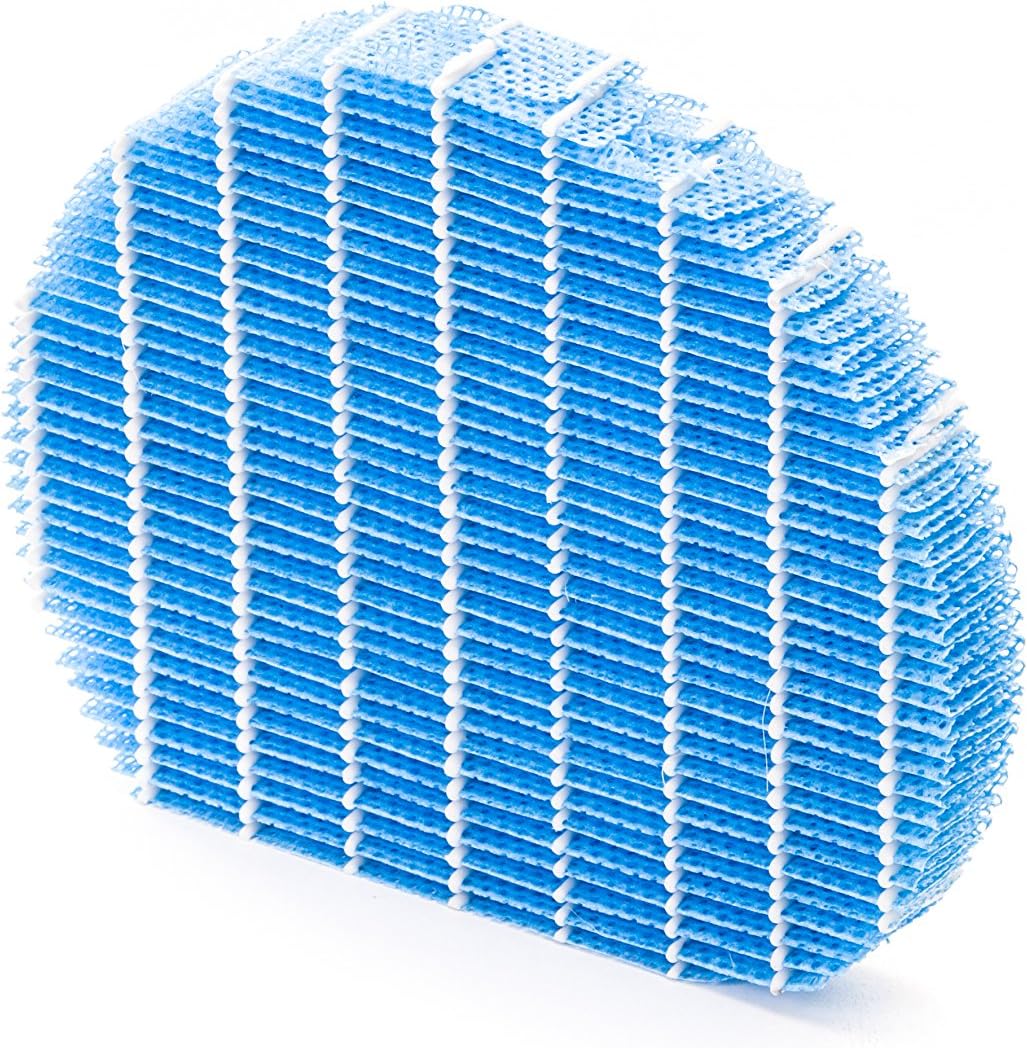
Foto 5.1: Example of a humidifying filter component, which requires regular cleaning.
- Tupu nzacha: Clean regularly (e.g., monthly) by vacuuming or washing with water. Allow to dry completely before reinstallation.
- HEPA Myọcha: This filter captures fine dust and allergens. It cannot be washed and must be replaced. The replacement interval can vary, but typically ranges from 2 to 5 years depending on usage and air quality. Monitor the filter's condition; if it appears significantly discolored (e.g., black instead of white), replace it immediately.
- Deodorizing Filter (Activated Carbon): This filter removes odors. It can often be washed periodically (e.g., every few months) to refresh its effectiveness. Allow to dry completely. Replace when odors persist after cleaning.
- Humidifying Filter: If using the humidification function, clean the humidifying filter and its tray at least every 4 weeks to prevent mold and bacteria growth. Use a mild detergent and rinse thoroughly.
5.2 Ichacha tankị mmiri
For units with humidification, clean the water tank regularly (e.g., weekly) to prevent mineral buildup and bacterial growth. Use a soft brush and mild detergent, then rinse thoroughly with clean water.
5.3 Nhicha mputa
Jiri nwayọ hichaa mpụta nke otu ahụ, damp akwa . Ejila ihe nchacha abrasive ma ọ bụ ihe mgbaze.
6. Nchọpụta nsogbu
If you encounter issues with your Sharp KC-A50EU-W, refer to the following common problems and solutions.
| Nsogbu | Ihe nwere ike ime | Ngwọta |
|---|---|---|
| Unit anaghị agbanwuo. | Power cord not properly connected; no power at outlet. | Ensure power cord is securely plugged in. Check the power outlet with another device. |
| Arụmọrụ nhicha ikuku adịghị mma. | Ihe nzacha ruru unyi ma ọ bụ kpọchie; etinyere ihe nzacha ahụ nke ọma. | Clean or replace filters as per maintenance instructions. Ensure filters are installed correctly. |
| Humidification not working or low output. | Water tank is empty; humidifying filter is dirty or clogged. | Refill the water tank. Clean the humidifying filter and tray. |
| Mkpọtụ na-adịghị ahụkebe sitere na otu. | Obstruction in fan; unit not on a level surface. | Check for any foreign objects near the fan. Place the unit on a stable, level surface. |
| Persistent odors. | Deodorizing filter is saturated or needs cleaning/replacement. | Clean or replace the deodorizing filter. |
Ọ bụrụ na nsogbu ahụ dịgidere mgbe ịnwale azịza ndị a, biko kpọtụrụ nkwado ndị ahịa.
7. Nkọwapụta
- Nọmba nlereanya: KC-A50EU-W
- Onye nrụpụta: Nkọ
- Agba: Ọcha
- Akụkụ ngwaahịa (L x W x H): 24 x 69 x 2.5 cm
- Ibu ihe: 9.2 n'arọ (9200 grams)
- Isi mmalite ike: 220V
- Ụdị nzacha: HEPA
- Mpaghara ala akwadoro: 24 square mita
- Ọkwa mkpọtụ: 49 decibel
- Ihe: Plastic
- Mba onye si: Japan
8. Akwụkwọ ikike na nkwado
For warranty information and customer support, please refer to the warranty card included with your product or visit the official Sharp websaịtị maka mpaghara gị. Debe nnata nzụta gị ka ihe akaebe nke ịzụrụ.