
1. Okwu mmalite
This manual provides instructions for the OEM RMT-B119A remote control, designed as a replacement or secondary remote for various Sony Blu-ray player models. This remote offers full functionality for controlling your Blu-ray player's features.
Compatible Sony Blu-ray Player Models:
- BDP-BX59
- BDP-S390
- BDP-S590
- BDP-BX110
- BDP-S1100
- BDP-S3100
- BDP-BX310
2. Nhazi
2.1 Ntinye batrị
Njikwa remote chọrọ batrị AAA abụọ (2) (anaghị etinye ya). Soro usoro ndị a iji wụnye batrị ndị a:
- Chọta mkpuchi mkpuchi batrị n'azụ nke njikwa anya.
- Pịa ala na taabụ ahụ wee mịda mkpuchi ahụ ala iji mepee ngalaba ahụ.
- Fanye batrị AAA abụọ, na-ahụ na njedebe dị mma (+) na nke na-adịghị mma (-) dabara nke ọma na akara ndị dị n'ime ụlọ ahụ.
- Weghachite mkpuchi nke batrị batrị n'ime ebe ruo mgbe ọ pịrị na nchekwa.
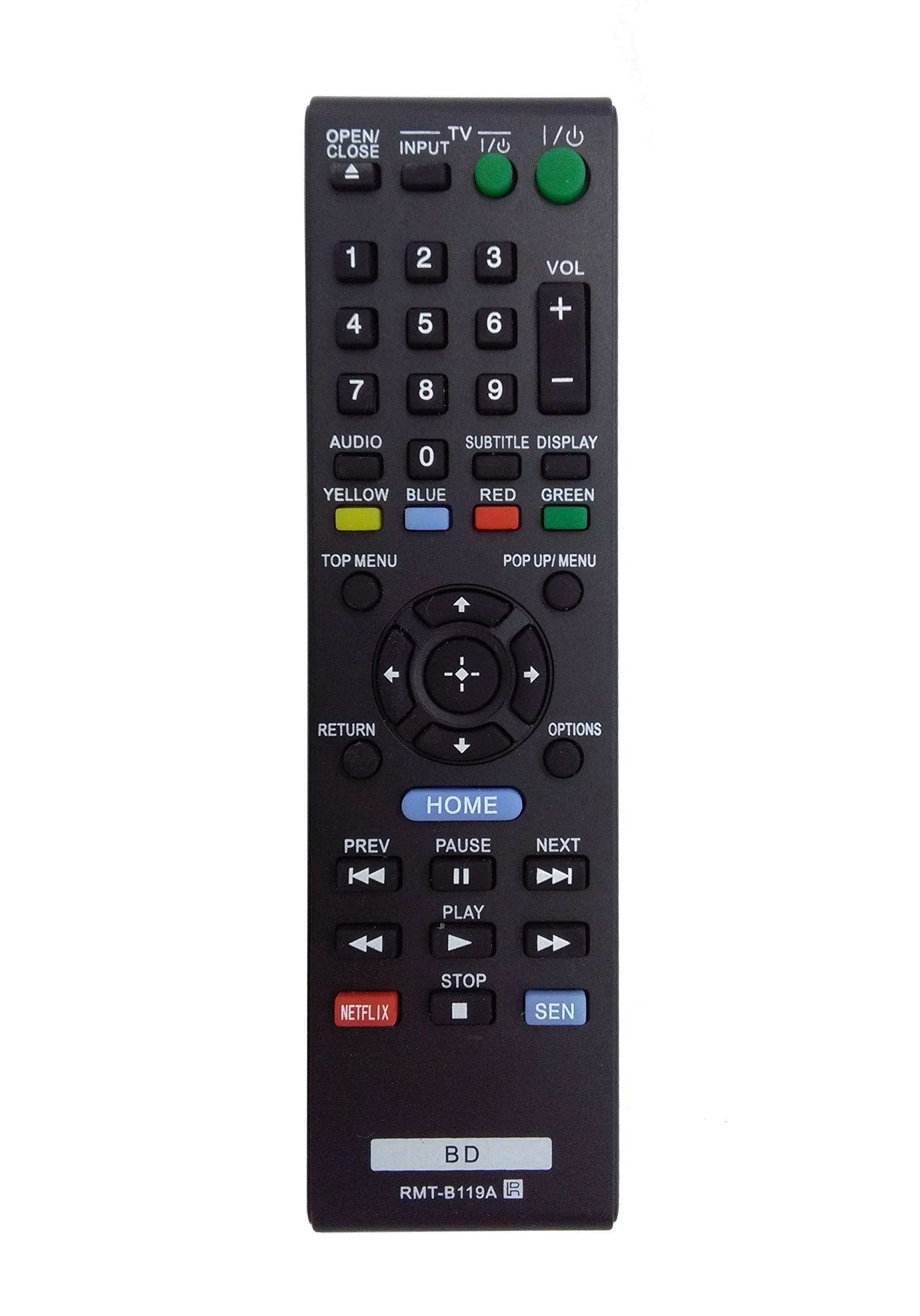
Image: The OEM RMT-B119A remote control, showing the full button layout on the front and a partial view of the open battery compartment on the back, revealing the battery terminals.
3. Ntuziaka ọrụ
3.1 Remote Control Layout and Button Functions
Familiarize yourself with the buttons on your RMT-B119A remote control. Below is a description of each button's primary function.
Image: The OEM RMT-B119A remote control, displaying all buttons and their labels.
- Power (I/O): Turns the Blu-ray player on or off.
- OPEN/CLOSE (▲): Mepee ma ọ bụ mechie traị diski.
- Ntinye: Switches the input source on the connected TV (if programmed).
- TV: Switches the remote to TV control mode (if programmed).
- Nọmba akara (0-9): Used for direct track selection, chapter selection, or entering numerical data.
- VOL (+/-): Adjusts the volume level (typically for the connected TV, if programmed).
- AUDIO: Changes the audio track or language during playback.
- SUBTITLE DISPLAY: Toggles subtitle display on or off, or cycles through available subtitle languages.
- YELLOW, BLUE, RED, GREEN: Color-coded function buttons, typically used for specific features within menus or interactive content. Their function varies depending on the disc or menu.
- NRI Accesses the main menu of the Blu-ray disc.
- POP UP/MENU: Displays the pop-up menu during disc playback.
- Directional Pad (↑↓←→): Na-agagharị na menus na nhọrọ.
- Center Button (Enter/Select): Confirms a selection or enters a menu item.
- Nlaghachi: Na-alaghachi na ihuenyo gara aga ma ọ bụ menu.
- Nhọrọ: Displays context-sensitive options or settings.
- OMLỌ: Accesses the Blu-ray player's home menu.
- PREV (◀◀): Skips to the beginning of the current track/chapter or the previous track/chapter.
- PAUSE (▌▌): Kwụsị ịkpọgharị.
- NEXT (▶▶): Skips to the next track or chapter.
- PLAY (▶): Na-amalite ma ọ bụ maliteghachi ịkpọghachi.
- KWỤSỊ (■): Kwụsị ịkpọghachi ya.
- NETFLIX: Direct access button for the Netflix streaming service.
- SEN: Direct access button for the Sony Entertainment Network (now PlayStation Video/Music).
- BD: Likely a dedicated button for Blu-ray Disc functions or to switch to Blu-ray mode.
4. Nlekọta
Iji hụ na njikwa remote gị dị ogologo ma rụọ ọrụ nke ọma, soro ntuziaka mmezi ndị a:
- Nhicha: Jiri akwa dị nro hichaa ihe dịpụrụ adịpụ. Maka unyi isi ike, ntakịrị dampen the cloth with water or a mild, non-abrasive cleaner. Avoid using harsh chemicals or solvents.
- Ngbanwe batrị: Replace batteries when the remote's response becomes sluggish or it stops functioning. Always replace both batteries at the same time with new ones of the same type.
- Nchekwa: Store the remote in a cool, dry place away from direct sunlight, extreme temperatures, and high humidity. If the remote will not be used for an extended period, remove the batteries to prevent leakage.
- Zere mbelata: Chebe ebe dịpụrụ adịpụ site na mmetụta anụ ahụ, n'ihi na ntụpọ nwere ike imebi ihe dị n'ime.
5. Nchọpụta nsogbu
Ọ bụrụ na ị na-enwe nsogbu na njikwa remote gị, lee tebụl na-esonụ maka nsogbu na ngwọta ndị a na-ahụkarị:
| Nsogbu | Ihe nwere ike ime | Ngwọta |
|---|---|---|
| Remote anaghị arụ ọrụ. | Ịtinye batrị nwụrụ anwụ ma ọ bụ na-ezighi ezi. | Dochie batrị ọhụrụ na nke ọhụrụ, na-ahụ polarity ziri ezi (+/-). |
| Remote na-arụ ọrụ nwa oge. | Low battery power or obstruction. | Replace batteries. Ensure no objects are blocking the remote's signal path to the Blu-ray player. |
| Remote anaghị achịkwa TV. | Remote not programmed for TV or TV mode not selected. | This remote is primarily for Blu-ray players. TV control functionality may require specific programming not covered by this manual, or may not be supported by this OEM model. |
| Bọtịnụ anaghị anabata ma ọ bụ na-arapara. | Unyi ma ọ bụ irighiri ihe n'okpuru bọtịnụ. | Clean the remote control surface. Avoid spilling liquids on the remote. |
6. Nkọwapụta
- Akara: OEM
- Nọmba nlereanya: RMT-B119A
- Teknụzụ Njikọta: Infrared (IR)
- Ngwa dakọtara: Sony Blu-ray Players (specific models listed in Introduction)
- Isi mmalite ike: Batrị 2 x AAA (anaghị etinye ya)
- Oke kacha: Ihe dị ka mita 10 (ụkwụ 33)
- Njirimara Pụrụ Iche: Ergonomic imewe
7. Akwụkwọ ikike na nkwado
This OEM RMT-B119A remote control comes with a Akwụkwọ ikike nke ụbọchị 30 site na ụbọchị ịzụrụ, na-ekpuchi ntụpọ nrụpụta. Biko dowe ihe akaebe nke ịzụrụ ihe maka akwụkwọ ikike.
For technical support or warranty inquiries, please contact the retailer or manufacturer directly. Refer to your purchase documentation for specific contact information.