
1. Okwu mmalite
Daalụ maka ịzụrụasing the KLH R5100 Surround Sound Receiver. This receiver is designed to provide high-quality audio and video performance for your home entertainment system. It features multiple audio and video inputs, surround sound processing, and a powerful amplifier to deliver an immersive listening experience. Please read this manual thoroughly before operating the unit to ensure proper setup and optimal performance.
2. Ozi nchekwa dị mkpa
Iji belata ihe egwu nke ujo eletrik, ọkụ, ma ọ bụ mmebi nke unit ahụ, biko debe ihe nchekwa nchekwa ndị a:
- Isi mmalite ike: Connect the unit only to an AC 120V, 60Hz power supply.
- Igwe ikuku: Hụ na ikuku na-abata nke ọma. Ekpuchila oghere ikuku. Hapụ ohere zuru oke gburugburu ngwaọrụ ahụ maka ikuku na-abata nke ọma.
- Mmiri na mmiri: Do not expose the unit to rain, moisture, or excessive humidity. Do not place objects filled with liquids, such as vases, on the unit.
- Okpomọkụ: Debe ngwaọrụ ahụ n'ebe dị anya site na isi iyi okpomọkụ dịka radiators, ndekọ okpomọkụ, stovu, ma ọ bụ ngwaọrụ ndị ọzọ (gụnyere amplifiers) nke na-emepụta okpomọkụ.
- Nhicha: Wepụ ihe mkpuchi ahụ na ihe mkpuchi mgbidi tupu ị hichaa ya. Jiri ákwà kpọrọ nkụ hichaa ya.
- Ije ozi: Anwala ịrụzi ngalaba a n'onwe gị. Nye ndị ọrụ ruru eru ọrụ niile.
- Gịnị: Chebe eriri ọkụ ka ị ghara ịgagharị na ma ọ bụ tuo ya, ọkachasị na plọg, ebe nchekwa dị mma, na ebe ha si na unit pụta.
3. Ihe ngwugwu
Biko lelee ma ngwugwu gị nwere ihe ndị a:
- KLH R5100 Surround Sound Receiver
- Ngalaba njikwa anya
- Akwụkwọ ntuziaka onye ọrụ
- Audio/Video Cables (RCA type)
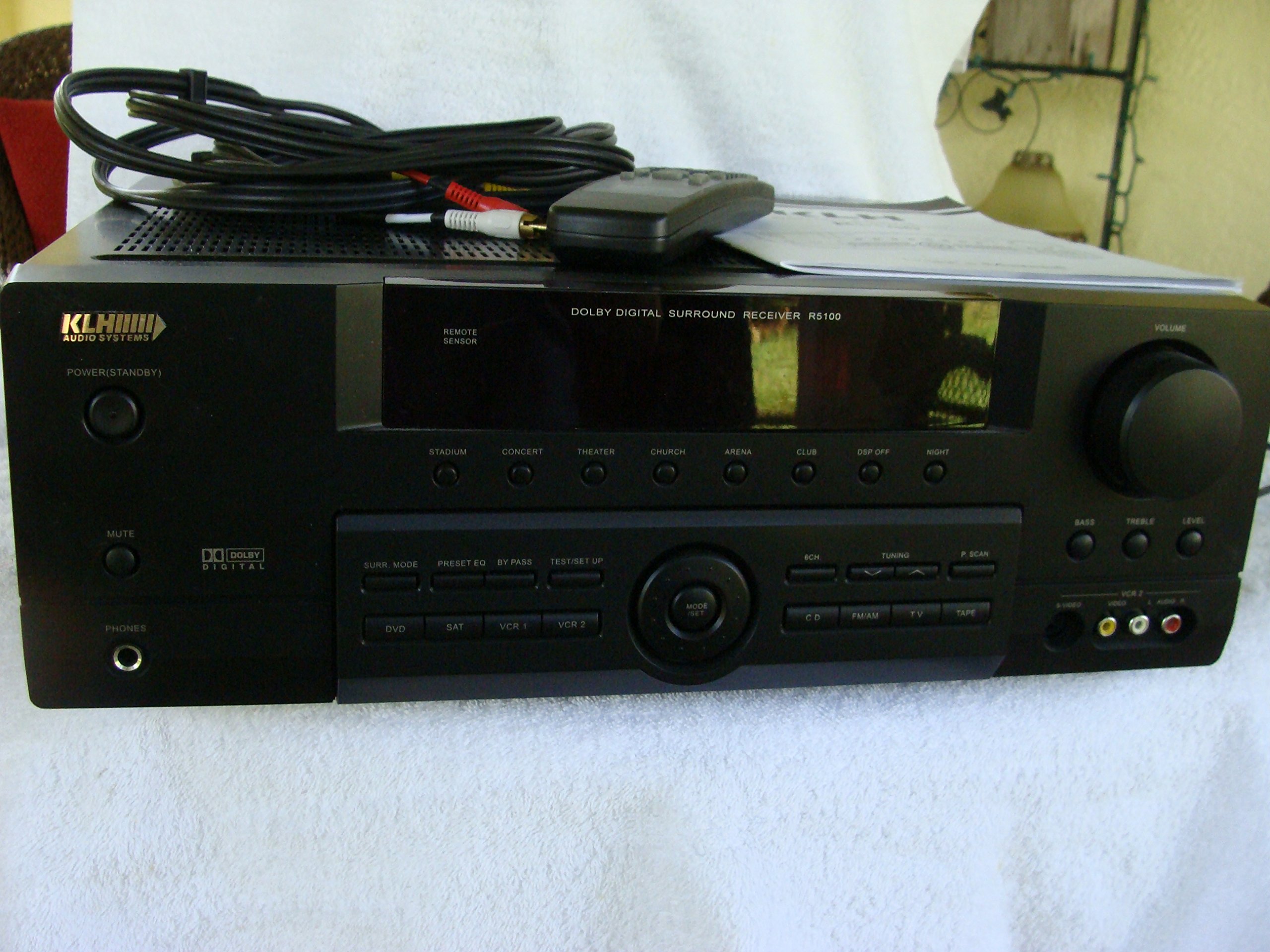
Image: The KLH R5100 receiver, its remote control, user manual, and included audio/video cables.
4. Ngwaahịa gafereview
4.1 Njikwa ihu ihu
The front panel provides access to essential controls and indicators for daily operation.

Foto: nkọwa zuru ezu view of the receiver's front panel, highlighting the display, volume control, and input selection buttons.
- Bọtịnụ ike: Gbanyụọ ma ọ bụ gbanyụọ nnata.
- Nhọrọ ntinye: Buttons for DVD, SAT, VCR 1, VCR 2, CD, FM/AM, TV, TAPE to choose your audio/video source.
- Mpịakọta Mpịakọta: Na-edozi olu mmepụta n'ozuzu ya.
- Surround Mode Buttons: Select various sound fields like Stadium, Concert, Theater, Church, Arena, Club, DSP Off, Night.
- Bass/Treble/Level: Controls for adjusting audio tone and individual channel levels.
- Jack ekweisi: Maka ige ntị nkeonwe.
4.2 Njikọ azụ azụ
The rear panel houses all input and output terminals for connecting your audio and video components, as well as speakers.

Image: The full rear panel of the receiver, displaying all connection ports for audio, video, and speakers.
- Ọnụ Ọkà Okwu: Connections for Main (Front Left/Right), Center, and Rear (Surround Left/Right) speakers.
- Audio Inputs (RCA): For connecting CD players, tape decks, VCRs, TVs, and other stereo audio sources.
- Video Inputs/Outputs (RCA/S-Video): For connecting video sources like DVD players, VCRs, and TVs.
- Digital Audio Inputs (Optical/Coaxial): For connecting digital audio sources like DVD players or set-top boxes.
- 6CH Direct Input: For connecting external multi-channel decoders or players with 5.1 analog outputs.
- Subwoofer apụọ: RCA output for connecting an active subwoofer.
- Ọnụ ahịa antenna: For FM and AM antennas.
4.3 Ngalaba njikwa anya
The remote control provides convenient access to all receiver functions from your listening position.

Foto: A nso nso view of the remote control unit, detailing its buttons for various functions.
- Gbanyụọ/ Gbanyụọ: Gbanyụọ ma ọ bụ gbanyụọ nnata.
- Nhọrọ ntinye: Dedicated buttons for each input source (DVD, CD, TV, etc.).
- Elu elu/ala: Na-edozi olu ukwu.
- Mechie: Na-emechi ihe a na-emepụta n'olu dara ụda nwa oge.
- Ụdị gburugburu: Cycles through available surround sound modes.
- Level/Test: For adjusting individual speaker levels and running a test tone.
- Njikwa Tuner: For FM/AM station tuning and memory functions.
5. Nhazi
5.1 Connecting Your Speakers
Ensure the receiver is unplugged from the power outlet before making any connections.
- Ndị na-ekwu okwu ihu: Connect your main left and right speakers to the 'MAIN SPEAKERS (8Ω)' terminals. Ensure correct polarity (+ to + and - to -).
- Ọkà okwu etiti: Connect your center channel speaker to the 'CENTER SPEAKER (8Ω)' terminals.
- Ndị na-ekwu okwu n'azụ: Connect your surround left and right speakers to the 'REAR SPEAKERS (8Ω)' terminals.
- Subwoofers: Connect an active subwoofer to the 'SUBWOOFER OUT' RCA jack using a single RCA cable.

Foto: Zuru ezu view of the speaker connection terminals on the rear panel.
5.2 Ijikọ Isi mmalite ọdịyo/vidiyo
Use appropriate cables (RCA, Optical, Coaxial) to connect your source components to the receiver.
- Ihe ọkpụkpọ DVD: Connect the audio output of your DVD player to the 'DVD' audio input jacks (RCA) on the receiver. For digital audio, use either the 'DIGITAL IN OPTICAL' or 'DIGITAL IN COAXIAL' input. Connect the video output to the 'DVD' video input.
- Ihe ọkpụkpọ CD: Connect the audio output of your CD player to the 'CD' audio input jacks (RCA).
- TV/Cable Box: Connect the audio output of your TV or cable box to the 'TV' audio input jacks (RCA). Connect video output to the 'TV' video input.
- Ngwa ndị ọzọ: Use 'SAT', 'VCR 1', 'VCR 2', or 'TAPE' inputs for other audio/video components as needed.

Image: A close-up of the digital audio inputs (Coaxial, Optical) and the 6-channel direct input section on the rear panel.
5.3 Njikọ antenna
Connect the supplied FM and AM antennas to their respective terminals on the rear panel for radio reception.
6. Ntuziaka ọrụ
6.1 Basic Arụmọrụ
- Ike Na: Press the Power button on the front panel or remote control.
- Họrọ ntinye: Press the desired input selector button (e.g., 'DVD', 'CD') on the front panel or remote control to choose your source.
- Gbanwee olu: Turn the Volume knob on the front panel or use the Volume Up/Down buttons on the remote control.
6.2 Surround Sound Modes
The R5100 offers various sound modes to enhance your listening experience:
- Ama egwuregwu: Simulates the acoustics of a large stadium.
- Ihe nkiri: Creates a concert hall ambiance.
- Ụlọ ihe nkiri: Optimized for movie playback, enhancing dialogue and effects.
- Ụka: Replicates the spaciousness of a church.
- Arena: Provides a wide, open sound field.
- Klọb: Simulates a lively club environment.
- DSP Off: Disables digital sound processing for a direct stereo signal.
- Abalị: Reduces dynamic range for late-night listening without disturbing others.
Press the 'SURR. MODE' button on the remote or front panel to cycle through these modes.
6.3 Njikwa ụda
Use the BASS and TREBLE controls on the front panel or remote to adjust the low and high frequency response. The LEVEL controls allow for fine-tuning of individual speaker output levels.
6.4 Ọrụ Tuner
To listen to radio:
- Press the 'FM/AM' input selector.
- Use the 'TUNING' buttons on the front panel or remote to find stations.
- Press 'MEMORY' to store favorite stations, and 'P.SCAN' to scan through presets.
7. Nlekọta
To ensure the longevity and optimal performance of your KLH R5100 receiver, follow these maintenance guidelines:
- Nhicha: Wipe the exterior surfaces with a soft, dry cloth. Do not use abrasive cleaners, waxes, or solvents as they may damage the finish.
- Igwe ikuku: Regularly check that the ventilation openings are not obstructed by dust or debris. Use a soft brush or vacuum cleaner to gently remove any build-up.
- eriri ike: Inspect the power cord periodically for any signs of damage. If damaged, discontinue use and contact qualified service personnel.
- Nchekwa: If storing the unit for an extended period, unplug it from the power outlet and cover it to protect against dust.
8. Nchọpụta nsogbu
If you encounter problems with your receiver, refer to the following common issues and solutions before seeking professional service.
| Nsogbu | Ihe nwere ike ime | Ngwọta |
|---|---|---|
| Enweghị ike | Power cord unplugged; Power outlet not active | Ensure power cord is securely plugged in; Check power outlet with another device |
| Enweghị ụda | Incorrect input selected; Speakers not connected properly; Volume too low; Mute function active | Select correct input source; Check speaker connections and polarity; Increase volume; Deactivate Mute |
| Njikwa anya anaghị arụ ọrụ | Batteries depleted; Obstruction between remote and receiver; Remote sensor blocked | Replace batteries; Remove any obstructions; Ensure remote sensor on receiver is clear |
| Nnabata redio adịghị mma | Antenna not connected or poorly positioned | Connect antennas securely; Adjust antenna position for better reception |
| Ụda agbagọ | Input signal too high; Speaker impedance mismatch; Damaged cables | Reduce source volume; Ensure speakers match 8Ω impedance; Check and replace damaged cables |
9. Nkọwapụta
The following are the technical specifications for the KLH R5100 Surround Sound Receiver:
- Nọmba nlereanya: R5100
- Akụkụ ngwaahịa: 16.88 x 6.88 x 15.75 sentimita asatọ
- Ibu ihe: 24.2 pound
- Isi mmalite ike: AC 120V, 60 Hz
- Oriri ike: 320W
- Ụkpụrụ mmepụta ụda: Gburugburu
- Nhazi ọwa ụda gburugburu: 5.1
- Teknụzụ Njikọta: RCA, 3.5mm Jack, Optical, Coaxial
- Ngwa dakọtara: Ndị na-ekwu okwu
- Njikwa Type: Ime ime
- Njirimara Pụrụ Iche: Advanced Room Calibration (as per product listing, though specific details may vary)
- Agba: Nwa
10. Akwụkwọ ikike na nkwado
For warranty information and customer support, please refer to the documentation included with your purchase or contact KLH customer service directly. Keep your proof of purchase for any warranty claims.