
1. Okwu mmalite
Thank you for choosing the Linq HB-02 Mini Speaker. This portable speaker is designed to provide amplified audio from a variety of devices, including smartphones, MP3/MP4 players, notebooks, and more. Its compact design and rechargeable battery make it ideal for on-the-go use. Please read this manual carefully before using the product to ensure proper operation and longevity.
2. Ozi nchekwa
- Do not expose the speaker to water or excessive moisture.
- Zere oke okpomọkụ.
- Akwụsịla ma ọ bụ nwaa ịrụzi ọkà okwu n'onwe gị. Nke a ga-emebi akwụkwọ ikike.
- Debe ebe ụmụaka na-apụghị iru.
- Jiri naanị eriri USB enyere maka ịchaji.
- Tụfuo batrị ahụ n'ụzọ kwesịrị ekwesị dịka iwu obodo si dị.
3. Ihe ngwugwu
The Linq HB-02 Mini Speaker package typically includes:
- Linq HB-02 Mini Speaker
- Igwe nchaji USB
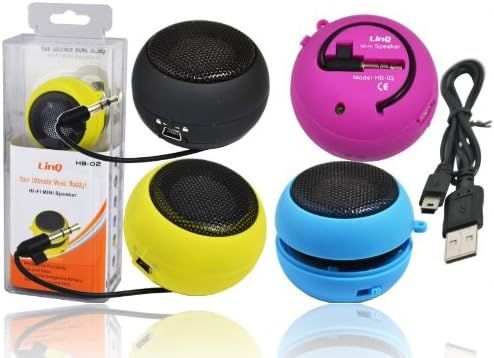
Image: Linq HB-02 Mini Speaker shown in its retail packaging, alongside other speakers and the included USB charging cable. This illustrates the typical contents and appearance of the product.
4. Akụrụngwa Ngwaahịa
- Mini Pocket Speaker: Kọmpat na obere imewe maka ibu dị mfe.
- Ndakọrịta Universal: Connects via 3.5mm audio jack to devices like iPhones, iPods, MP3/MP4 players, smartphones, notebooks, PSP, CD players, and more.
- Batrị enwere ike ịchaji: Built-in lithium-ion battery for wireless use.
- Retractable Sound Resonator: Features a pneumatic suspension system that allows the acoustic membrane to be extended from one side, enhancing amplification and sound quality.
- Nchaji USB: Conveniently recharges via the included USB cable.
- Ampụda dị elu: Delivers excellent and pleasant acoustic performance despite its small size.

Image: Four Linq HB-02 Mini Speakers in pink, yellow, purple, and blue, shown with their retractable sound resonators extended, demonstrating the design and color variety.
5. Nhazi
5.1 Nchaji izizi
- Tupu i jiri ya na mbụ, chajie igwe okwu ahụ nke ọma.
- Connect the small end of the included USB charging cable to the mini USB port on the speaker.
- Connect the standard USB end of the cable to a USB power source (e.g., computer USB port, USB wall adapter).
- The charging indicator light (if present) will illuminate during charging and turn off or change color when fully charged.
5.2 Ijikọ na Ngwaọrụ Ọdịyo
- Locate the integrated 3.5mm audio jack on the speaker. This jack is often stored neatly within the speaker's body.
- Plug the 3.5mm audio jack into the headphone port of your audio device (e.g., smartphone, MP3 player, notebook).
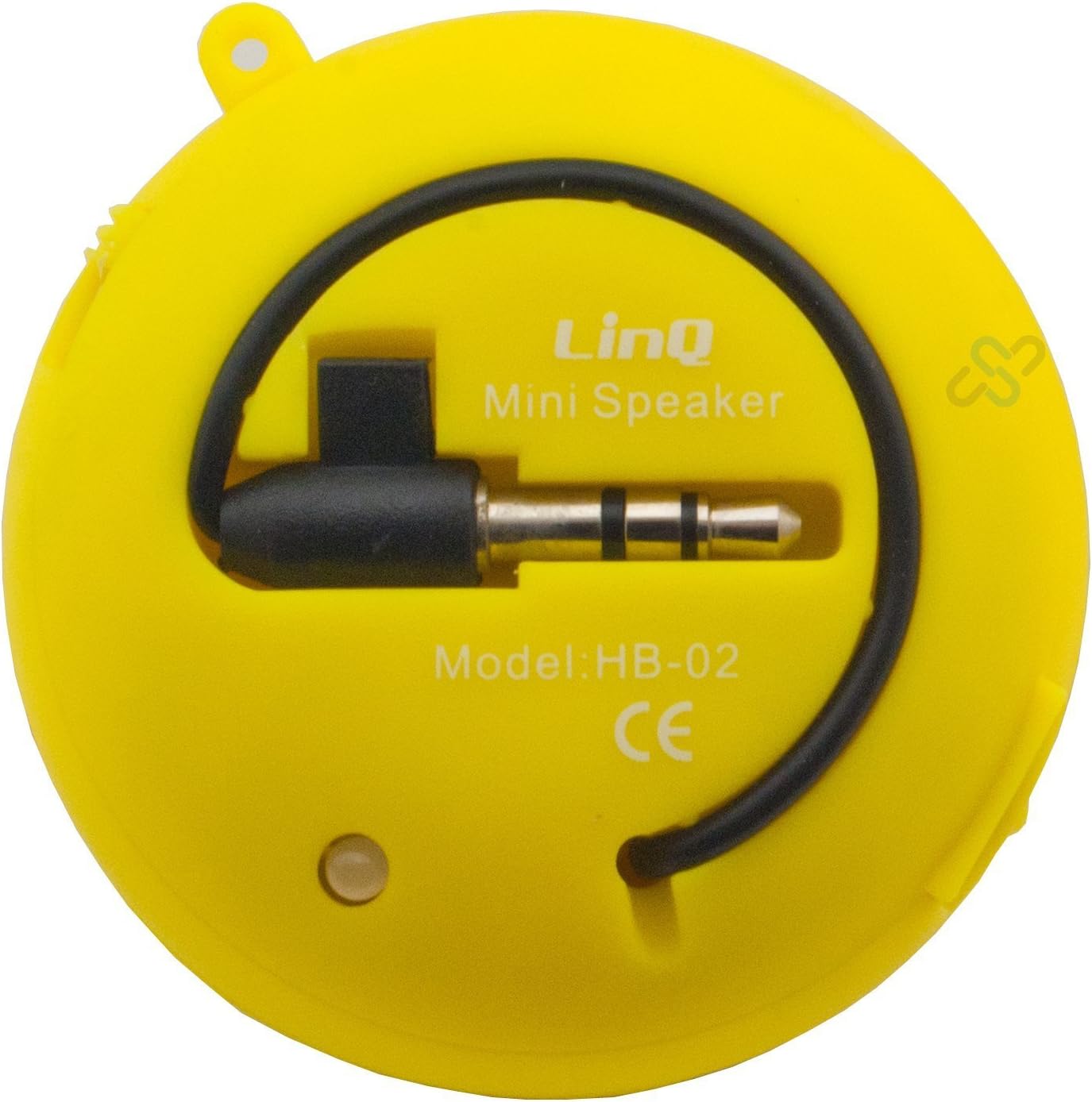
Image: A yellow Linq HB-02 Mini Speaker, viewed from the back, clearly showing the integrated 3.5mm audio jack coiled around the speaker and the model number 'HB-02'.
6. Ntuziaka ọrụ
6.1 Gbanyụọ/ gbanyụọ
Locate the power switch on the speaker. Slide it to the 'ON' position to turn on the speaker. Slide it to the 'OFF' position to turn it off.
6.2 Na-akpọ Audio
- Ensure the speaker is connected to your audio device via the 3.5mm jack.
- Gbanwuo ọkà okwu.
- Start playing audio on your connected device. The sound will now be amplified through the Linq HB-02 speaker.
- Adjust the volume directly from your connected audio device. The speaker itself does not have volume controls.
6.3 Using the Retractable Sound Resonator
Maka emelitere amplification and sound quality, gently pull and extend the acoustic membrane from one side of the speaker. This engages the 'Retractable Sound Resonator' system. To return to a more compact form, gently push the membrane back into the speaker body.
7. Nlekọta
- Nhicha: Jiri akwa dị nro dị nro hichaa mpụta ọkà okwu. Ejila ihe nhicha mmiri ma ọ bụ ikuku ikuku.
- Nchekwa: When not in use, store the speaker in a cool, dry place, away from direct sunlight and extreme temperatures.
- Nlekọta batrị: Ka ịgbatị ndụ batrị ogologo, zere ịchaji ọkà okwu ugboro ugboro. Na-ana ya ụgwọ oge niile, ọbụlagodi ma ọ bụrụ na ejighị ya ogologo oge.
8. Nchọpụta nsogbu
8.1 Enweghị ụda
- Ensure the speaker is turned ON.
- Check if the 3.5mm audio jack is fully inserted into both the speaker and your audio device.
- Verify that your audio device's volume is turned up and not muted.
- Ensure the speaker's battery is charged.
8.2 Ọdịmma Ụda Na-adịghị Mma
- Lelee isi iyi ọdịyo maka nsogbu dị mma.
- Ensure the 3.5mm audio jack connection is secure.
- Try extending the 'Retractable Sound Resonator' for improved sound.
- Ensure the speaker is fully charged. Low battery can affect sound quality.
8.3 Speaker Not Charging
- Verify that the USB cable is correctly connected to both the speaker and the power source.
- Gbalịa ọdụ ụgbọ USB ma ọ bụ ihe nkwụnye ọkụ dị iche.
- Gbaa mbọ hụ na eriri USB emebighị.
9. Nkọwapụta
| Ụdị | Njikọ |
| Nlereanya | HB-02 |
| Ike Nwepu kacha | 2 Watt |
| Teknụzụ Njikọta | AUX (3.5mm Jack), USB (for charging) |
| Ụdị nkwụnye | N'elu tebụl |
| Ụdị Ọkà Okwu | Ọkà Okwu Nwere Ike |
| Mgbochi | 8 Ohm |
| Isi Iyi Ike | Batrị kwadoro (enwere ike ịchaji) |
| Ibu | Not specified, designed for portability. |
10. Akwụkwọ ikike na nkwado
This product comes with a standard manufacturer's warranty. Please refer to the warranty card included with your purchase or contact your retailer for specific warranty terms and conditions. For technical support or further assistance, please contact the retailer or the manufacturer's customer service.