
OneConcept MG3-V12-WH_SML
OneConcept V-12 Stereo System
Akwụkwọ ntuziaka onye ọrụ
Model: MG3-V12-WH_SML
Okwu mmalite
This manual provides detailed instructions for the safe and efficient operation of your OneConcept V-12 Stereo System. Please read this manual thoroughly before using the device and retain it for future reference.

Foto: N'ihu view of the OneConcept V-12 Stereo System, showing the main unit with integrated CD player, control buttons, digital display, and two detachable speakers. The system is white and rests on a circular stand.
Ntuziaka nchekwa
- Ewepụla unit ahụ na mmiri ozuzo ma ọ bụ mmiri.
- Akwụsịla oghere ikuku ikuku ọ bụla.
- Gbaa mbọ hụ na ọkọnọ ọkụ nke ọma voltage as indicated on the unit.
- Debe ihe ahụ ka ọ ghara ịpụta ìhè n'anwụ, ebe okpomọkụ na-esi, na ebe magnet siri ike.
- Anwala ịkwasa ma ọ bụ rụkwaa unit ahụ n'onwe gị. Kpọtụrụ ndị ọrụ ruru eru ọrụ niile.
Melite
Mwepu na ọdịnaya
Jiri nlezianya wepụ ihe niile dị na nkwakọ ngwaahịa. Chọpụta na ihe niile dị:
- OneConcept V-12 Main Unit
- Two Detachable Speakers
- Ihe nkwụnye ọkụ
- Akwụkwọ ntuziaka (akwụkwọ a)
Ọnyịnye Nhọrọ
The OneConcept V-12 offers versatile placement options:
- Desktop/Shelf Placement: Use the integrated stand for stable placement on any flat surface.
- Ịkwanye mgbidi: The main unit and speakers can be detached from the stand and mounted on a wall using appropriate hardware (not included). Ensure the wall can support the weight of the unit.

Foto: Akụkụ view of the OneConcept V-12 Stereo System, highlighting its compact design and the circular stand. This view demonstrates the unit's suitability for various placements.

Image: The OneConcept V-12 Stereo System with its two speakers detached from the central unit. This illustrates the modular design, allowing for flexible speaker placement or wall mounting.
Connecting Power and Speakers
- Connect the power adapter to the DC IN port on the back of the main unit.
- Tinye nkwụnye ọkụ n'ime oghere mgbidi ọkọlọtọ.
- Connect the speaker cables from the detachable speakers to the corresponding speaker output jacks on the back of the main unit. Ensure correct polarity.

Foto: N'azụ view of the OneConcept V-12 Stereo System, showing the speaker cable connections and the main power input. This view also highlights the ventilation grilles on the back of the unit and speakers.

Image: Top-down rear view of the OneConcept V-12 Stereo System, focusing on the manual switches for AM/FM radio selection and the main mode selector (AUX, Radio, CD, Alarm). Also visible is the tuning wheel.
Ntuziaka ọrụ
Njikwa ntọala
- IKE Gbanyụọ/Gbanyụọ: Pịa IKE bọtịnụ iji gbanye ma ọ bụ gbanyụọ unit ahụ.
- IHE: Jiri ihe VOL+ na Vol- bọtịnụ iji dozie ọkwa olu.
- Edị: Pịa MODE button to cycle through available input sources: CD, USB, SD, FM Radio, AM Radio, AUX.
CD/MP3 ịkpọghachi
- Pịa Mepee/mechie bọtịnụ imepe tray CD.
- Debe CD ma ọ bụ MP3 CD n'elu spindle ahụ ka akụkụ akara ahụ chee ihu elu.
- Pịa Mepee/mechie bọtịnụ ọzọ iji mechie traị ahụ.
- Ensure the unit is in CD mode. Playback should begin automatically.
- Jiri ihe MAKA bọtịnụ (◀◀ / ▶▶) iji chịgharịa egwu.
- Pịa KWURU/Kwụsịa kwụsịtụ ma ọ bụ maliteghachi ịkpọghachi.
- Pịa KWỤSỊ ịkwụsị ịkpọghachi.

Image: The OneConcept V-12 Stereo System with its front-loading CD tray open, revealing the disc compartment. The detached speakers are also visible, emphasizing the system's modularity.
Ọkụ USB/SD
- Tinye draịvụ USB flash n'ime ọdụ ụgbọ USB ma ọ bụ kaadị SD n'ime oghere kaadị SD.
- Pịa MODE button until "USB" or "SD" is displayed.
- Ngalaba ahụ ga-achọpụta ozugbo wee malite ịkpọ ọdịyo dakọtara files (MP3).
- Jiri ihe Tinyegharịa/MKWUO button for repeat modes and programming playback.
- Jiri ihe ALBUM button to navigate between folders (albums) on the storage device.
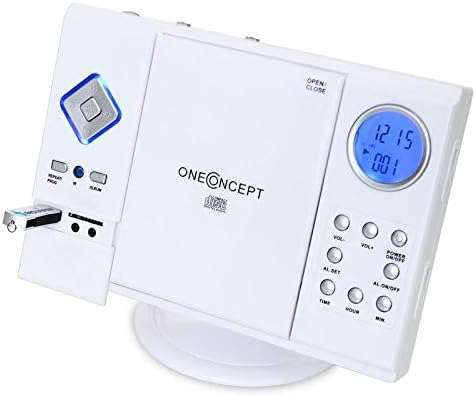
Image: Close-up of the left side of the OneConcept V-12 Stereo System, clearly showing a USB flash drive inserted into its dedicated port. This highlights the system's USB playback capability.

Foto: Zuru ezu view of the OneConcept V-12 Stereo System's left panel, featuring the USB port, SD card slot, and two 3.5mm audio jacks (likely headphone out and AUX in). This image emphasizes the various connectivity options.
Ọrụ redio (FM/AM)
- Switch the AM/FM selector on the back of the unit to the desired band.
- Pịa MODE button until "Radio" is displayed.
- Jiri ihe NKWUKWU wheel on the back of the unit to manually tune to a station.
- For better reception, extend the FM wire antenna fully.
Ntinye aka AUX
Connect an external audio device (e.g., smartphone, MP3 player) to the AUX IN jack using a 3.5mm audio cable (not included). Press the MODE button until "AUX" is displayed. Audio from the connected device will play through the stereo system.
Ọrụ mkpu
The unit features an alarm function. Refer to the buttons on the right side of the main unit for setting the alarm:
- AL. SET: Press to enter alarm setting mode.
- TIME / HOUR / MIN: Use these buttons to set the alarm time.
- AL. ON/OFF: Press to activate or deactivate the alarm.
Nlekọta
Nhicha
- Mgbe niile, wepụ unit na ebe ọkụ tupu ihicha.
- Jiri akwa dị nro ma kpọọ nkụ hichapụ elu elu.
- Ejila ihe nchacha, waxes, ma ọ bụ ihe mgbaze ka ha nwere ike imebi njedebe.
- Maka oghere CD, jiri diski pụrụ iche nke na-ehicha oghere CD.
Nchekwa
Ọ bụrụ na ị na-echekwa unit ahụ ruo ogologo oge, kwụpụ ya na ike wee chekwaa ya n'ebe dị jụụ, kpọrọ nkụ, pụọ na ìhè anyanwụ kpọmkwem na oke okpomọkụ.
Nchọpụta nsogbu
| Nsogbu | Ihe nwere ike ime | Ngwọta |
|---|---|---|
| Enweghị ike | Ejikọghị eriri ọkụ na nchekwa. | Lelee njikọ eriri ọkụ eletrik na unit na oghere mgbidi. |
| Enweghị ụda | Volume too low; incorrect mode selected; speaker cables loose. | Increase volume; select correct input mode; check speaker connections. |
| CD/USB/SD not playing | Disc/device inserted incorrectly; incompatible file format; dirty disc. | Reinsert disc/device correctly; ensure MP3 format; clean disc; try another disc/device. |
| Ogbenye Redio nnabata | A naghị agbatị antenna; akara adịghị ike. | Fully extend FM wire antenna; reposition unit for better signal. |
Nkọwapụta
| Njirimara | Nkọwa |
|---|---|
| Ụdị | OneConcept |
| Nọmba nlereanya | MG3-V12-WH_SML |
| Agba | Ọcha |
| Teknụzụ Njikọta | USB |
| Atụmatụ pụrụ iche | CD changer, Alarm function |
| Ngwa dakọtara | MP3 player, Smartphone |
| Ụdị Ọkà Okwu | Stereo |
| Nhazi ọwa ụda gburugburu | 2.0 |
| Ụkpụrụ akwadoro | MP3 |
| Akụkụ ihe (L x W x H) | 28 x 20 x 33 centimita |
| Ibu Ibu | 2.4 kilogram |
| Isi Iyi Ike | Igwe ọkụ eletrik |
Akwụkwọ ikike na nkwado
This product is covered by a standard return policy. For specific warranty details and support, please refer to your point of purchase or the official OneConcept websaịtị. Debe akwụkwọ nnata ịzụrụ maka akwụkwọ ikike.
For technical assistance or inquiries, please contact OneConcept customer support, providing your product model number (MG3-V12-WH_SML) and a detailed description of the issue.
Ask a question about this manual
Ask about setup, troubleshooting, compatibility, parts, safety, or missing instructions. Manuals+ will review the question and use this page’s manual context to help answer it.