
Okwu mmalite
Thank you for choosing the KabelDirekt 4K HDMI Cable. This high-performance cable is engineered to deliver superior audio and video quality for your home theater, gaming, and professional AV setups. This manual provides essential information for setting up, operating, maintaining, and troubleshooting your HDMI cable to ensure optimal performance.
Njirimara ngwaahịa
- Arụmọrụ dị elu: Thanks to premium build quality, HDMI-to-HDMI cables of 20ft and longer support up to 4K@60Hz. Also supports HDR, 7.1 surround sound, ARC, and Ethernet for stunning image and sound quality.
- German-Engineered: Unlike standard HDMI cables, KabelDirekt cables feature a German-engineered multi-layer shielding system inside the connector. Gold-plated, break-resistant connectors and high-purity copper conductors ensure stable, interference-free transmission and long-lasting durability.
- Length Options for Every Setup: Available in a wide range of lengths from 0.5ft to 75ft. Ideal for home theaters, gaming setups, offices, and pro AV installations.
- Ndakọrịta sara mbara: Works perfectly with PCs, laptops, game consoles (PS5, Xbox, Switch/Switch 2), Blu-ray/DVD players, TVs, streaming devices, monitors, projectors, and all HDMI-enabled devices.
Kedu ihe dị na Igbe ahụ
- 1x KabelDirekt - HDMI TOP Series - 25ft (7.6m)
Ntuziaka nhazi
Follow these steps to connect your KabelDirekt 4K HDMI Cable:
- Chọpụta ọdụ ụgbọ mmiri: Locate the HDMI output port on your source device (e.g., PC, game console, Blu-ray player) and the HDMI input port on your display device (e.g., TV, monitor, projector).
- Jikọọ eriri: Gently insert one end of the KabelDirekt HDMI cable into the HDMI output port of your source device.
- Jikọọ na Ngosipụta: Insert the other end of the HDMI cable into an available HDMI input port on your display device. Ensure both connections are secure.
- Ike Na Ngwaọrụ: Gbanwuo ma ngwaọrụ isi iyi gị yana ngwaọrụ ngosi gị.
- Họrọ ntinye: On your display device, use the remote control or menu buttons to select the correct HDMI input source that corresponds to the port where you connected the cable.

Image: KabelDirekt HDMI cable securely connected to a TV's HDMI port.

Image: The KabelDirekt HDMI cable is compatible with a wide range of devices, including PCs, game consoles, Blu-ray players, and projectors.
Video: An official KabelDirekt video demonstrating the features and connection of their High Speed HDMI Cable.
Ntuziaka ọrụ
Once connected, your KabelDirekt HDMI cable will automatically transmit audio and video signals. For optimal performance:
- Verify Display Settings: Ensure your display device is set to the highest possible resolution and refresh rate supported by both the display and the source device (e.g., 4K@60Hz).
- Ntọala ọdịyo: Check your source device's audio output settings to ensure it's configured for HDMI audio, especially if using features like ARC (Audio Return Channel).
- HDR/UHD: If your devices support HDR or UHD, confirm these settings are enabled in your device's display options for enhanced visual experience.

Image: Enjoy crystal clear 4K@60Hz visuals and immersive 7.1 surround sound for movies and gaming.
Nlekọta
To ensure the longevity and performance of your KabelDirekt HDMI cable:
- Jiri Nlekọta Aka: Zenarị ịgbagọ, ịgbagọ, ma ọ bụ ịdọrọ na eriri, ọkachasị n'akụkụ njikọ.
- Njikọ echekwara Ensure connectors are fully inserted into ports to prevent accidental disconnections and signal loss.
- Njikọ ndị dị ọcha: Periodically clean the gold-plated connectors with a dry, lint-free cloth to remove dust or debris.
- Nchekwa: Mgbe ọ naghị eji ya, kpoo eriri ahụ nke ọma ma chekwaa ya n'ebe kpọrọ nkụ, dị jụụ na-adịghị na ìhè anyanwụ kpọmkwem na oke okpomọkụ.
Nchọpụta nsogbu
If you encounter issues with your KabelDirekt HDMI cable, try the following solutions:
- Enweghị foto/ụda:
- Verify that both ends of the HDMI cable are securely connected to the correct ports.
- Ensure your display device is set to the correct HDMI input source.
- Try connecting the cable to a different HDMI port on your display or source device.
- Restart both your source and display devices.
- Poor Picture Quality (Flickering, Static, Distorted Colors):
- Lelee maka mmebi anụ ahụ ọ bụla mebiri eriri ma ọ bụ njikọ.
- Ensure your source device's resolution and refresh rate settings are compatible with your display.
- Reduce the resolution or refresh rate on your source device to see if the issue resolves.
- Test the cable with another device or display to rule out a faulty cable.
- Njikọ na-adịte aka:
- Hụ na njikọ niile siri ike ma ghara ịtọgbọ.
- Avoid placing heavy objects on the cable or routing it through areas where it might be pinched or stressed.
Nkọwapụta
| Njirimara | Nkọwa |
|---|---|
| Ụdị | KabelDirekt |
| Aha Nlereanya | KabelDirekt 4K HDMI Cable – 25ft & Longer HDMI Cables (20ft–75ft) – German-Engineered HDMI Cord – Supports 4K@60Hz, UHD, HDR, ARC, Ethernet – HDMI Cable for HDTV, PC, PS5, Xbox, Switch |
| Nọmba Nlereanya ihe | 270 |
| Ụdị njikọ | HDMI |
| Ụdị USB | HDMI |
| Agba | Oji/acha anụnụ anụnụ |
| Njikọ okike | Nwoke-na-nwoke |
| Ọnụego mbufe data | 18 Gigabits kwa nkeji |
| Ugboro ugboro | 60 Hz |
| Njirimara Pụrụ Iche | Gold plated, Shielding |
| Ngwa dakọtara | Any device with an HDMI port, including: TVs, notebooks, projectors, A/V receivers, Xbox Series X, Xbox Series S, Xbox One, PS4, PS5 & other video game consoles, monitors, UHD players, Apple TV devices, PCs, Blu-ray players |
| Ibu Ibu | 1 pound |
| Akụkụ ngwaahịa | 6.8 x 1.9 x 6.3 sentimita asatọ |
| UPC | 609224989384 |
Akwụkwọ ikike na nkwado
KabelDirekt stands by the quality of its products. This HDMI cable is backed by a Akwụkwọ ikike nrụpụta ọnwa 36. Each cable undergoes strict quality checks and is individually machine-tested for flawless performance and long-term reliability.
For any issues or questions, please contact KabelDirekt Products directly. We are committed to ensuring your complete satisfaction.
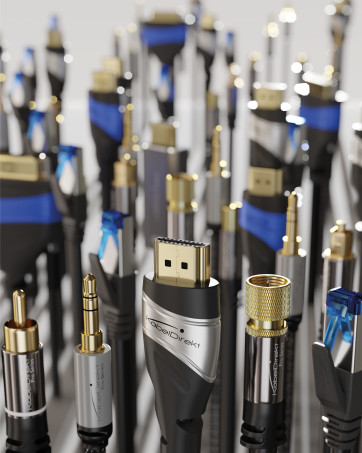
Image: German-engineered quality ensures durability and reliable performance.
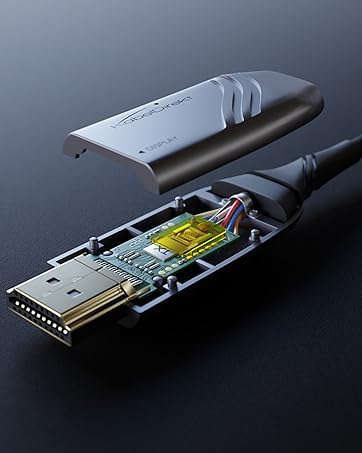
Image: High-purity copper conductors and robust shielding contribute to stable, interference-free transmission.