
Okwu mmalite
This manual provides detailed instructions for the setup, operation, and maintenance of your iLive ISB212B Bluetooth Speaker. This compact speaker delivers audio wirelessly from compatible Bluetooth devices and also supports wired connections. Please read this manual thoroughly before using your speaker.
Ihe ngwugwu
- iLive ISB212B Bluetooth Speaker
- Mini-USB to USB Charging Cable
Njirimara ngwaahịa
- Wireless audio streaming via Bluetooth
- LED pairing indicator for connection status
- Compact, cylindrical design
- Rechargeable battery with approximately 2 hours of playback
- Mini-USB port for battery recharging
- 3.5mm Audio Input for wired connections
Njikwa na egosi
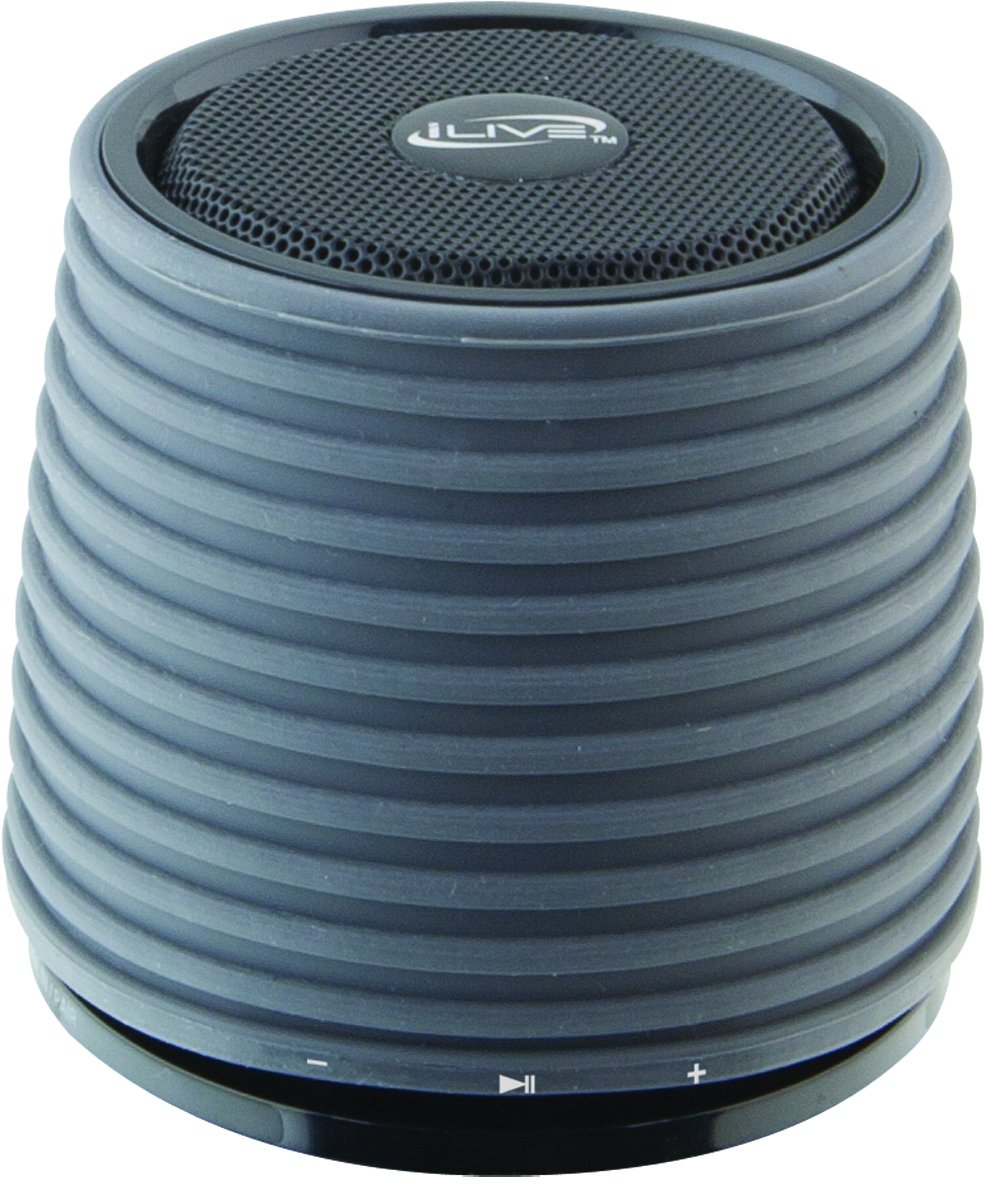
This image displays the iLive ISB212B Bluetooth Speaker. It features a cylindrical shape with a textured grey body and a black speaker grille on top. A band around the middle shows control buttons for play/pause, volume up/next track, and volume down/previous track.
- Bọtịnụ ike: Pịa ma jide ka ịgbanwuo/ gbanyụọ.
- Bọtịnụ Kwụsị/Kwụsị: Na-ejikwa ịkpọghachi ọdịyo.
- Bọtịnụ egwu na-esote: Pịa mkpirisi maka ibuli olu, ogologo pịa maka egwu ọzọ.
- Mpịakọta nke ala / bọtịnụ egwu gara aga: Pịa obere oge maka mbelata olu, pịa ogologo oge maka egwu gara aga.
- LED Pairing Indicator: Na-egosi ọkwa njikọ Bluetooth.
- Obere-USB ọdụ ụgbọ mmiri: Maka ịchaji batrị dị n'ime.
- Ntinye ọdịyo 3.5mm: For connecting external audio devices via an auxiliary cable (not included).
Melite
1. Ịchaji batrị
- Connect the small end of the included Mini-USB to USB charging cable to the Mini-USB port on the speaker.
- Connect the large end of the USB charging cable to a powered USB port (e.g., computer, USB wall adapter).
- Ihe ngosi LED ga-enwu ọkụ n'oge ịchaji wee gbanyụọ ma ọ bụ gbanwee agba mgbe chajachara.
- A full charge provides approximately 2 hours of playback time.
2. Ịgbanye / gbanyụọ
- To power on, press and hold the Power button until the LED indicator illuminates.
- To power off, press and hold the Power button again until the LED indicator turns off.
Ntuziaka ọrụ
1. Njikọ Bluetooth
- Hụ na ọ na-agba ọkụ ma ọ dịkwa ihe dị ka ụkwụ iri atọ site na ngwaọrụ Bluetooth gị.
- The LED pairing indicator will flash, indicating it is in pairing mode.
- On your Bluetooth device (smartphone, tablet, etc.), enable Bluetooth and search for new devices.
- Select "iLive ISB212B" from the list of available devices.
- Once paired, the LED pairing indicator will become solid, and you may hear an audible confirmation.
- Ọ bụrụ na njikọ ahụ ada ada, gbanyụọ ọkà okwu na ngwaọrụ gị, wee megharịa usoro ndị a.
2. Audiokpọ Audio
- After successful Bluetooth pairing, begin playing audio on your connected device.
- Use the Play/Pause button on the speaker to control playback.
- Use the Volume Up/Down buttons for volume adjustment. Long press for track navigation.
3. Using the 3.5mm Audio Input
- Connect one end of a 3.5mm audio cable (not included) to the 3.5mm Audio Input port on the speaker.
- Connect the other end of the cable to the headphone jack or audio output of your external audio device.
- Ọkà okwu ahụ ga-agbanwe na akpaghị aka gaa na ọnọdụ ntinye enyemaka.
- Adjust volume using your external device and the speaker's volume controls.
Nlekọta
- Jiri akwa dị nro hichaa ọkà okwu. Ejila ihe nchacha abrasive ma ọ bụ ihe mgbaze.
- Keep the speaker away from water, moisture, and extreme temperatures. This product is not waterproof.
- Chekwaa ọkà okwu n'ebe dị jụụ ma kpọọ nkụ mgbe ọ naghị eji ya ogologo oge.
- Agbalịla ịgbasa ma ọ bụ gbanwee igwe okwu ahụ. Nke a ga-eme ka akwụkwọ ikike ahụ ghara ịdị irè.
Nchọpụta nsogbu
| Nsogbu | Ngwọta |
|---|---|
| Ọkà okwu anaghị agba ọkụ. | Ensure the battery is charged. Connect the speaker to a power source using the Mini-USB cable. |
| Enweghị ike ijikọ na ngwaọrụ Bluetooth. |
|
| Enweghị ụda ma ọ bụ obere olu. |
|
| Ndụ batrị dị mkpụmkpụ. | Ensure the speaker is fully charged before use. Battery life can vary based on volume level and usage. |
Nkọwapụta
| Njirimara | Nkọwa |
|---|---|
| Nọmba nlereanya | ISB212B |
| Njikọta | Bluetooth, 3.5mm Auxiliary, Mini-USB (charging) |
| Ike mmepụta okwu | 3 Watt |
| Ụdị batrị | 1 Lithium ion (gụnyere) |
| Ndụ batrị (ihe dị ka) | Awa 2 |
| Akụkụ ngwaahịa | 7.8 x 7.8 x 7.01 cm |
| Ibu Ibu | 295 g |
| Mba onye si | China |
| Waterproof | Mba |
Akwụkwọ ikike na nkwado
This iLive ISB212B Bluetooth Speaker comes with a Akwụkwọ ikike nke ụbọchị 90 from the date of purchase. This warranty covers manufacturing defects. For technical support or warranty claims, please refer to the contact information provided with your product packaging or visit the official iLive websaịtị.