
Okwu mmalite
The Jabra Music Street2 Bluetooth Stereo Headset is designed to provide high-quality audio and hands-free communication. This manual provides essential information for the proper use, maintenance, and troubleshooting of your device. Please read it carefully before use.
Melite
1. Ịchaji ekweisi
Before first use, fully charge the headset. Connect the micro-USB charging cable to the charging port on the headset and the other end to a USB power source.
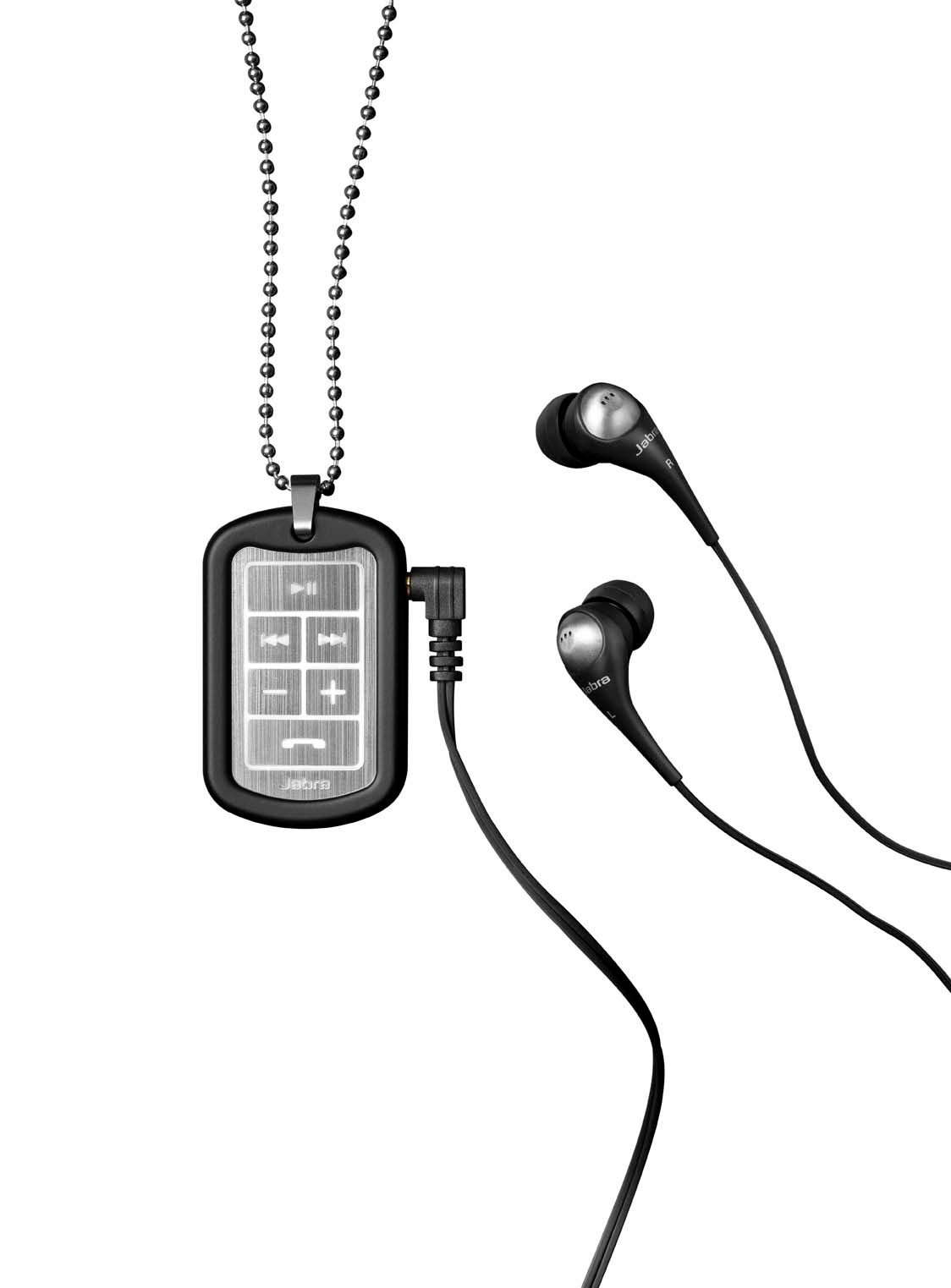
Image: The Jabra Music Street2 headset, highlighting the micro-USB charging port located on the side of the control unit.
- Ụgwọ zuru ezu na-ewekarị ihe dịka awa 2.
- Ihe ngosi LED ga-egosi ọkwa nchaji (dịka ọmụmaatụ, ọbara ọbara maka ịchaji, acha anụnụ anụnụ maka chaja zuru oke).
2. Ijikọ na ngwaọrụ Bluetooth
- Gbaa mbọ hụ na agbanyụrụ ekweisi.
- Press and hold the Multi-function button (usually the play/pause button) for approximately 5-7 seconds until the LED indicator flashes blue rapidly. This indicates pairing mode.
- Na ngwaọrụ Bluetooth gị (smartphone, tabletị, wdg), gaa na ntọala Bluetooth wee mee ka Bluetooth nwee ike.
- Chọọ maka available devices. "Jabra Street2" should appear in the list.
- Select "Jabra Street2" to connect. If prompted for a passcode, enter "0000" (four zeros).
- Once successfully paired, the LED indicator will flash blue slowly.
The headset can remember multiple paired devices but can only be connected to one at a time.
Ntuziaka ọrụ
Gbanyụọ/ Gbanyụọ
- Ike Na: Press and hold the Multi-function button until the LED flashes blue.
- Gbanyụọ: Press and hold the Multi-function button until the LED flashes red and then turns off.
Njikwa egwu
- Gwuo/kwụsịtụ: Pịa bọtịnụ Multi-function ozugbo.
- Track na-esote: Press the "Next Track" button (usually marked with a forward arrow).
- Gara aga Track: Press the "Previous Track" button (usually marked with a backward arrow).
- Olu elu: Pịa bọtịnụ "+".
- Olu ala: Pịa bọtịnụ "-".
Njikwa Oku
- Oku azaa: Pịa bọtịnụ Multi-function ozugbo.
- Oku ngwụcha: Pịa bọtịnụ ọtụtụ ọrụ otu ugboro n'oge oku.
- Jụ oku: Pịa ma jide bọtịnụ ọtụtụ ọrụ maka sekọnd iri na abụọ.
- Nọmba Ikpeazụ emegharịgharịrị: Pịa bọtịnụ ọtụtụ ọrụ ugboro abụọ mgbe ọ na-anọghị na oku.
- Dpị olu: Press the Multi-function button once when not on a call (if supported by your phone).
The headset automatically switches between music and calls.
Nlekọta
- Keep the headset dry. Moisture can damage the electronic circuits.
- Avoid extreme temperatures. High temperatures can shorten the life of electronic devices, damage batteries, and warp or melt certain plastics.
- Do not attempt to open the headset. Unauthorized modifications can damage the unit and void your warranty.
- Clean the headset with a soft, dry cloth. Do not use harsh chemicals or detergents.
- Store the headset in a cool, dry place when not in use for extended periods.
Nchọpụta nsogbu
Enweghị ike
- Ensure the headset is fully charged. Connect it to a power source and check the charging indicator.
Enweghị ike ijikọ na ngwaọrụ
- Make sure the headset is in pairing mode (LED flashing blue rapidly).
- Ensure Bluetooth is enabled on your device and it is within range (typically 10 meters or 33 feet).
- Try turning off and on both the headset and your Bluetooth device.
- If previously paired, try deleting "Jabra Street2" from your device's Bluetooth list and re-pairing.
Enweghị ụda ma ọ bụ ụda adịghị mma
- Lelee ọkwa olu na ma ekweisi yana ngwaọrụ ejikọrọ.
- Gbaa mbọ hụ na ejikọrọ ekweisi nke ọma na ngwaọrụ gị.
- Gaa nso na ngwaọrụ gị ka ịzenarị nnyonye anya.
- Ensure the ear buds are correctly inserted and fit snugly to block external noise.
Calls Not Switching Automatically
- Verify that the headset is the active audio device for calls on your phone's Bluetooth settings.
- Some phone models may require manual selection of the audio output during a call.
Nkọwapụta
| Aha Nlereanya | Jabra Music Street2 |
| Ụdị Bluetooth | 3.0 + EDR |
| Ikuku iche | Ruo mita 10 (ụkwụ 33) |
| Oge Okwu | Ruo awa iri abụọ |
| Oge Njikere | Ruo ụbọchị 9.5 |
| Oge Nchaji | Ihe dị ka awa 2 |
| Njikọta | Bluetooth, 3.5 mm Jack (for wired connection if applicable) |
| Atụmatụ | Virtual surround sound, power bass, noise-blocking ear buds, automatic music/call switching |
Akwụkwọ ikike & Nkwado
Jabra products are covered by a limited warranty. For specific warranty terms and conditions, please refer to the warranty card included with your product or visit the official Jabra websaịtị.
For technical support, frequently asked questions, or to download the latest software/firmware updates, please visit the official Jabra support page:
You may also contact Jabra customer service directly for assistance.