
1. Okwu mmalite
Thank you for choosing the RHYTHM USA Claremont Wall Clock. This manual provides essential information for the proper setup, operation, and maintenance of your new clock. Please read these instructions carefully before use and retain them for future reference.
2. Ozi nchekwa
- Ensure the clock is securely mounted on a sturdy wall to prevent falling.
- Keep batteries out of reach of children. Do not mix old and new batteries, or different types of batteries.
- Tụfuo batrị eji eme ihe dịka iwu mpaghara siri dị.
- Ekwela ka elekere ahụ hụ oke okpomọkụ, anwụ kpọmkwem, ma ọ bụ oke iru mmiri.
- Avoid disassembling the clock mechanism, as this may void the warranty and cause damage.
3. Nhazi
3.1 Nwepu
Jiri nlezianya wepụ elekere ahụ n'ime ihe e ji ekpuchi ya. Lelee ma ọ bụrụ na ihe ọ bụla mebiri emebi. Debe ihe e ji ekpuchi ya maka njem ma ọ bụ nchekwa n'ọdịnihu.
3.2 Ntinye batrị
The Claremont Wall Clock requires batteries for operation. Locate the battery compartment on the back of the clock. Insert the required batteries, ensuring correct polarity (+/-). The product typically uses AA batteries.
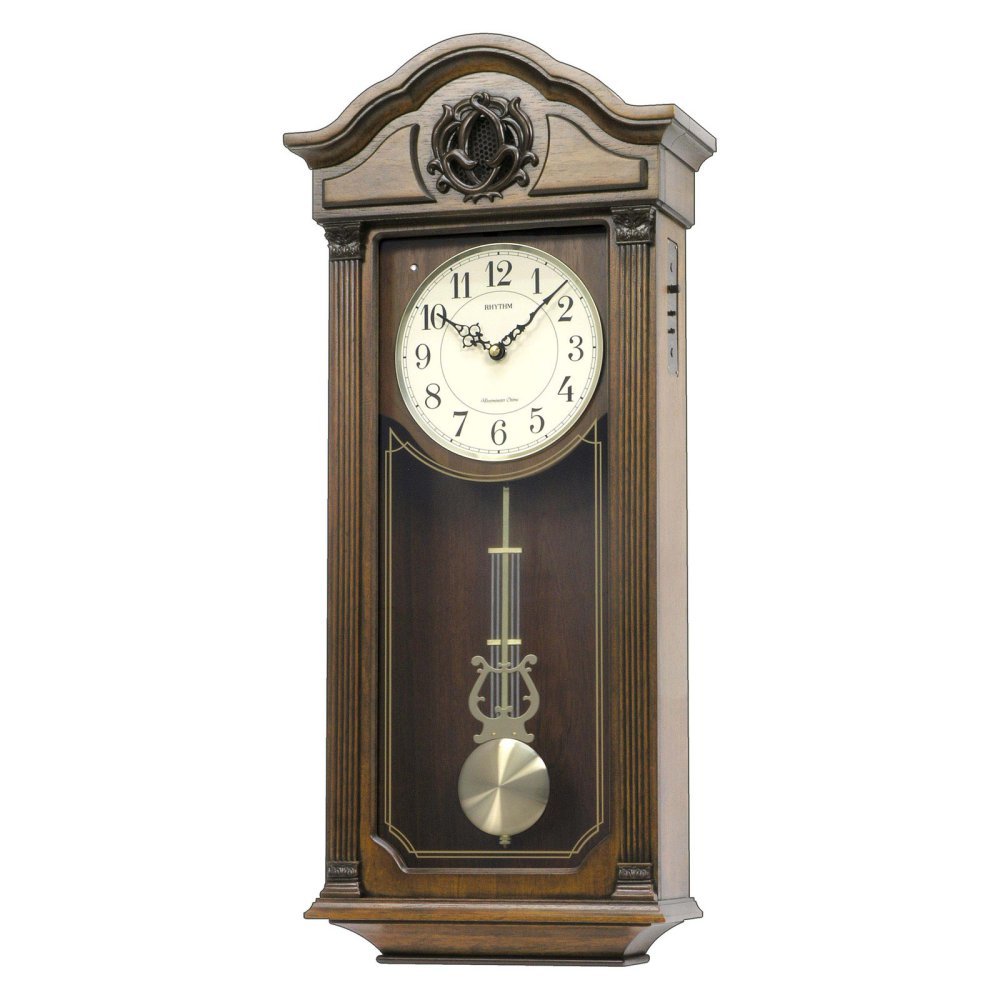
Foto: N'ihu view of the Rhythm USA Claremont Wall Clock, showcasing its elegant wooden frame, analog dial, and visible pendulum.
3.3 Isetịpụ oge
After installing the batteries, locate the time-setting knob on the back of the clock mechanism. Gently turn the knob clockwise to set the correct time. Do not force the hands directly.
3.4 Pendulum Setup
The clock features a decorative pendulum. Carefully remove any packing material securing the pendulum during transit. Ensure the pendulum is hanging freely and can swing without obstruction.
3.5 Ịwụnye Elekere ahụ
Choose a suitable location on a sturdy wall. Use appropriate wall anchors and screws for secure mounting. The clock can be hung using the integrated hanging slot on the back. Ensure the clock is level for optimal performance and appearance.
3.6 Chime Settings (If Applicable)
If your model includes chimes, locate the chime control switch or volume knob on the side or back of the clock. Adjust settings as desired. Some models may offer different chime melodies or a night-off feature.
4. Ịrụ ọrụ elekere
Once set up, the clock will begin to keep time. The pendulum will swing, and the hands will move. If your model has chimes, they will activate at the designated intervals (e.g., hourly).
5. Nlekọta
5.1 Nhicha
Wipe the clock's exterior with a soft, dry cloth. Do not use abrasive cleaners, solvents, or polishes, as these may damage the finish. For the glass, use a mild glass cleaner applied to a cloth, not directly to the clock.
5.2 nnọchi batrị
Replace batteries annually or when the clock begins to lose time or the chimes weaken. Always replace all batteries at the same time with new ones of the same type.
6. Nchọpụta nsogbu
| Nsogbu | Ihe nwere ike ime | Ngwọta |
|---|---|---|
| Elekere anaghị agba ọsọ | Batrị nwụrụ anwụ ma ọ bụ arụnyere na ezighi ezi | Lelee polarity batrị; dochie ya na batrị ọhụrụ. |
| Elekere na-efunahụ ma ọ bụ na-enweta oge | Batrị adịghị ike | Dochie batrị. |
| Chimes not working (if applicable) | Chime switch off, low battery, or night-off feature active | Check chime switch/volume. Replace batteries. Verify night-off settings. |
| Pendulum anaghị atụgharị | Obstructed or not properly engaged | Ensure no packing material remains. Gently start the pendulum swing. |
Ọ bụrụ na nsogbu na-adịgide mgbe ị nwara azịza ndị a, biko kpọtụrụ nkwado ndị ahịa.
7. Nkọwapụta
- Akara: RHYTHM
- Ụdị: CMJ543UR06
- Agba: Agba aja aja
- Ụdị ngosi: Analọg
- Ụdị: Omuma
- Akụkụ ngwaahịa: 11.9"W x 26.6"H
- Isi mmalite ike: Akwanyere batrị
- Ụdị: Gburugburu
- Ojiji ime ụlọ/n'èzí: Ime ụlọ
- Ihe: Wood, Engineered Wood (Frame)
- Ụdị nkwụnye: Ugwu mgbidi
- Ibu ihe: 12 pound
- Ụdị ọrụ: Eletriki
- UPC: 009136543061
8. Akwụkwọ ikike na nkwado
For warranty information and customer support, please refer to the documentation included with your purchase or visit the official RHYTHM websaịtị. Debe ihe akaebe nke ịzụrụ ihe maka akwụkwọ ikike ọ bụla.