
Xantrex C12
Xantrex C12 Solar Charge Controller 12 Amps Ntuziaka ntuziaka
Nlereanya: C12
1. Okwu mmalite
This manual provides essential information for the safe and efficient operation of your Xantrex C12 Solar Charge Controller. The C12 is a sophisticated 12-amp controller designed for charge, lighting, or load management in solar power systems. It features three-stage charging, user-definable voltage parameters, and automatic equalization to optimize battery performance and longevity. Please read this manual thoroughly before installation and use.
2. Ozi nchekwa
Always observe the following safety precautions to prevent personal injury and damage to the controller or other equipment.
- Hụ na waya niile nha ha ziri ezi ma nwee mkpuchi kwesịrị ekwesị.
- Always disconnect power from the solar array and battery before installing or servicing the controller.
- Install the controller in a dry, well-ventilated area, away from flammable materials.
- Do not attempt to open or repair the controller. Refer all servicing to qualified personnel.
- Wear appropriate personal protective equipment, including eye protection, when working with batteries.
3. Ihe ngwugwu
Chọpụta na ihe niile dị na ngwugwu:
- Xantrex C12 Solar Charge Controller (1 unit)
- Akwụkwọ ntuziaka (akwụkwọ a)
4. Ntọala na nwụnye
The Xantrex C12 controller is designed for quick and easy setup. Follow these general steps for installation:
- Ịkwanye: Choose a suitable location for mounting the controller. It should be close to the battery, in a cool, dry, and well-ventilated area, protected from direct sunlight and moisture.
- Njikọ batrị: Connect the battery to the controller's battery terminals first. Ensure correct polarity (positive to positive, negative to negative). This step is crucial for the controller to sense battery voltage.
- Njikọ anyanwụ panel: Connect the solar panel array to the controller's solar input terminals. Again, observe correct polarity.
- Njikọ Ibu (Nhọrọ): If using the controller for load management, connect your DC loads to the designated load terminals. Ensure the total current draw of the loads does not exceed the controller's rated ampoge.
- Nyocha: Double-check all connections for tightness and correct polarity before applying power.
Ihe dị mkpa: Always connect the battery first and disconnect it last. Failure to do so may damage the controller.
5. Ntuziaka ọrụ
The Xantrex C12 controller automatically manages the charging process and load distribution.
- Atọ-Stage Ịchaji: The controller employs a three-stage charging algorithm (bulk, absorption, float) to efficiently charge your battery and prolong its lifespan.
- User-Definable Voltage Parameters: The C12 allows for customization of voltage setpoints to match specific battery types and requirements. Refer to the display indicators section for details on HVD (High Voltage Disconnect) and UVD (Low Voltage Disconnect) settings.
- Automatic Equalization: The controller can perform automatic equalization cycles, which are crucial for maintaining the health of flooded lead-acid batteries. The "EQUALIZE ACTIVATED" indicator will illuminate during this process.
- Njikwa ibu: When configured for load control, the controller will disconnect the load if the battery voltage dara n'okpuru Low Voltage Disconnect (LVD) threshold to protect the battery from deep discharge.
6. Ngosipụta ihe ngosi
The front panel of the Xantrex C12 features an intuitive LED display to indicate battery status and operational modes.
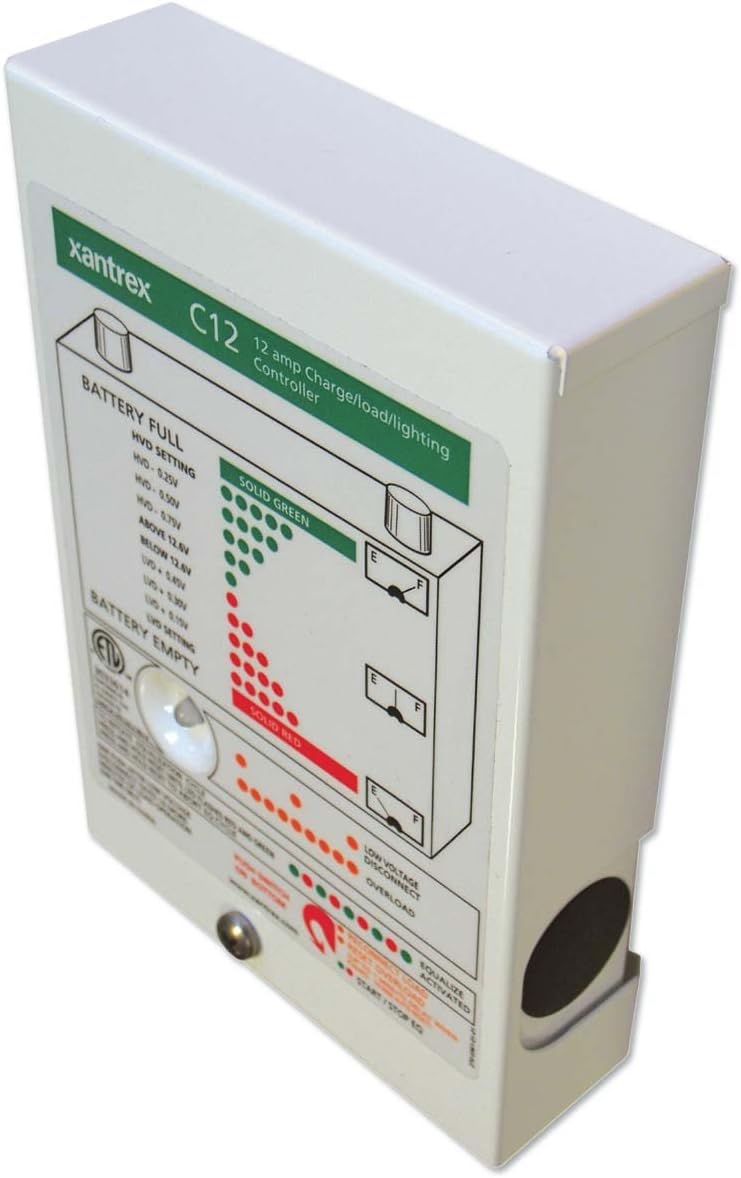
Foto 1: N'ihu view of the Xantrex C12 Solar Charge Controller, showing the LED indicator panel.
The LED panel provides visual feedback on the system's status:
- BATTERY FULL (Solid Green LEDs): Indicates the battery is fully charged or near full. The specific voltage thresholds for High Voltage Disconnect (HVD) are displayed on the panel (e.g., HVD - 0.25V, HVD - 0.50V, HVD - 0.75V, ABOVE 12.8V).
- BATTERY EMPTY (Solid Red LEDs): Indicates the battery is discharged or near empty. The specific voltage thresholds for Low Voltage Disconnect (UVD) are displayed (e.g., BELOW 12.8V, UVD - 0.50V, UVD - 0.75V, UVD - 1.0V).
- VOL dị alaTAGE DISCONNECT (Orange/Red LEDs): Na-enwu mgbe batrị voltage drops below a critical level, and the load has been disconnected to protect the battery.
- OVERLOAD (Orange/Red LEDs): Indicates that the connected load is drawing excessive current, potentially causing the controller to shut down the load output.
- EQUALIZE ACTIVATED (Green LED): Lights up when the automatic battery equalization cycle is active.
- START/STOP EQ (Button): A push-button located at the bottom of the panel to manually initiate or stop an equalization cycle.
7. Nlekọta
The Xantrex C12 Solar Charge Controller requires minimal maintenance.
- Nyocha oge niile: Periodically check all wiring connections for tightness and corrosion.
- Nhicha: Keep the controller's exterior clean and free of dust. Use a dry cloth; do not use liquid cleaners.
- Igwe ikuku: Hụ na oghere ikuku anaghị egbochi iji gbochie oke okpomọkụ.
8. Nchọpụta nsogbu
If you encounter issues with your Xantrex C12 controller, refer to the following common problems and solutions:
| Nsogbu | Ihe nwere ike ime | Ngwọta |
|---|---|---|
| Enweghị ngosipụta/Enweghị ike | Loose battery connection, reversed polarity, blown fuse (external) | Check battery connections and polarity. Inspect external fuses. |
| Batrị anaghị achaji | No solar input, reversed solar polarity, faulty solar panel, battery already full | Check solar panel connections and polarity. Verify solar panel output. Monitor battery status. |
| Load disconnected (Low Voltage Disconnect LED on) | Batrị voltage dị ala | Allow battery to charge. Reduce load. |
| Overload LED on | Excessive current draw from load | Reduce the connected load. Check for short circuits in the load wiring. |
If the problem persists after attempting these solutions, contact Xantrex customer support.
9. Nkọwapụta
| Njirimara | Nkọwa |
|---|---|
| Ụdị | Xantrex |
| Nlereanya | C12 |
| Ampoge | 12 Amps |
| Voltage | 12 volts |
| Ụdị ngosi | LCD (LED indicators on front panel) |
| Ibu Ibu | 1.35 pound (0.61 n'arọ) |
| Akụkụ ngwugwu | 6.7 x 4.8 x 1.8 sentimita (17 x 12.2 x 4.6 cm) |
| Ihe onwunwe | Ọla, plastik |
| UPC | 687873000520 |
10. Akwụkwọ ikike na nkwado
For detailed warranty information, please refer to the warranty card included with your product or visit the official Xantrex websaịtị.
If you require technical assistance or have questions not covered in this manual, please contact Xantrex customer support through their official websaịtị ma ọ bụ ọwa nkwado ahapụtara.
Ask a question about this manual
Ask about setup, troubleshooting, compatibility, parts, safety, or missing instructions. Manuals+ will review the question and use this page’s manual context to help answer it.