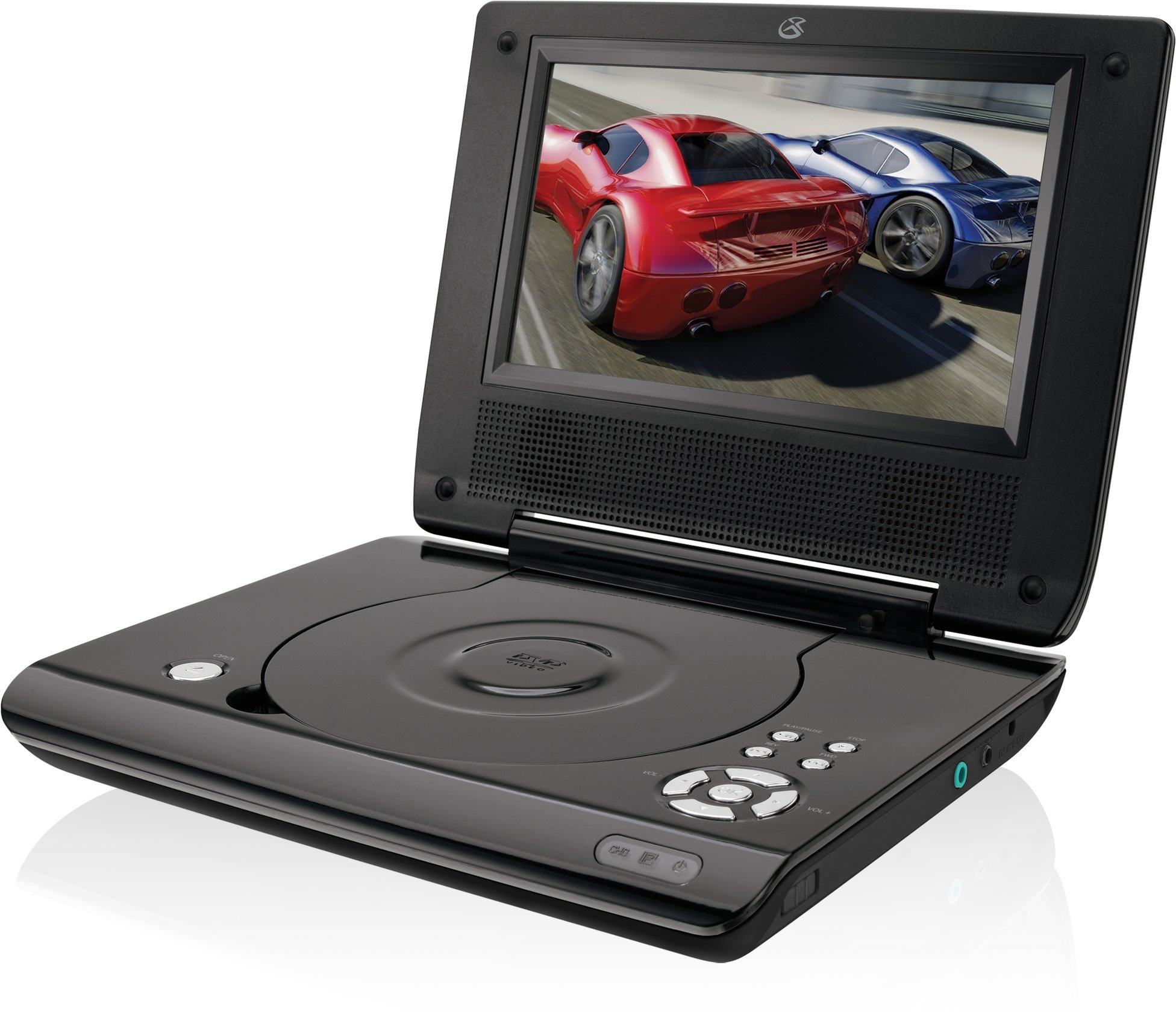
This manual provides essential instructions for the safe and efficient operation of your GPX PD730B 7-inch Portable DVD Player. Please read this manual thoroughly before using the device and retain it for future reference. The GPX PD730B is designed for portable entertainment, allowing you to enjoy DVDs, CDs, and JPEG files on its 7-inch TFT LCD screen.
Ihe ngwugwu
Nyochaa na etinyere ihe niile edepụtara n'okpuru na ngwugwu gị:
GPX PD730B Portable DVD Player
Ihe nkwụnye ọkụ AC/DC
DC Car Adapter (12V)
Earbuds Stereo
Njikwa anya (ya na batrị 2 AAA)
Akwụkwọ ntuziaka (akwụkwọ a)
Ngwaahịa gafereview
Figure 1: GPX PD730B Portable DVD Player (Closed)
This image shows the GPX PD730B portable DVD player in its closed position, highlighting its compact and sleek design. The top surface is smooth and black, with control buttons visible on the right edge.
Njikwa na Njikọ
Familiarize yourself with the various controls and connection ports on your portable DVD player.
Bọtịnụ ike: Gbanyụọ ma ọ bụ gbanyụọ unit ahụ.
Bọtịnụ Kwụsị/Kwụsị: Na-amalite ma ọ bụ kwụsịtụ ọkpụkpọ.
Kwụsị bọtịnụ: Kwụsị ịkpọghachi ya.
Skip/Search Buttons: Navigates tracks or chapters, or fast-forwards/rewinds.
Njikwa olu: Na-emezi ọkwa mmepụta ọdịyo.
Jack ekweisi: For private listening with stereo earbuds or headphones.
DC In Port: Connects to the AC/DC or car power adapter for charging and power.
Melite
1. Ịchaji batrị
Before initial use, fully charge the built-in rechargeable battery. A full charge provides approximately 2 hours of playback time.
Connect the AC/DC power adapter to the DC In port on the DVD player.
Tinye ihe nkwụnye ọkụ AC/DC n'ime oghere mgbidi ọkọlọtọ.
The charging indicator light (if present) will illuminate. Charging is complete when the light changes color or turns off (refer to device for specific indicator behavior).
Alternatively, use the 12V DC car adapter to charge the player in a vehicle.
2. Ịgbanye / gbanyụọ
Pịa ma jide Ike button on the unit to turn the player on or off. The screen will illuminate when powered on.
Ntuziaka ọrụ
1. Inserting and Removing Discs
Gently open the disc compartment lid.
Place a DVD or CD onto the spindle with the label side facing up. Press down gently on the center of the disc until it clicks into place.
Close the disc compartment lid firmly.
To remove a disc, open the lid, gently press the spindle button (if present) or lift the disc from the edges, avoiding touching the data surface.
2. Basic playback
After inserting a disc, the player will typically begin playback automatically.
Jiri ihe Gwuo/kwụsịtụ bọtịnụ ka kwụsịtụ ma ọ bụ maliteghachi ịkpọghachi.
Pịa Kwụsị bọtịnụ kwụsị ịkpọghachi.
Jiri ihe Mafee buttons (usually labeled with arrows) to navigate between chapters or tracks.
Jiri ihe ọchụchọ buttons (often combined with Skip) to fast-forward or rewind.
3. Iji Remote Control
The included remote control provides convenient access to all player functions from a distance. Ensure the 2 AAA batteries are correctly installed. Point the remote control directly at the player's remote sensor.
4. Ijikọ ekweisi
For private listening, plug the stereo earbuds (or your own headphones) into the Jack ekweisi on the side of the player. The built-in speakers will automatically mute when headphones are connected.
Figure 2: Portable DVD Player in use (Bedroom)
This image illustrates the portable DVD player being used by a girl in a bedroom setting, demonstrating its suitability for personal entertainment at home.
Figure 3: Portable DVD Player in use (Vehicle)
This image shows a boy watching the portable DVD player in the back seat of a car, highlighting its utility for entertainment during travel.
Figure 4: Portable DVD Player in use (Airplane)
This image depicts a woman using the portable DVD player with headphones on an airplane, showcasing its versatility for quiet, personal entertainment during flights.
Nlekọta
Cleaning the Player
Disconnect the player from all power sources before cleaning.
Jiri ákwà dị nro ma kpọọ nkụ hichaa elu mpụta. Ejila ihe nhicha, wax, ma ọ bụ ihe mgbaze.
For the screen, use a soft, lint-free cloth specifically designed for LCD screens. Avoid excessive pressure.
Debe ebe diski ahụ ka ọ ghara inwe uzuzu na ihe ndị na-emebi ihe.
Nlekọta batrị
Ka ịgbatị ndụ batrị ogologo, zere ịchaji batrị ugboro ugboro.
If the player will not be used for an extended period, charge the battery to about 50% before storing.
Store the player in a cool, dry place.
Nchọpụta nsogbu
If you encounter issues with your GPX PD730B, refer to the following common problems and solutions:
Nsogbu
Ihe nwere ike ime
Ngwọta
Onye ọkpụkpọ anaghị agbanyụ.
Battery is discharged; Power adapter not connected properly.
Charge the battery; Ensure power adapter is securely connected to both the player and power source.
Enweghị ọkpụkpọ diski.
Disc inserted incorrectly; Disc is dirty or scratched; Incorrect disc format.
Reinsert disc correctly (label side up); Clean disc with a soft cloth; Ensure disc is DVD, CD, or JPEG CD format.
Enweghị ụda sitere na igwe okwu / ekweisi.
Volume too low; Headphones not fully plugged in; Mute function active.
Increase volume; Ensure headphones are fully inserted; Check if mute is active on remote or player.
Njikwa anya anaghị arụ ọrụ.
Batrị anwụọla ma ọ bụ tinye ya n'ụzọ na-ezighi ezi; Ihe mgbochi dị n'etiti ihe dị anya na ihe ọkpụkpọ.
Replace remote batteries; Ensure correct polarity; Remove any obstructions and point remote directly at sensor.
Nkọwapụta
Nọmba nlereanya
PD730
Nha ihuenyo
7 sentimita asatọ
Ụdị ngosi
TFT LCD
Mkpebi obodo
480x234
Akụkụ akụkụ
16:9
Mgbasa ozi dakọtara
DVD, DVD+R/RW, CD, CD-R/RW, JPEG CD
Ndụ batrị (Ọkara)
Awa 2
Ntinye ike
AC/DC Adapter, 12V DC Car Adapter
Njikọta
Ihe enyemaka (Ekwentị isi)
Ibu Ibu
1.72 pound
UPC
047323007309
Akwụkwọ ikike na nkwado
For warranty information, technical support, or service inquiries, please refer to the warranty card included with your product or visit the official GPX websaịtị. Debe nnata nzụta gị dị ka ihe akaebe nke ịzụrụ maka nkwupụta ikike.
Ask about setup, troubleshooting, compatibility, parts, safety, or missing instructions. Manuals+ will review the question and use this page’s manual context to help answer it.