
Okwu mmalite
This manual provides essential instructions for the setup, operation, maintenance, and troubleshooting of your Insignia 6.1-Channel 600W Digital Home Theater Receiver, model IS-HC040917. Please read this manual thoroughly before using the receiver to ensure proper and safe operation.
Ntuziaka nchekwa dị mkpa
- Akwụsịla oghere ikuku ikuku ọ bụla. Wụnye dị ka ntuziaka onye nrụpụta si dị.
- Awụnyela n'akụkụ ebe okpomọkụ ọ bụla dị ka radiators, ndekọ okpomọkụ, stovu, ma ọ bụ ngwa ndị ọzọ (gụnyere amplifiers) nke na-emepụta okpomọkụ.
- Chebe eriri ọkụ ka ị ghara ịgagharị ma ọ bụ tuo ya, ọkachasị na plọg, ebe nchekwa dị mma, na ebe ha si na ngwa ahụ pụta.
- Jiri naanị mgbakwunye / ngwa ndị nrụpụta akọwapụtara.
- Kwupu ngwa a n'oge oke mmiri ozuzo ma ọ bụ mgbe ejighi ya ogologo oge.
- Tụtụ aka n'aka ndị ọrụ ruru eru. Achọrọ ọrụ mgbe akụrụngwa mebiri emebi n'ụzọ ọ bụla.
Ntuziaka nhazi
1. Iwepu ngwongwo
Carefully remove the receiver and all accessories from the packaging. Ensure all components are present:
- Insignia IS-HC040917 Receiver
- Njikwa anya
- AM Loop Antenna
- FM Waya Antenna
- Akwụkwọ ntuziaka (akwụkwọ a)
2. Ijikọ ndị na-ekwu okwu
The IS-HC040917 receiver supports a 6.1-channel speaker configuration. Connect your speakers to the corresponding terminals on the rear panel. Ensure correct polarity (+ to + and - to -) for each speaker.
- Front Left/Right: For main stereo sound.
- Ebe etiti: For dialogue.
- Surround Left/Right: For ambient sound effects.
- Gburugburu azụ: For additional rear channel effects in 6.1 setups.
- Subwoofer (Pre-out): Connect to a powered subwoofer's LFE input.
Note: The receiver is designed for speakers with an impedance of 8 ohms.
3. Connecting Audio/Video Sources
Connect your external devices (e.g., DVD player, Blu-ray player, game console, cable box) to the appropriate input jacks on the receiver.
- HDMI: Use HDMI cables for high-definition audio and video signals. The receiver has 3 HDMI input ports.
- Digital Audio (Optical/Coaxial): For digital audio from devices like CD players or set-top boxes.
- Analog Audio (RCA): For standard stereo audio connections from devices like VCRs or older CD players.
- S-Video: For video signals from compatible devices.
4. Njikọ antenna
Connect the supplied AM loop antenna and FM wire antenna to their respective terminals on the rear panel for radio reception.
5. Njikọ ike
Once all audio/video and speaker connections are made, plug the receiver's power cord into a standard AC wall outlet.
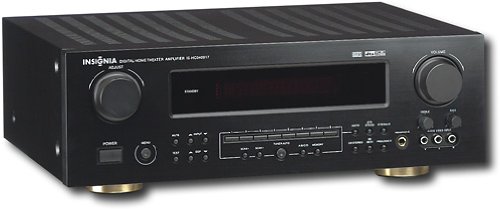
Foto: Rear panel of the Insignia IS-HC040917 receiver, showing various input and output connections for speakers, audio/video sources (HDMI, RCA, S-Video, Digital), and antenna terminals. This diagram is crucial for correctly wiring the home theater system.
Ntuziaka ọrụ
1. Gbanyụọ / gbanyụọ
Pịa IKE bọtịnụ dị n'ihu panel ma ọ bụ remote control gbanye ma ọ bụ gbanyụọ nnata.
2. Nhọrọ Ntinye
Jiri ihe Ntinye nhọrọ knob/buttons on the front panel or the remote control to choose the desired audio/video source (e.g., HDMI 1, DVD, CD, Tuner).
3. Njikwa olu
Gbanwee olu ukwu site na iji nnukwu Mpịakọta mkpịsị aka n'ihu panel ma ọ bụ Olu +/- bọtịnụ dị na njikwa anya.
4. Ụdị ọdịyo
The receiver supports various audio modes, including 6.1-channel surround sound. Use the MODE or DSP buttons on the remote to cycle through available sound modes (e.g., Stereo, Dolby Digital, DTS, Pro Logic).
5. Tuner Operation (AM/FM Radio)
Select the "Tuner" input. Use the BAND button to switch between AM and FM. Use the TUNE +/- buttons to manually tune to stations or PRESET +/- to select stored stations. Refer to the remote control for specific tuner functions.
Nlekọta
1. Nhicha
Wipe the exterior of the receiver with a soft, dry cloth. Do not use liquid cleaners or aerosol sprays, as they may damage the finish or internal components. Ensure the unit is unplugged before cleaning.
2. Igwe ikuku
Ensure that the ventilation openings on the top and sides of the receiver are not blocked. Proper airflow is essential to prevent overheating and ensure long-term performance.
3. Njikwa USB
Periodically check all cable connections to ensure they are secure. Loose connections can lead to poor audio or video quality.
Nchọpụta nsogbu
| Nsogbu | Ihe nwere ike ime | Ngwọta |
|---|---|---|
| Enweghị ike | Power cord unplugged; power outlet not active. | Lelee njikọ eriri ọkụ eletrik; nwaa oghere dị iche. |
| Enweghị ụda | Incorrect input selected; speaker wires loose; volume too low; mute activated. | Họrọ ntinye ziri ezi; lelee njikọ igwe okwu; mụbaa olu; gbanyụọ ogbi. |
| Enweghị vidiyo | Incorrect input selected; video cables loose or incorrect. | Select correct input; check video cable connections (HDMI, S-Video, RCA). |
| Njikwa anya anaghị arụ ọrụ | Batteries depleted; obstruction between remote and receiver; incorrect remote mode. | Replace batteries; remove obstructions; ensure remote is in the correct operating mode. |
Nkọwapụta
- Ụdị: IS-HC040917
- Akara: Insignia
- Ike mmepụta: 600 Watt
- Ọnụọgụ ọwa: 6.1 ọwa
- Ụkpụrụ mmepụta ụda: Gburugburu
- Mgbakọta ọdụ ụgbọ mmiri HDMI: 3
- Ụdị njikọ: 3.5mm Jack, HDMI, RCA, USB
- Ngwa dakọtara: Ọkà okwu
- Usoro njikwa: Ime ime
- Agba: Nwa
- UPC: 799530659962
- ASIN: B0075C3DN2
Akwụkwọ ikike na nkwado
For warranty information and customer support, please refer to the warranty card included with your product or visit the official Insignia websaịtị. Debe akwụkwọ nnata ịzụrụ maka akwụkwọ ikike.
For further assistance, you may contact Insignia customer service. Contact details are typically available on the manufacturer's websaịtị ma ọ bụ na nkwakọ ngwaahịa.