
1. Okwu mmalite
The SIIG Analog to Digital Audio Converter (Model CE-CV0111-S1) is designed to convert analog left/right stereo audio input into simultaneous Coaxial and Toslink digital audio outputs. This device facilitates the integration of analog audio sources with modern digital audio systems, ensuring clear and reliable audio transmission.
Atụmatụ gụnyere:
- Converts analog L/R stereo audio to Coaxial and Toslink digital outputs simultaneously.
- Supports audio sampling rate at 48KHz.
- Provides uncompressed 2-channel LPCM digital audio output.
- Features a durable metal housing for enhanced RF shielding.
2. Ihe ngwugwu
Biko chọpụta na ihe niile dị na ngwugwu gị:
- SIIG Analog to Digital Audio Converter (CE-CV0111-S1)
- 5V DC nkwụnye ọkụ
- Akwụkwọ ntuziaka onye ọrụ
3. Ihe osise
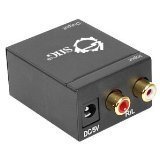
Foto 1: N'ihu view of the SIIG Analog to Digital Audio Converter. This image displays the DC 5V power input port on the left and the red (Right) and white (Left) RCA analog audio input ports on the right.
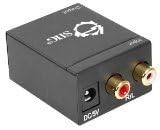
Foto 2: N'azụ view of the SIIG Analog to Digital Audio Converter. This image shows the digital audio output ports: a Coaxial port and a Toslink (optical) port.
4. Ntọala na nwụnye
Connecting the Audio Converter
- Connect Analog Audio Input: Using an RCA stereo audio cable (not included), connect the analog L/R audio output from your source device (e.g., TV, DVD player, game console) to the L/R RCA input ports on the SIIG Analog to Digital Audio Converter. Ensure the red connector goes to the 'R' (Right) input and the white connector goes to the 'L' (Left) input.
- Connect Digital Audio Output: Choose one or both digital output options:
- Mmepụta Coaxial: Connect a Coaxial audio cable (not included) from the Coaxial output port on the converter to the Coaxial digital audio input on your amplifier, receiver, or soundbar.
- Toslink (Optical) Output: Connect a Toslink optical audio cable (not included) from the Toslink output port on the converter to the optical digital audio input on your amplifier, receiver, or soundbar.
- Njikọ Ike: Plug the included 5V DC power adapter into the 'DC 5V' input port on the converter. Then, plug the power adapter into a standard electrical outlet. The converter will power on automatically.
- Nyochaa njikọ: Gbaa mbọ hụ na ejikọrọ eriri niile na ọdụ ụgbọ mmiri ha nke ọma.
5. Ntuziaka ọrụ
Once all connections are made and the converter is powered on, the device operates automatically. It will continuously convert the incoming analog L/R stereo audio signal into both Coaxial and Toslink digital audio signals simultaneously.
- Ensure your source device is playing audio through its analog L/R outputs.
- Select the appropriate digital input (Coaxial or Toslink) on your receiving audio device (amplifier, receiver, etc.) to hear the converted audio.
- The converter supports uncompressed 2-channel LPCM audio at a 48KHz sampọnụego ling.
6. Nchọpụta nsogbu
| Nsogbu | Ihe nwere ike ime | Ngwọta |
|---|---|---|
| Enweghị mmepụta ọdịyo | 1. Loose cable connections. 2. Incorrect input/output selection on receiving device. 3. Power adapter not connected or faulty. 4. Source device not outputting analog audio. | 1. Check all RCA, Coaxial, and Toslink cable connections. 2. Gbaa mbọ hụ na gị amplifier/receiver is set to the correct digital input (Coaxial or Optical). 3. Verify the power adapter is securely connected and the power outlet is functional. 4. Confirm the source device's analog audio output is active and functioning. |
| Ọdịmma ọdịyo gbagọrọ agbagọ ma ọ bụ nke na-adịghị mma | 1. Poor quality audio cables. 2. Ntinye aka sitere na ngwaọrụ eletrọnịkị ndị ọzọ. 3. Volume levels too high on source or receiving device. | 1. Use high-quality shielded audio cables. 2. Ensure the converter is placed away from strong electromagnetic interference sources. 3. Adjust volume levels on both the source and receiving devices to prevent clipping or distortion. |
| Only one digital output works | Faulty Coaxial or Toslink cable/port. | Test with a different cable for the non-working output. If the issue persists, the port may be faulty. |
7. Nkọwapụta
- Ụdị: CE-CV0111-S1
- Ntinye: Analog L/R Stereo Audio (RCA)
- Mpụta: Coaxial Digital Audio, Toslink (Optical) Digital Audio
- Ọdịdị SampỌnụ Ọgụgụ: 48 kHz
- Usoro ọdịyo: Uncompressed 2-channel LPCM
- Akụkụ (L x W x H): 1.57 x 1.97 x 1.38 sentimita (40 x 50 x 35 mm)
- Arọ: 9.6 ounce (272 grams)
- Ịnye ọkụ: 5V DC (included adapter)
- Ụlọ: Ọla
- Onye nrụpụta: Ụlọ ọrụ SIIG Inc.
- ASIN: B006ZB2LJ6
- UPC: 662774014524, 745449847037
8. Ozi nchekwa
- Ewepụla ngwaọrụ a na mmiri ma ọ bụ oke mmiri.
- Do not attempt to open or modify the device. There are no user-serviceable parts inside.
- Use only the provided 5V DC power adapter. Using an incorrect power adapter may damage the device and void the warranty.
- Debe ngwaọrụ ahụ na mpaghara ikuku nke ọma ka ọ ghara ikpo oke ọkụ.
- Debe ebe ụmụaka na-apụghị iru.
9. Akwụkwọ ikike na nkwado teknụzụ
SIIG Inc. products are designed for reliability and performance. For warranty information or technical assistance, please refer to the official SIIG website or contact their customer support directly. Please have your product model number (CE-CV0111-S1) and purchase details available when seeking support.
For the most current support information, visit the Ụlọ Ahịa SIIG na Amazon or the official SIIG websaịtị.