
1. Okwu mmalite
This manual provides detailed instructions for the safe and effective use of the PeakTech P 4980 Dual Laser Pointer IR Thermometer. This device is designed for non-contact temperature measurements across a wide range, from -50 to +800 °C. It features dual laser pointers for precise targeting of the measurement area. Please read this manual thoroughly before operating the device and keep it for future reference.
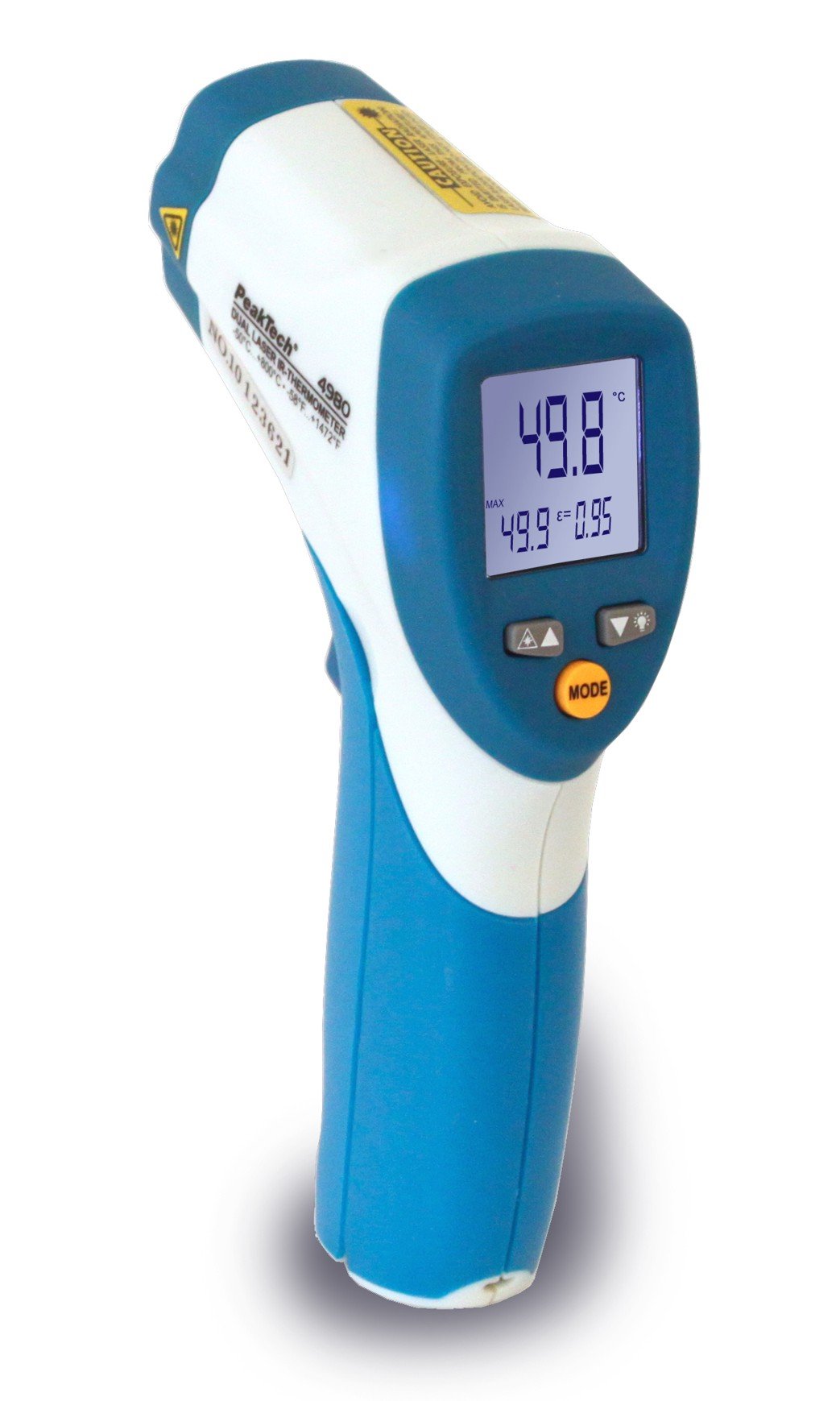
Image 1.1: The PeakTech P 4980 Dual Laser Pointer IR Thermometer, showing its ergonomic design and display.
2. Ozi nchekwa
Always observe the following safety precautions to prevent injury and avoid damage to the device:
- Nchekwa laser: This device uses Class 2 lasers. Do not stare directly into the laser beam or direct it at people or animals. Avoid direct eye exposure.
- gburugburu arụ ọrụ: Do not use the thermometer in environments with explosive gases, vapor, or dust.
- Oke okpomọkụ: Ekpughela ngwaọrụ ahụ n'ọnọdụ okpomọkụ dị oke elu karịa oke ọrụ ya.
- Nlekọta: Only qualified personnel should perform repairs. Do not attempt to modify the device.
- Nhicha: Jiri akwa dị nro, kpọrọ nkụ maka nhicha. Ejila ihe nchacha abrasive ma ọ bụ ihe mgbaze.
- Ijikwa batrị: Ensure correct battery polarity. Remove batteries if the device will not be used for an extended period. Dispose of batteries according to local regulations.
3. Akụrụngwa Ngwaahịa
The PeakTech P 4980 offers advanced features for accurate and convenient temperature measurement:
- Ihe nrịbama laser abụọ: Provides precise targeting, indicating the exact measurement spot.
- Oke okpomoku sara mbara: Measures temperatures from -50 °C to +800 °C (-58 °F to +1472 °F).
- Nleba na-abụghị kọntaktị: Safely measure hot, hazardous, or hard-to-reach surfaces.
- Ngosipụta LCD: Clear digital display for easy reading of temperature values.
- Mgbagha emezigharị: Allows for accurate measurements on various surface types (refer to operating instructions for details).
- Ọrụ njide data: Na-eme ka ọgụgụ egosiri na-akpọnwụ ka ọ dị mfe idekọ.
- Ìhè azụ: Improves visibility in dimly lit conditions.
- Gbanyụọ ike akpaaka: Na-echekwa ndụ batrị.
4. Nhazi
4.1 Ntinye batrị
- Locate the battery compartment cover on the handle of the device.
- Mepee mkpuchi ahụ site n'iwepụ ma ọ bụ ịtọpụ ya.
- Insert the included battery, ensuring correct polarity (+ and - terminals).
- Mechie mkpuchi nke batrị batrị nke ọma.
4.2 Gbanyụọ/ gbanyụọ
- To power on the device, press the trigger. The display will illuminate.
- The device will automatically power off after a period of inactivity to conserve battery life.
5. Ntuziaka ọrụ
5.1 Inyocha ihe
- Point the thermometer at the target surface.
- Press and hold the trigger. The dual laser pointers will activate, indicating the measurement area.
- The measured temperature will be displayed on the LCD.
- Release the trigger to hold the reading on the display (Data Hold function).
5.2 Distance-to-Spot Ratio
The accuracy of the measurement depends on the distance-to-spot ratio. Ensure the target area is larger than the measurement spot size at your chosen distance. The dual lasers help define this spot.
5.3 Emissivity Adjustment
Different materials emit infrared energy differently. For accurate readings, adjust the emissivity setting to match the surface being measured. Consult a standard emissivity table for common materials. The P 4980 allows adjustment via dedicated buttons (refer to device interface for specific controls).
5.4 Unit Selection (°C/°F)
To switch between Celsius (°C) and Fahrenheit (°F), locate the unit selection button (usually labeled '°C/°F' or similar) and press it. The display will change accordingly.
6. Nlekọta
6.1 Na-ehicha ngwaọrụ
- Hichapụ ngwaọrụ ahụ casing jiri nwayọ, damp akwa . Ejila ihe abrasive ma ọ bụ ihe mgbaze.
- For the lens, use a soft cloth or cotton swab with a small amount of isopropyl alcohol.
6.2 nnọchi batrị
When the low battery indicator appears on the display, replace the battery as described in Section 4.1. Always use the specified battery type.
6.3 Nchekwa
Store the thermometer in a cool, dry place, away from direct sunlight and extreme temperatures. Remove batteries if storing for extended periods.
7. Nchọpụta nsogbu
| Nsogbu | Ihe nwere ike ime | Ngwọta |
|---|---|---|
| Ngwaọrụ anaghị agbanwu ọkụ. | Batrị nwụrụ anwụ ma ọ bụ arụnyere na ezighi ezi. | Lelee polarity batrị ma ọ bụ jiri batrị ọhụrụ dochie. |
| Ọgụgụ na-ezighi ezi. | Incorrect emissivity setting; distance too far; lens dirty. | Adjust emissivity; move closer to target; clean lens. |
| Laser pointers not visible. | Laser function disabled (if applicable); bright ambient light. | Check laser activation button; use in less bright conditions. |
| Display shows 'ERR' or similar. | Measurement outside range; internal error. | Ensure target temperature is within -50 to +800 °C. If error persists, contact support. |
8. Nkọwapụta
| Njirimara | Nkọwapụta |
|---|---|
| Nlereanya | P 4980 |
| Oke okpomọkụ | -50C ruo +800C (-58°F ruo +1472°F) |
| Mkpebi | 0.1 Celsius C / 0.1 Celsius F |
| Ụdị ngosi | LCD |
| Njirimara Pụrụ Iche | Non-contact, Dual Laser Pointer |
| Isi Iyi Ike | Batrị kwadoro |
| Ngwa gụnyere | Batrị |
| Ihe dị n'elu | Plastic |
| Agba | Ọcha/acha anụnụ anụnụ |
9. Akwụkwọ ikike na nkwado
9.1 Ozi akwụkwọ ikike
This PeakTech product is backed by a 3-year manufacturer's warranty, ensuring quality and reliability. Please retain your proof of purchase for warranty claims.
9.2 Nkwado ndị ahịa
For technical assistance, troubleshooting, or warranty inquiries, please contact PeakTech customer support. Refer to the official PeakTech websaịtị ma ọ bụ nkwakọ ngwaahịa maka ozi kọntaktị kachasị ugbu a.