
Okwu mmalite
This manual provides essential information for the safe operation, assembly, maintenance, and troubleshooting of your WEN 4210 10-Inch Drill Press with Laser. Please read and understand all instructions before operating the tool to ensure personal safety and proper function.
The WEN 4210 drill press is designed for precision drilling in various materials. It features a 10-inch swing, a powerful 3.2-amp motor, five adjustable speeds, and a Class II 1mW laser for accurate hole placement.
Ozi nchekwa
Ịdọ aka ná ntị: Always follow basic safety precautions to reduce the risk of fire, electric shock, and serious personal injury.
- Nchedo anya: Always wear ANSI-approved safety goggles or safety glasses with side shields when operating this drill press.
- Mpaghara ọrụ: Keep the work area clean and well-lit. Do not operate power tools in the presence of flammable liquids or gases.
- Ihe eji arụ ọrụ echedoro: Mgbe niile clamp or secure the workpiece to the drill press table. Never hold the workpiece by hand.
- Uwe kwesịrị ekwesị: Do not wear loose clothing, gloves, neckties, or jewelry that can get caught in moving parts. Tie back long hair.
- Kwụpụ ike: Always disconnect the drill press from the power source before making adjustments, changing accessories, or performing maintenance.
- Nchekwa laser: This product uses a Class II 1mW laser. Avoid direct eye exposure to the laser beam. Do not stare into the beam.
- Igwe ikuku: Ensure adequate ventilation when drilling, especially with materials that produce dust or fumes.
Ihe ngwugwu
Chọpụta na ihe niile dị mgbe ị na-ebupụ:
- WEN 4210 Drill Press
- Class II 1mW Laser
- 1/2-inch Keyed Chuck & Key
- Ngwa maka Mgbakọ
Ntọala na Mgbakọ
Follow these general steps for assembly. Refer to the detailed diagrams in your printed manual for specific component identification.
- Mgbakọ ntọala na kọlụm: Securely attach the column to the base using the provided hardware.
- Mgbakọ isi: Carefully mount the head assembly onto the top of the column.
- Worktable Installation: Install the worktable and its support bracket onto the column. Ensure the rack and pinion mechanism operates smoothly for height adjustment.
- Nwụnye Chuck: Insert the chuck onto the spindle. Apply firm, even pressure and tap the chuck with a rubber mallet a few times to ensure a secure, compression fit.
- Nwụnye Laser: Install the laser centering device according to the instructions.
- Bench Mounting: For stability and safety, it is highly recommended to mount the drill press to a sturdy workbench using the pre-drilled holes in the base.
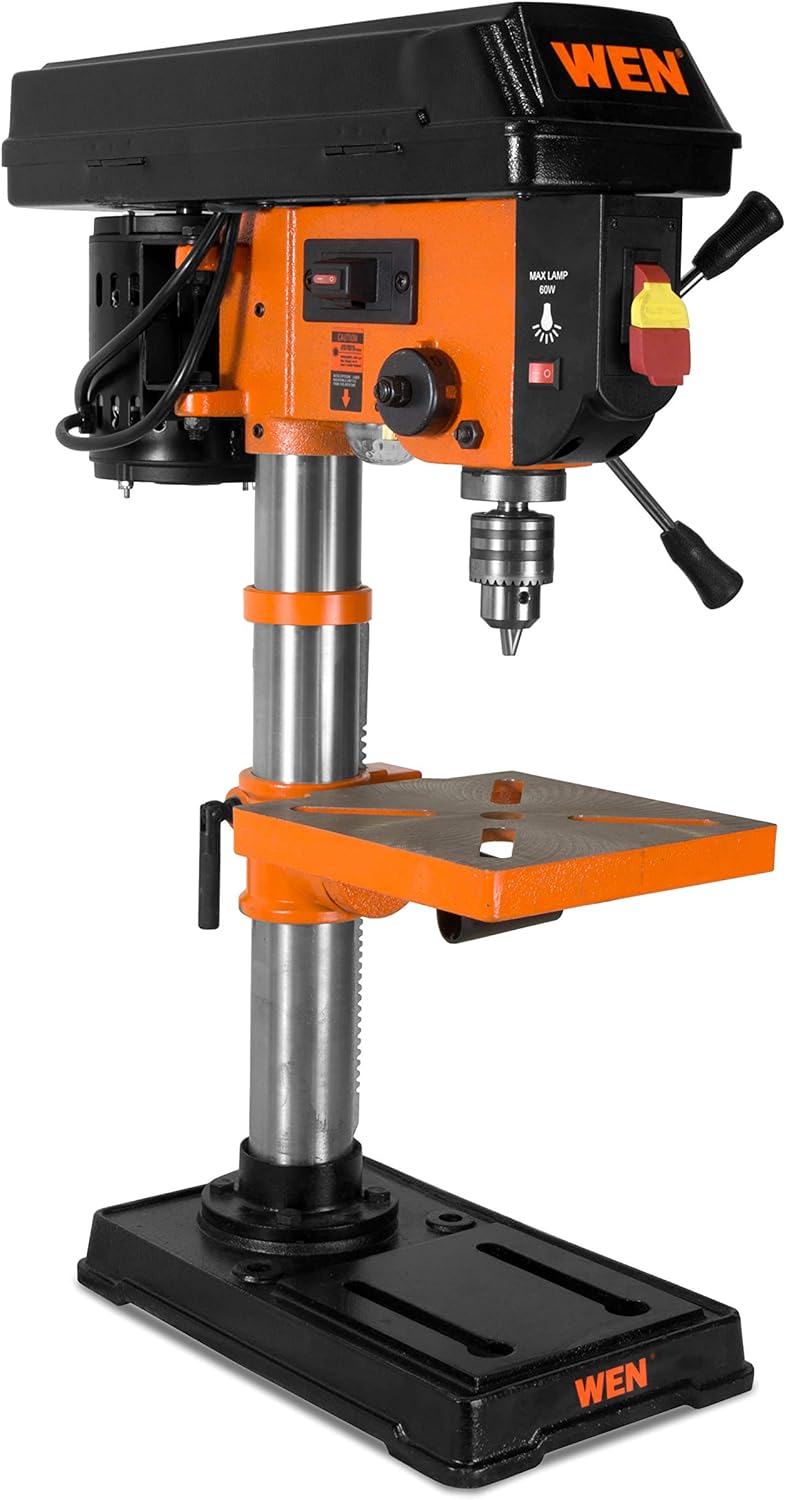
Figure 1: Fully assembled WEN 4210 Drill Press.
Ntuziaka ọrụ
1. Gbanyụọ / gbanyụọ
The drill press is equipped with a clearly marked ON/OFF switch. Press the green button to turn the unit ON and the red button to turn it OFF.
2. Ndozi ngwa ngwa
The WEN 4210 offers five speed settings: 600, 1100, 1700, 2400, and 3100 RPM. To change speeds:
- Kwupu ngwa ntanye ihe na-esi na isi iyi ike.
- Open the pulley cover located on top of the head assembly.
- Adjust the drive belt position on the motor and spindle pulleys to achieve the desired speed, as indicated on the speed chart inside the cover.
- Close the pulley cover securely before reconnecting power.

Figure 2: Control panel and pulley cover for speed adjustment.
3. Laser Centering Device
The integrated Class II 1mW laser projects an X-pattern onto your workpiece, indicating the exact drilling point. Activate the laser using its dedicated switch. This feature aids in precise hole placement, reducing guesswork.

Figure 3: Laser centering device projecting an X-pattern on the worktable.
4. Depth Stop
The drill press features a locking linear depth stop with 2-1/2 inches of spindle travel. To set the drilling depth:
- Lower the chuck until the drill bit touches the workpiece at the desired depth.
- Adjust the depth stop collar to the desired position.
- Lock the depth stop to ensure repeatable drilling to the set depth.
5. Worktable Adjustment
The 7-5/8 x 7-5/8 inch cast iron worktable can be adjusted for height and angle:
- Ndozi elu: Use the rack and pinion crank to raise or lower the table to the desired working height. Lock it in place with the table locking handle.
- Ndozi Bevel: The worktable can bevel up to 45 degrees left and right for angled drilling. Loosen the table tilt bolt, adjust to the desired angle using the scale, and then re-tighten the bolt.

Figure 4: Worktable showing the bevel adjustment scale.
Nlekọta
Nlekọta anya mgbe niile na-eme ka ogologo ndụ na ịrụ ọrụ kachasị mma nke igwe egwu egwu gị.
- Nhicha: After each use, clean the drill press to remove dust, chips, and debris. Use a brush or vacuum. Do not use solvents that may damage plastic parts.
- mmanu mmanu: Periodically apply a light coat of machine oil to the column and other moving parts to prevent rust and ensure smooth operation.
- Nyocha eriri: Regularly check the drive belt for wear, cracks, or tension. Replace if necessary.
- Lelee ngwa ngwa: Periodically inspect all nuts, bolts, and screws to ensure they are tight. Tighten any loose fasteners.
Nchọpụta nsogbu
| Nsogbu | Ihe nwere ike ime | Ngwọta |
|---|---|---|
| Drill press does not start | Enweghị ike, mgba ọkụ na-adịghị mma, nsogbu moto | Check power connection, circuit breaker. Contact customer support if issue persists. |
| Excessive vibration or wobble | Loose components, bent spindle, unbalanced chuck/bit | Ensure all fasteners are tight. Check chuck and drill bit for proper installation and balance. If spindle wobble is suspected, contact customer support. |
| Laser anaghị arụ ọrụ | Laser switch off, battery depleted (if applicable), faulty laser module | Ensure laser switch is ON. Check for battery replacement if your model uses one. Contact customer support if the laser remains inoperable. |
| Difficulty changing speeds | Belt tension, pulley obstruction | Ensure the belt is not overly tight. Check for any obstructions in the pulley system. |
Nkọwapụta
| Njirimara | Nkọwapụta |
|---|---|
| Ụdị | WEN |
| Nọmba nlereanya | 4210 |
| Isi Iyi Ike | Igwe ọkụ eletrik |
| Voltage | 220 volts (AC) |
| Ampoge | 3.2 Amps |
| Ike kacha | 384 Watt |
| Ọnụọgụ nke Ọsọ ọsọ | 5 |
| Oke ọsọ | 600, 1100, 1700, 2400, 3100 RPM |
| Ọsọ ntụgharị kacha | 3100 RPM |
| Oke Chuck kacha | 13 millimeters (1/2 inch) |
| Njem Spindle | 2.5 sentimita asatọ |
| Worktable Size | 7-5/8 x 7-5/8 sentimita asatọ |
| Worktable Bevel | 0-45 degrees Left & Right |
| Ụdị Laser | Class II 1mW |
| Drilling Capacity (Wood/Metal) | 2.5 sentimita asatọ |
| Ibu Ibu | 51 pound |
| Ụdị ihe | Ọla |
Akwụkwọ ikike na nkwado
The WEN 4210 Drill Press is covered by a Akwụkwọ ikike dị afọ 2 for residential use and a Akwụkwọ ikike nke ụbọchị 90 for commercial use. This warranty covers defects in material and workmanship under normal use.
For technical assistance, warranty claims, or to purchase replacement parts, please contact WEN Customer Support. You can find contact information and additional resources on the official WEN websaịtị ma ọ bụ site na ịga na Ụlọ ahịa WEN na Amazon.