
1. Okwu mmalite
The Rosewill RC-211 is a 2-port SATA II PCI Express Host Controller Card designed to expand your system's storage capabilities. It supports various RAID configurations, including RAID 0, RAID 1, RAID 0+1, RAID 5, and JBOD, providing flexibility for performance and data redundancy. This manual provides instructions for the proper installation, configuration, and operation of your RC-211 card.
2. Akụrụngwa Ngwaahịa
- Ihuenyo: PCI Express x1, offering 2.5 Gb/s throughput and full-duplex operation.
- ọdụ ụgbọ mmiri SATA: Two independent Serial ATA II channels.
- Ọnụego mbufe: Supports Serial ATA 3.0 Gb/s.
- Nkwado RAID: RAID 0 (Stripping), RAID 1 (Mirroring), RAID 0+1 (Mirrored-Stripping), RAID 5 (Distributed Parity RAID), and JBOD.
- Nkwado LBA: 48-bit LBA for hard drives larger than 137GB.
- Akụkụ dị elu: Supports Hot-plug capability, Legacy Command Queuing (LCQ), Native Command Queuing (NCQ), Non-zero offsets NCQ, Out of order data delivery NCQ, and FIS-based switching with Port Multipliers.
- Ihe ngosi LED: Two pin headers on board for LED connection.
3. System chọrọ
- Available PCI Express x1 slot or higher.
- Operating System: Windows 2000, Windows XP, or Windows 2003 Server.
- SATA hard drives.
- For RAID 5, a Port Multiplier capable enclosure and a minimum of three drives are required.
4. Setup: Hardware Installation
- Sistemụ gbanyụọ ike: Ensure your computer is completely powered off and unplugged from the power source before beginning installation.
- Mepee akpa kọmputa: Remove the side panel of your computer case to access the motherboard and expansion slots.
- Chọta oghere PCI Express: Identify an available PCI Express x1 slot (or larger, as the card is compatible with x4, x8, x16 slots).
- Insert Controller Card: Carefully align the Rosewill RC-211 card with the chosen PCI Express slot and press down firmly until it is securely seated. Ensure the bracket is aligned with the case opening.
- Kaadị echedoro: Use a screw to secure the card's bracket to the computer case.
- Connect SATA Drives: Connect your SATA hard drives to the two SATA ports on the RC-211 card using SATA data cables. Ensure connections are firm.
- Njikọ Ike: Ensure your SATA hard drives are connected to the power supply.
- LED Connection (Optional): If desired, connect system activity LEDs to the two pin headers on the card. Refer to your system's motherboard manual for LED pinout details.
- Mechie Ikpe: Replace the computer case side panel and reconnect the power cable.
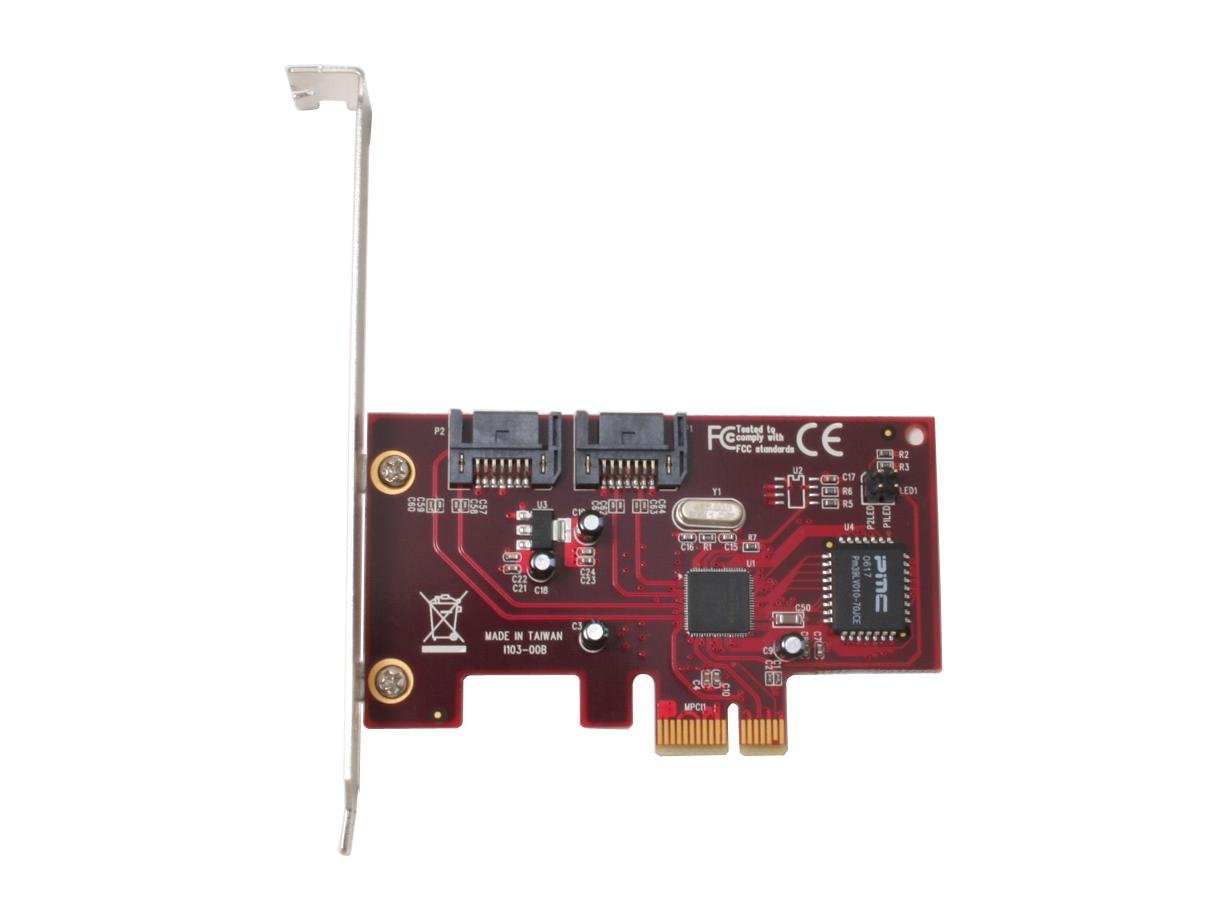
Image: Rosewill RC-211 SATA II PCI Express Host Controller Card. This image shows the physical card with its PCI Express connector and two SATA ports.
5. Setup: Driver Installation
After hardware installation, power on your computer. The operating system may detect new hardware. You will need to install the appropriate drivers for the Rosewill RC-211 card. Drivers are typically provided on a CD included with the product or can be downloaded from the Rosewill official website. Follow the on-screen instructions for driver installation.
6. Operating: RAID Configuration
The Rosewill RC-211 supports various RAID levels. Configuration is typically performed through a BIOS-level utility that appears during system boot-up or via a software utility after driver installation. Refer to the specific driver and utility documentation for detailed steps on creating and managing RAID arrays.
Supported RAID Modes:
- RAID 0 (Stripping): Combines multiple drives into a single logical unit, distributing data across them. This significantly increases data transfer performance but offers no data redundancy. If one drive fails, all data is lost.
- RAID 1 (na-egosipụta): Writes identical data to two drives simultaneously. This provides data protection; if one drive fails, the data is still accessible from the other drive. Performance is generally similar to a single drive.
- RAID 0+1 (Mirrored-Stripping): Combines the performance benefits of RAID 0 with the data redundancy of RAID 1. It requires at least four drives. Data is striped across two drives, and then mirrored to another pair of striped drives.
- RAID 5 (Distributed Parity RAID): Stripes data and parity information across three or more drives. It offers a balance of performance and data redundancy, allowing for the failure of one drive without data loss. Note: RAID 5 requires the use of Port Multiplier capability and a minimum of three drives.
- JBOD (Just a Bunch Of Disks): Combines multiple disk drives into one large virtual disk. It does not offer performance benefits or data redundancy but allows for combining drives of different sizes into a single volume.
7. Nchọpụta nsogbu
- Card Not Detected: Ensure the card is fully seated in the PCI Express slot. Verify that the PCI Express slot is functional. Check your system's BIOS settings to ensure PCI Express slots are enabled.
- Drives Not Detected: Confirm that SATA data and power cables are securely connected to both the drives and the controller card. Ensure drivers for the RC-211 card are correctly installed.
- RAID Array Issues: If a RAID array fails or rebuilds unexpectedly, check the health of individual drives. Ensure all drives in the array are compatible and functioning correctly. Refer to the RAID utility documentation for specific error codes or messages.
- SATA Connector Durability: When connecting or disconnecting SATA cables, exercise caution. The plastic connectors on some cards can be fragile. Always ensure proper alignment and avoid excessive force to prevent damage.
- Okwu arụmọrụ: Verify that the correct drivers are installed. Ensure your SATA drives are operating at their specified speeds. Check for other system bottlenecks.
8. Nlekọta
The Rosewill RC-211 card requires minimal maintenance. Ensure your computer's internal environment is clean and free of dust to prevent overheating. Periodically check for updated drivers on the Rosewill website to ensure optimal performance and compatibility.
9. Nkọwapụta
| Njirimara | Nkọwapụta |
|---|---|
| Nlereanya | RC-211 |
| Interface | Nweta PCI Express x1 |
| Njikọ nke ime | 2 x Serial ATA II |
| Ọnụego mbufe | 3.0 Gbps |
| Nkwado RAID | RAID 0, RAID 1, RAID 0+1, RAID 5, JBOD |
| akwadoro sistemu eji arụ ọrụ | Windows 2000, XP, 2003 Server |
| LBA Support | 48-bit LBA (supports HDDs > 137GB) |
| Hot-plug Capability | Ee |
| Ibu Ibu | 0.3 pound |
10. Akwụkwọ ikike na nkwado
For information regarding product warranty, technical support, and driver downloads, please visit the official Rosewill websaịtị ma ọ bụ kpọtụrụ ngalaba ọrụ ndị ahịa ha. Debe akwụkwọ nnata ịzụrụ maka akwụkwọ ikike.


