
Okwu mmalite
This manual provides detailed instructions for the proper setup, operation, and maintenance of your Denon AVR-1312 5.1-channel AV Surround Receiver. The AVR-1312 is designed to deliver a powerful surround sound experience, supporting 3D video when connected to compatible equipment. It features Compressed Audio Restorer technology for enhanced sound from portable audio players and Quick Select buttons for easy source and surround mode selection.
Ntọlite mbụ
1. Iwepu ngwongwo
Carefully remove the receiver from its packaging. Ensure all accessories, such as the remote control, batteries, and FM/AM antennas, are present. Retain the packaging for future transport or storage.
2. Ntinye
Place the receiver on a stable, level surface with adequate ventilation. Avoid placing it near heat sources or in direct sunlight. Ensure there is sufficient space around the unit for proper airflow to prevent overheating.
3. Njikọ
Before making any connections, ensure the receiver and all connected devices are powered off and unplugged from the wall outlet.

Figure 1: Rear panel connections of the Denon AVR-1312. This view displays HDMI inputs and output, analog audio inputs, digital audio inputs (optical and coaxial), video inputs, and speaker terminals.
Njikọ HDMI:
- Connect your video sources (e.g., Blu-ray player, game console, cable box) to the HDMI n'ime ports (HDMI 1-4).
- Connect your TV or projector to the HDMI OUT MONITOR port. This single cable will carry both video and audio signals to your display.
Njikọ ọdịyo:
- Digital Audio Inputs (OPTICAL/COAXIAL): For devices with digital audio outputs (e.g., CD player, older game consoles).
- Analog Audio Inputs (AUDIO IN): For devices with analog stereo outputs (e.g., CD player, tape deck).
- Stereo Mini Jack (FRONT PANEL): For connecting portable audio players.
Video Connections (Legacy):
- Component Video (DVD, GAME, SAT/CBL): For devices using component video cables (red, green, blue).
- Composite Video (DVD, GAME, SAT/CBL, VCR): For devices using composite video cables (yellow).
Njikọ Ọkà Okwu:
- Connect your speakers to the corresponding terminals on the rear panel: FRONT L/R, EGO, Gburugburu L/R.
- Ensure correct polarity (+ to + and - to -) for all speakers.
- For the subwoofer, connect a single RCA cable from the SUBWOOFER eburu ụzọ to the subwoofer's LFE input.
- The receiver supports 6-8 ohm speakers.
Njikọ antenna:
- Connect the supplied FM indoor antenna to the FM ANTENNA Ọnụ.
- Connect the supplied AM loop antenna to the AM ANTENNA ọnụ ọnụ.
Isi ọrụ
1. Gbanyụọ / gbanyụọ
Pịa IKE button on the front panel or the NA/Njikere button on the remote control to turn the receiver on or off.
2. Nhọrọ Ntinye
Select the desired input source using the input selector buttons on the front panel (e.g., DVD, GAME, SAT/CBL) or the corresponding buttons on the remote control.
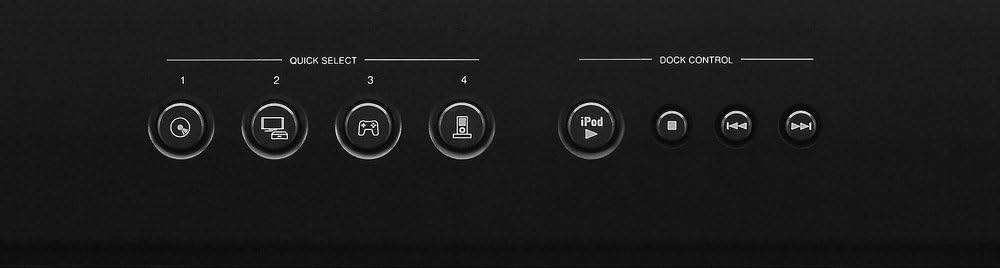
Figure 2: Front panel Quick Select and Dock Control buttons. These buttons allow for quick access to frequently used sources and sound modes.
Bọtịnụ Nhọrọ Ngwa Ngwa:
The AVR-1312 features four ahọpụtara ngwa ngwa buttons on the front panel and remote control. These buttons allow you to instantly switch to a pre-registered input source and surround mode. To register a setting, select the desired input and surround mode, then press and hold one of the Quick Select buttons (1-4) for a few seconds until the display flashes.
3. Njikwa olu
Gbanwee olu ukwu site na iji nnukwu Mpịakọta mkpịsị aka n'ihu panel ma ọ bụ Olu +/- bọtịnụ dị na njikwa anya.
4. Ụdị ụda
Pịa MODE or Gburugburu buttons on the remote control to cycle through available sound modes (e.g., Stereo, Dolby Digital, DTS, Multi-Channel Stereo). The receiver automatically detects the incoming audio signal and suggests optimal modes.

Figure 3: Denon RC-1158 Remote Control. This remote provides full control over the receiver's functions, including power, input selection, volume, sound modes, and menu navigation.
Nlekọta na nlekọta
- Nhicha: Wipe the exterior of the receiver with a soft, dry cloth. Do not use abrasive cleaners, solvents, or chemical cloths, as these may damage the finish.
- Igwe ikuku: Ensure that the ventilation openings on the top and sides of the receiver are not blocked. Proper airflow is essential to prevent internal heat buildup.
- Ụdọ ọkụ: When unplugging the power cord, always grasp the plug, not the cord itself.
- Nchekwa: If storing the unit for an extended period, disconnect the power cord and store it in a clean, dry place.
Nchọpụta nsogbu nsogbu
If you encounter issues with your receiver, refer to the following common problems and solutions before contacting customer support.
| Nsogbu | Ihe nwere ike ime | Ngwọta |
|---|---|---|
| Enweghị ike | Ejikọghị eriri ọkụ eletrik; nsogbu nke ebe ọkụ eletrik. | Ensure power cord is securely plugged in. Check if the power outlet is functional. |
| Enweghị ụda | Ahọpụtaghị ntinye na-ezighi ezi; anaghị ejikọ ndị na-ekwu okwu; olu ya dị ala nke ukwuu; agbanyere mkpọtụ. | Select correct input. Check speaker connections. Increase volume. Deactivate mute. |
| Enweghị vidiyo | Incorrect input selected; HDMI cable issue; TV input issue. | Select correct input. Check HDMI cable connections. Ensure TV is on correct input. |
| Njikwa anya anaghị arụ ọrụ | Batteries depleted; obstruction; incorrect remote mode. | Replace batteries. Remove obstructions. Ensure remote is in the correct operating mode for the receiver. |
Nkọwa nka nka
| Ụdị | Denon |
| Nọmba nlereanya | AVR1312 |
| Ike mmepụta | 75 Watts kwa ọwa |
| Ọnụọgụ nke ọwa | 5.1 |
| Mgbakọta ọdụ ụgbọ mmiri HDMI | 5 (4 n'ime / 1 pụta) |
| Teknụzụ Njikọta | Ekwenyere |
| Ọnọdụ mmepụta ọdịyo | Stereo, Gburugburu |
| Atụmatụ pụrụ iche | 3D Pass-Through, Equal Power Amp Design, High-Definition Audio Support |
| Ngwa dakọtara | Game Console, Television |
| Ibu Ibu | 19.8 pound |
Ozi akwụkwọ ikike
The Denon AVR-1312 AV Surround Receiver comes with a 2-afọ akwụkwọ ikike from the date of purchase. This warranty covers defects in materials and workmanship under normal use. Please retain your proof of purchase for warranty claims. For full terms and conditions, refer to the warranty card included with your product or visit the official Denon websaịtị.
Nkwado ndị ahịa
For further assistance, technical support, or service inquiries, please visit the official Denon website or contact their customer service department. You can typically find contact information, FAQs, and additional resources on the manufacturer's support pages.