
Quantum J-32U Portable CD/MP3 Player, USB, Radio, and Cassette Recorder User Manual
Ụdị: J-32U
1. Okwu mmalite
Daalụ maka ịzụrụasing the Quantum J-32U Portable CD/MP3 Player, USB, Radio, and Cassette Recorder. This device is designed to provide versatile audio playback and recording capabilities in a compact, portable unit. Please read this manual thoroughly before operating the unit to ensure proper use and to maximize its performance.
Debe akwụkwọ ntuziaka a maka ntụnye aka n'ọdịnihu.
2. Ntuziaka nchekwa dị mkpa
- Isi mmalite ike: Jiri naanị isi iyi ike egosiri na akara akara rụọ ọrụ.
- Igwe ikuku: Akwụsịla oghere ikuku ikuku ọ bụla. Wụnye dị ka ntuziaka onye nrụpụta si dị.
- Mmiri na mmiri: Ejila ngwa a n'akụkụ mmiri ma ọ bụ mmiri.
- Nhicha: Jiri akwa kpọrọ nkụ hichaa naanị.
- Okpomọkụ: Awụnyela n'akụkụ ebe okpomọkụ ọ bụla dị ka radiators, ndekọ okpomọkụ, stovu, ma ọ bụ ngwa ndị ọzọ (gụnyere amplifiers) nke na-emepụta okpomọkụ.
- Ije ozi: Tụtụ aka n'aka ndị ọrụ ruru eru. Achọrọ ọrụ mgbe akụrụngwa mebiri emebi n'ụzọ ọ bụla.
- Batrị: Tụfuo batrị ejirila dịka iwu obodo si dị. Ekpughela batrị ahụ n'ebe okpomọkụ dị oke elu.
3. Ihe ngwugwu
Biko lelee na agụnyere ihe ndị a na ngwugwu gị:
- Quantum J-32U Portable Audio System
- Igwe ọkụ AC
- Akwụkwọ ntuziaka (akwụkwọ a)
4. Ngwaahịa gafereview
4.1 Ogwe ihu
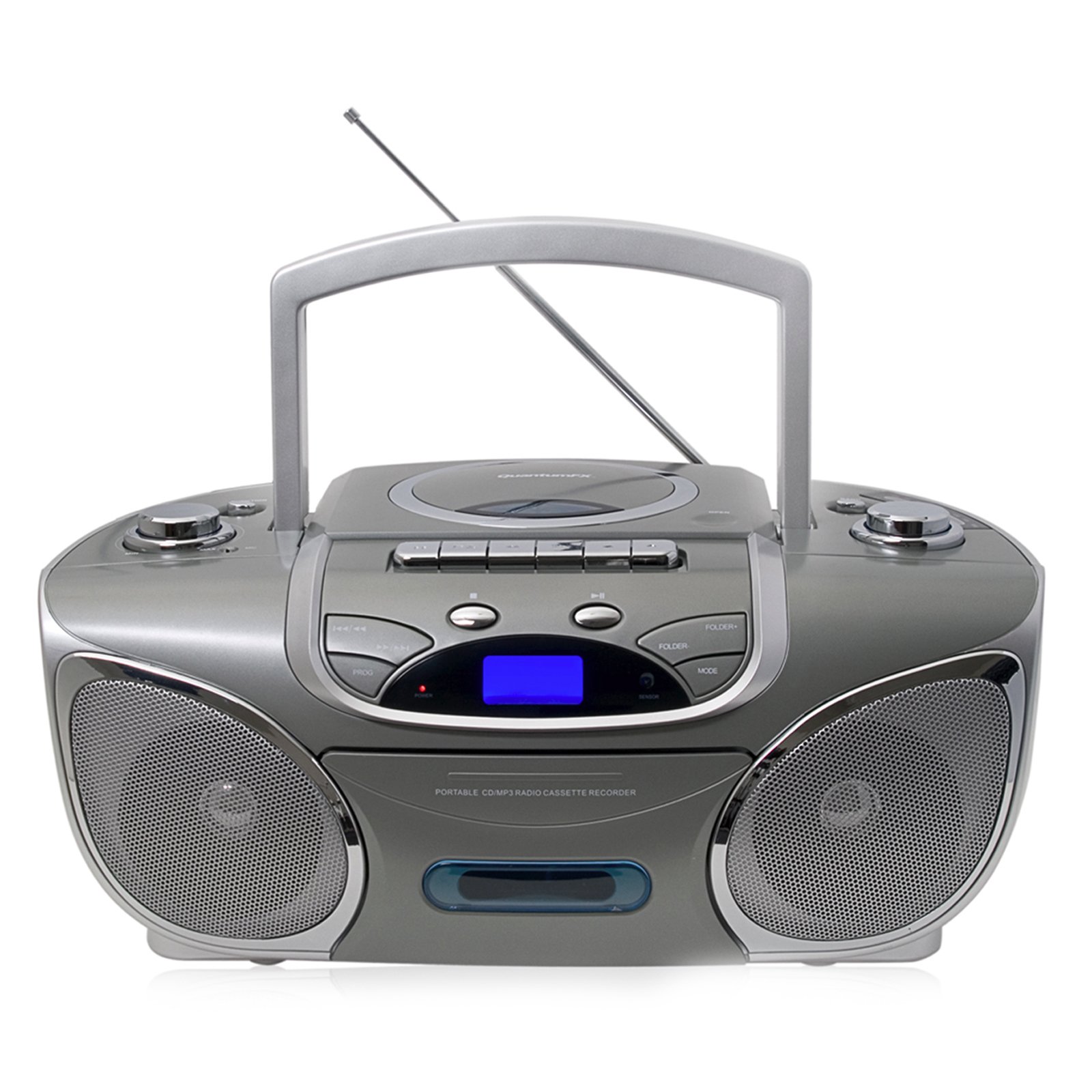
Foto: N'ihu view of the Quantum J-32U, showing the speaker grilles, display, and control buttons.
- Ndị na-ekwu okwu: Stereo speakers for audio output.
- Ngosipụta LCD: Shows current mode, track number, and radio frequency.
- Bọtịnụ ọrụ: Kpọọ/Kwụsịtụ, Kwụsị, Wụpụ/Chọọ (Gaa n'ihu/Laghachi azụ).
- Njikwa olu: Rotary knob to adjust audio output level.
- Bọtịnụ ụkpụrụ: Selects between CD, USB/SD, Radio, and Cassette modes.
4.2 Ogwe Top
Foto: Top view of the Quantum J-32U, highlighting the CD compartment, cassette deck, USB port, and SD/MMC slot.
- Ngalaba CD: Top-loading CD/MP3 disc tray.
- Ogbe Cassette: Maka ịkpọ na ịdekọ kaseti.
- Ọdụ ụgbọ mmiri USB: Maka ijikọ draịva USB flash.
- Oghere kaadị SD/MMC: Maka itinye kaadị ebe nchekwa SD ma ọ bụ MMC.
- Knob ntughari: For manual radio frequency selection.
- bọtịnụ njikwa Cassette: Gwuo egwu, Dekọọ, Gaa n'ihu ngwa ngwa, Weghachite azụ, Kwụsị/Wepụ.
4.3 Ogwe azụ
Foto: N'azụ view of the Quantum J-32U, showing the AC power input and battery compartment.
- Ntinye ike AC: Connect the supplied AC power cord here.
- Akụkụ batrị: For inserting batteries for portable operation.
- Antenna FM: Antenna telescopic maka nnata redio FM.
5. Nhazi
5.1 Ịkwado Ngalaba ahụ
The J-32U can be powered by AC mains or batteries.
Ike AC
- Gbaa mbọ hụ na agbanyụrụ unit ahụ.
- Connect the supplied AC power cord to the AC power input on the rear panel of the unit.
- Tinye nsọtụ nke ọzọ nke eriri ike AC n'ime oghere mgbidi nkịtị.
Ike batrị
- Mepee mkpuchi nke batrị dị na panel azụ.
- Insert the required number of "C" size batteries (not included), ensuring correct polarity (+/-).
- Mechie mkpuchi nke batrị batrị nke ọma.
- Mara: Disconnect the AC power cord when operating on batteries.
6. Ntuziaka ọrụ
6.1 Ọrụ izugbe
- Gbanyụọ/ Gbanyụọ: Pịa IKE bọtịnụ iji gbanye ma ọ bụ gbanyụọ unit ahụ.
- Nhọrọ ụdị: Pịa MODE button repeatedly to cycle through CD, USB/SD, Radio (AM/FM), and Cassette modes.
- Ndozi olu: Tugharia ihe Mpịakọta bọtịnụ iji bulie ma ọ bụ belata ọkwa ụda.
6.2 CD/MP3 Playback
- Pịa MODE bọtịnụ ka ịhọrọ ọnọdụ CD.
- Mepee mkpuchi nke CD ahụ.
- Place a CD or MP3 CD with the label side facing up.
- Close the CD compartment cover. The unit will read the disc.
- Pịa KWURU/Kwụsịa bọtịnụ ka ịmalite ịkpọghachi.
- Pịa WERE N'OGWU or MAKA azụ azụ to navigate tracks.
- Pịa ma jide WERE N'OGWU or MAKA azụ azụ to fast forward or rewind within a track.
- Pịa KWỤSỊ bọtịnụ kwụsị ịkpọghachi.
6.3 USB/SD/MMC Playback
- Insert a USB flash drive into the USB port or an SD/MMC card into the card slot.
- Pịa MODE button to select USB/SD mode. The unit will automatically detect and begin playing MP3 files.
- Jiri KWURU/Kwụsịa, KWỤSỊ, WERE N'OGWU, na MAKA azụ azụ buttons as with CD playback.
6.4 Radio Operation (AM/FM Stereo)
- Pịa MODE bọtịnụ iji họrọ ọnọdụ redio.
- Extend the FM telescopic antenna for better FM reception. For AM, rotate the unit for optimal reception.
- Tugharia ihe NKWUKWU knob to select your desired radio station.
- The frequency will be displayed on the LCD screen.
6.5 Mkpọgharị na Ndekọ Kaseti
Ngwughachi
- Pịa MODE bọtịnụ iji họrọ ụdị kaseti.
- Pịa Kwụsị/wepụ button to open the cassette deck.
- Insert a cassette tape and close the deck.
- Pịa KWURU bọtịnụ ka ịmalite ịkpọghachi.
- Jiri Ọsọ n'iru or KWESỊRỊ bọtịnụ iji chịgharịa teepu ahụ.
- Pịa Kwụsị/wepụ ịkwụsị ịkpọghachi.
Recording (from CD/USB/SD/Radio)
- Fanye teepu cassette oghere n'ime oche cassette ahụ.
- Select the desired source (CD, USB/SD, or Radio) using the MODE bọtịnụ.
- Start playback on the source (e.g., play a CD track, tune to a radio station).
- While the source is playing, press the Dekọọ bọtịnụ dị na kaseti ahụ. KWURU bọtịnụ ga-etinyekwa aka.
- Ka ịkwụsị ndekọ, pịa Kwụsị/wepụ bọtịnụ.
- Mara: Ensure the cassette tape has its record protection tabs intact for recording.
7. Nlekọta
- Na-ehicha Ngalaba: Jiri akwa dị nro dị nro hichaa mpụta nke unit ahụ. Ejila ihe nchacha abrasive ma ọ bụ ihe mgbaze.
- CD Lens Cleaning: If CD playback becomes erratic, use a commercially available CD lens cleaner disc to clean the laser lens.
- Isi nke Cassette: Periodically clean the cassette deck's heads, pinch rollers, and capstan with a cotton swab lightly dampetinyere ya na mmanya isopropyl.
- Nchekwa: When not in use for extended periods, disconnect the AC power cord and remove batteries. Store the unit in a cool, dry place.
8. Nchọpụta nsogbu
| Nsogbu | Ihe nwere ike ime | Ngwọta |
|---|---|---|
| Enweghị ike | Ejikọghị eriri AC; Batrị agwụla ma ọ bụ tinye ezighi ezi. | Lelee njikọ eriri AC; Dochie batrị ma ọ bụ hụ na polarity ziri ezi. |
| Enweghị ụda | Volume too low; Incorrect mode selected. | Increase volume; Press MODE to select correct source. |
| CD na-awụli elu ma ọ bụ anaghị egwu egwu | Disc dirty or scratched; CD compartment not closed; Disc inserted incorrectly. | Clean or replace disc; Close CD compartment firmly; Insert disc label side up. |
| Nnabata redio adịghị mma | Antenna adịghị agbatị; Ọnọdụ otu. | Gbatịa antenna FM nke ọma; Tụgharịa nkeji ahụ ka ọ dị mma ịnweta AM. |
| Teepu kaseti anaghị akpọ/edekọ | Tape incorrectly inserted; Record protection tab removed (for recording). | Ensure tape is correctly inserted; Cover record protection tab with tape for recording. |
9. Nkọwapụta
- Ụdị: J-32U
- Isi mmalite ike: AC 120V ~ 60Hz or DC 9V (6 x "C" size batteries)
- Ihe ọkpụkpọ CD: Top-loading CD/MP3 compatible
- USB/SD/MMC: Supports MP3 audio playback
- Ugboro redio: Stereo AM/FM
- Ogbe Cassette: Playback and Recording function
- Ndị na-ekwu okwu: Stereo
- Ngwa dakọtara: MP3 Player, Smartphone (via USB/SD for file playback, not direct audio input)
- GTIN: 606540009864
10. Akwụkwọ ikike na nkwado
Quantum products are designed for reliability and performance. For warranty information, please refer to the warranty card included with your purchase or visit the official Quantum website. For technical support or service inquiries, please contact Quantum customer service.
Nkwado n'ịntanetị: www.quantumfx.com/support (Rịba ama: Nke a bụ ebe njide ihe URL as no specific support link was provided.)
Ndị ọrụ nlekọta ndị ahịa: Refer to your product packaging or warranty card for contact details.


