
1. Okwu mmalite
Thank you for choosing the Vestal MCW027 Analog-Digital Watch. This timepiece combines classic analog hands with a modern digital display, offering versatility and functionality. This manual provides essential information for setting up, operating, and maintaining your watch to ensure its longevity and accurate performance.
2. Nhazi
2.1 Unboxing
Carefully remove your Vestal MCW027 watch from its packaging. Inspect the watch for any signs of damage. The package should contain the watch and this instruction manual.

Image: The Vestal watch box, black with the Vestal logo in white.
2.2 Ịtọ oge Analog
- Pull the crown (the small knob on the side of the watch case) out to its furthest position.
- Tụgharịa okpueze ahụ n'akụkụ elekere ma ọ bụ n'akụkụ elekere ka ịtọọ aka elekere na nkeji n'oge achọrọ.
- Once the time is set, push the crown back into its original position to start the analog movement.
2.3 Ịtọ Oge na Ụbọchị Dijitalụ
The Vestal MCW027 features a digital display with multiple functions. Specific button labels may vary, but typically:
- Locate the 'MODE' button (usually on the left side) to cycle through display modes (Time, Date, Alarm, Stopwatch).
- When in Time mode, press and hold the 'ADJUST' or 'SET' button (usually on the right side) until the digits begin to flash.
- Use the 'FORWARD' or 'REVERSE' buttons (often top-right and bottom-right) to change the flashing digits (hours, minutes, year, month, day).
- Press the 'MODE' button to move to the next setting.
- Once all settings are correct, press the 'ADJUST' or 'SET' button again to exit the setting mode.
2.4 Yiri nche
Adjust the leather strap to fit comfortably around your wrist. The watch should be snug enough not to slide freely but not so tight as to restrict circulation.
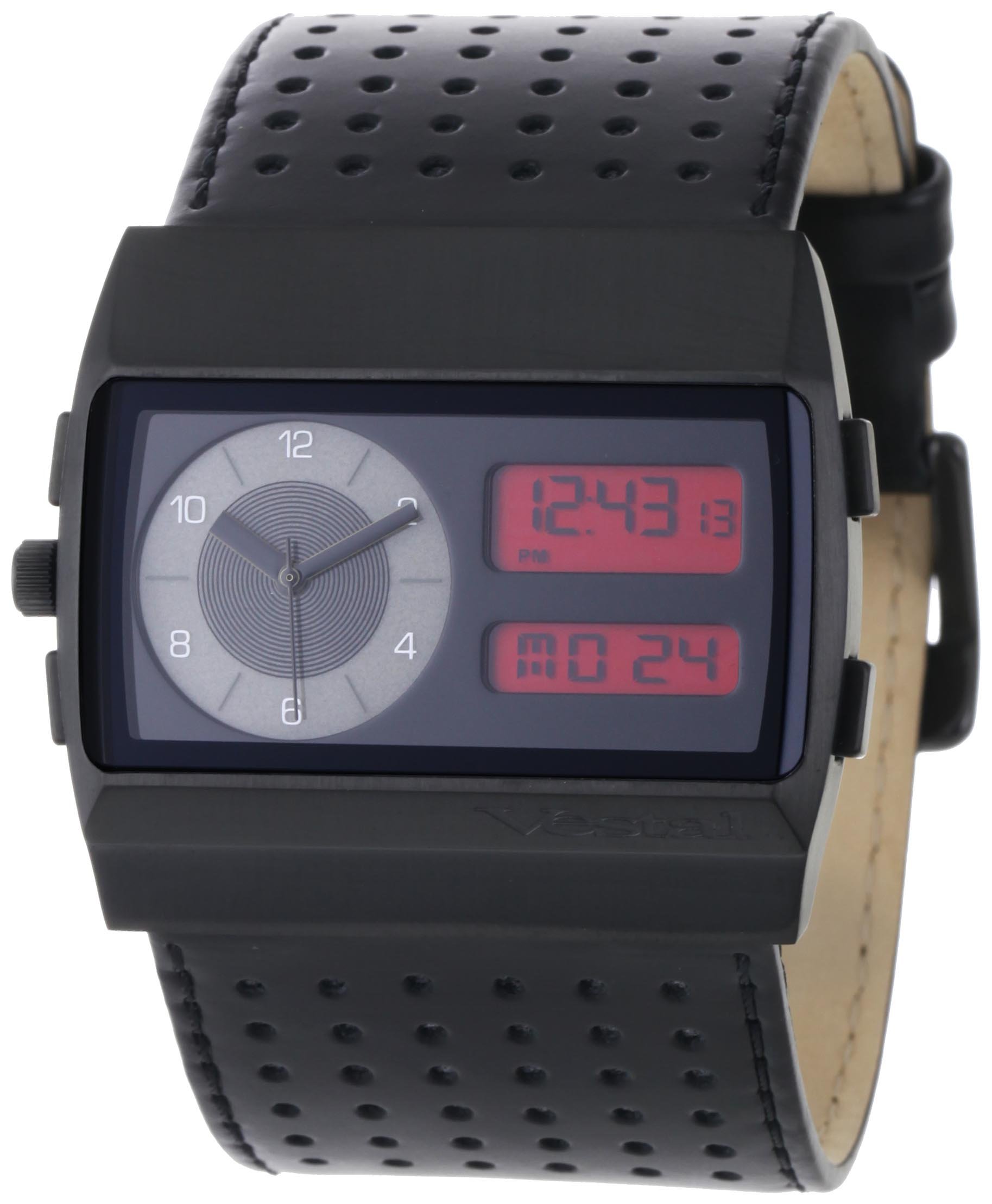
Image: The Vestal MCW027 watch displayed on a wrist, highlighting its analog and digital features.
3. Ịrụ ọrụ elekere
3.1 Nhọrọ ọnọdụ
Press the 'MODE' button repeatedly to cycle through the available digital display functions. These typically include:
- Ngosipụta oge: Shows current digital time (hours, minutes, seconds).
- Ngosipụta ụbọchị: Shows current date (month, day, year).
- Mkpu: Na-enye ohere ịtọ ma mee ka mkpu rụọ ọrụ.
- Oge elekere: Maka ịtụ oge agafeela.
3.2 Using Digital Functions
- Mkpu: In Alarm mode, use the 'ADJUST' button to enable/disable the alarm. Use 'SET' and 'FORWARD/REVERSE' buttons to set the alarm time.
- Oge elekere: In Stopwatch mode, press 'START/STOP' (often the top-right button) to begin and end timing. Press 'RESET' (often the bottom-right button) to clear the stopwatch.
4. Nlekọta
4.1 Na-ehicha elekere gị
- Ikpe: Wipe the watch case with a soft, dry cloth. For stubborn dirt, a slightly damp enwere ike iji akwa mee ihe, na-esote ihicha ozugbo.
- eriri akpụkpọ anụ: Avoid prolonged exposure to water, direct sunlight, and harsh chemicals. Clean with a specialized leather cleaner or a very slightly damp cloth, then allow to air dry completely.
4.2 Mmiri Nguzogide
The Vestal MCW027 watch has a certain level of water resistance, but it is generally not suitable for swimming, diving, or showering unless explicitly stated otherwise on the watch case back. Avoid operating buttons or the crown when the watch is wet to prevent water ingress.
4.3 nnọchi batrị
When the watch's battery runs low, the digital display may dim or the analog hands may stop. Battery replacement should be performed by a qualified watch technician to ensure proper sealing and function. Attempting to replace the battery yourself may void the warranty and compromise water resistance.
5. Nchọpụta nsogbu
| Nsogbu | Ihe nwere ike ime | Ngwọta |
|---|---|---|
| Aka analogues anaghị agagharị | Battery depleted; Crown pulled out. | Replace battery (professional service recommended); Push crown back in. |
| Digital display blank or dim | Battery depleted; Extreme temperature. | Replace battery; Allow watch to return to normal operating temperature. |
| Incorrect digital time/date | Time/date not set correctly. | Refer to Section 2.3 to reset digital time and date. |
| Bọtịnụ anaghị aza | Watch in locked mode; Internal malfunction. | Check manual for specific button lock features (if any); Contact customer support if issue persists. |
6. Nkọwapụta
- Nọmba nlereanya: MCW027
- Akara: Vestal
- Ụdị ngosi: Analog-Dijitalụ
- Ihe eriri: Akpụkpọ anụ
- Ntughari: Quartz
- Akụkụ ngwugwu: 11.4 x 10 x 10 cm
- Ibu ngwugwu: 258.55 g

Image: A visual guide demonstrating various watch case sizes, from 14-16mm up to 50-54mm, for reference.
7. Akwụkwọ ikike Ozi
Your Vestal MCW027 watch is covered by a manufacturer's warranty against defects in materials and workmanship. The duration and terms of the warranty may vary by region. Please refer to the official Vestal website or contact Vestal customer support for detailed warranty information specific to your purchase.
8. Nkwado ndị ahịa
If you encounter any issues not covered in this manual or require further assistance, please contact Vestal customer support. Contact details can typically be found on the official Vestal websaịtị ma ọ bụ na nkwakọ ngwaahịa gị.