
Okwu mmalite
The GIGABYTE GM-M7600 is a wireless precision optical mouse designed for comfortable and reliable use. This manual provides instructions for setting up, operating, maintaining, and troubleshooting your device.
Ihe ngwugwu
Biko lelee ọdịnaya nke ngwugwu ahụ ka ị hụ na ihe niile dị:
- GIGABYTE GM-M7600 Wireless Optical Mouse
- Portable Nano USB Receiver
- 2 x AAA batrị
Melite
1. Ịwụnye batrị
The GM-M7600 mouse requires two AAA batteries for operation. The batteries are included in the package.
- Chọta mkpuchi nke ebe batrị ahụ n'okpuru òké ahụ.
- Jiri nwayọọ slide ma ọ bụ welie ihe mkpuchi ahụ ka imeghe akụkụ ahụ.
- Insert the two AAA batteries, ensuring the positive (+) and negative (-) terminals align correctly with the markings inside the compartment.
- Mechie mkpuchi nke batrị batrị nke ọma.
2. Ijikọ eriri USB
The mouse connects to your computer via a portable Nano USB receiver.
- Locate the Nano USB receiver. It may be stored inside the mouse's battery compartment or packaged separately.
- Plug the Nano USB receiver into an available USB port on your computer (Laptop or Personal Computer).
- Your operating system (e.g., Windows XP, Linux) should automatically detect and install the necessary drivers. This process may take a few moments.
- Once the drivers are installed, the mouse is ready for use.
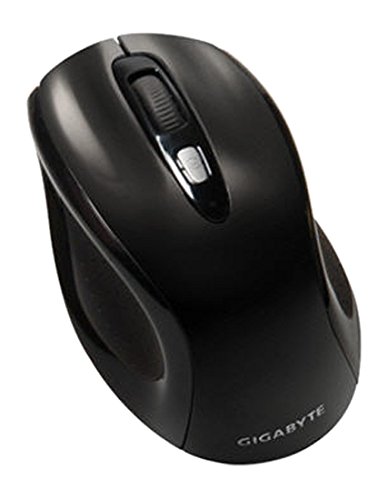
Foto 1: GIGABYTE GM-M7600 Wireless Optical Mouse. This image displays the ergonomic design of the mouse, highlighting its form factor and the location of its buttons. The Nano USB receiver is typically stored within the mouse or connected to a computer's USB port.
Ntuziaka ọrụ
1. Ịgbanye / gbanyụọ
The mouse typically has a power switch on its underside. Slide the switch to the 'ON' position to activate the mouse. Slide it to 'OFF' when not in use to conserve battery life.
2. Ịgbanwe DPI (Mmetụta)
The GM-M7600 features an adjustable DPI switch, allowing you to change the mouse sensitivity between 800 DPI and 1600 DPI. This switch is usually located near the scroll wheel. Press the DPI button to toggle between the two sensitivity settings.
3. Basic Mouse Ọrụ
- Pịa aka ekpe: Bọtịnụ isi maka ịhọrọ ihe, imeghe files, and interacting with software.
- Pịa aka nri: Bọtịnụ nke abụọ maka ịnweta menus ọnọdụ na nhọrọ ndị ọzọ.
- Mpempe akwụkwọ mpịakọta: A na-eji ya agagharị n'akwụkwọ na web pages. It can also function as a middle click button.
Nlekọta
1. Nhicha
Iji nọgide na-arụ ọrụ na ọdịdị kacha mma:
- Disconnect the mouse from your computer and turn off the power switch.
- Jiri akwa dị nro na-enweghị ntụpọ dampejiri mmiri kpuchie ma ọ bụ ihe ngwọta dị nro iji hichaa elu nke òké ahụ.
- Zere iji kemịkalụ siri ike, ihe nhicha ihe na-emebi ihe, ma ọ bụ fesa mmiri mmiri ozugbo n'elu òké ahụ.
- Clean the optical sensor area on the underside of the mouse with a dry cotton swab to remove any dust or debris.
2. Ngbanwe batrị
When the mouse performance degrades or it stops responding, it may be time to replace the batteries.
- Turn off the mouse using the power switch.
- Open the battery compartment as described in the 'Installing Batteries' section.
- Wepụ batrị AAA ochie.
- Tinye batrị AAA ọhụrụ abụọ, na-ahụ polarity ziri ezi (+/-).
- Close the battery compartment and turn the mouse back on.
Nchọpụta nsogbu
If you encounter issues with your GIGABYTE GM-M7600 mouse, try the following solutions:
- Òké anaghị aza:
- Gbaa mbọ hụ na agbanyere òké ahụ.
- Lelee ma arụnyere batrị nke ọma ma nwee ụgwọ zuru oke. Dochie ma ọ dị mkpa.
- Ensure the Nano USB receiver is securely plugged into a working USB port on your computer. Try a different USB port.
- Malitegharịa ekwentị gị na kọmputa.
- Mmegharị kọsọ na-ezighi ezi:
- Hichaa ihe mmetụta anya dị n'okpuru òké ahụ.
- Gbaa mbọ hụ na ị na-eji òké n'elu ala dabara adaba. Zenarị elu na-egosipụta nke ukwuu ma ọ bụ na-apụta ìhè.
- Check for any wireless interference. Move the mouse closer to the receiver or away from other wireless devices.
- DPI switch not working:
- Gbaa mbọ hụ na agbanyere ma jikọọ òké ahụ.
- Pịa bọtịnụ DPI nke ọma.
Nkọwapụta
| Aha Nlereanya | GM-M7600 |
| Ụdị | GIGABYTE |
| Teknụzụ Njikọta | 2.4GHz Radio Frequency Wireless |
| Nchọpụta mmegharị | Ngwa anya |
| DPI na-agbanwe agbanwe | 800/1600 DPI |
| Ọnụọgụ bọtịnụ | 3 (Left, Right, Scroll Wheel/Middle Click) |
| Isi Iyi Ike | Batrị 2 x AAA (gụnyere) |
| Ụdị nnata | Portable Nano USB Receiver |
| Ngwa dakọtara | Laptọọpụ, Kọmputa nkeonwe |
| Nkwado Sistemụ arụmọrụ | Linux, Windows XP |
| Ihe mkpuchi | Plastic with Rubberized Finish |
| Agba | Nwa |
Akwụkwọ ikike na nkwado
For warranty information and technical support, please refer to the warranty card included with your product or visit the official GIGABYTE websaịtị. Debe akwụkwọ nnata ịzụrụ maka akwụkwọ ikike.