
1. Okwu mmalite
Thank you for choosing the Ground Zero GZNA 2800XII 2-Channel Amplifia. Akwụkwọ ntuziaka a na-enye ozi dị mkpa maka nrụnye, ọrụ, na mmezi kwesịrị ekwesị nke ngwaọrụ gị amplifier. To ensure optimal performance and safety, please read these instructions thoroughly before attempting to install or operate the unit. Keep this manual for future reference.
2. Ntuziaka nchekwa
- Akwadoro nwụnye ọkachamara: Due to the complexity of car audio systems and the high power output of this amplifier, professional installation by a qualified technician is strongly recommended.
- Ịnye ọkụ: Ensure the vehicle's electrical system can support the amplifier's power requirements. Incorrect wiring can lead to fire, injury, or damage to the amplifier and vehicle.
- Nda ala: Always connect the ground terminal securely to a clean, unpainted metal surface of the vehicle chassis. A poor ground connection can cause noise or malfunction.
- Nchekwa fiusi: Install an appropriate fuse (not supplied) on the power cable as close to the vehicle battery as possible. Refer to the specifications for recommended fuse ratings.
- Zere mmiri na ikpo ọkụ: Ekpughela ihe ndị ahụ amplifier to moisture, water, or extreme temperatures. Install it in a dry, well-ventilated area.
- Nkwanye echekwabara: Ugwu ahụ amplifier securely to prevent it from coming loose during sudden stops or accidents.
- Usoro eriri USB: Route all cables carefully to avoid pinching, chafing, or interference with vehicle controls. Keep power cables separate from signal cables to minimize noise.
- Ọkwa olu: Prolonged exposure to high volume levels can cause hearing damage. Adjust volume responsibly.
3. Ngwaahịa gafereview
The Ground Zero GZNA 2800XII is a high-performance 2-channel amplifier designed for car audio applications, capable of delivering up to 2800 Watts of maximum power. Its robust design ensures reliable operation and excellent sound reproduction.

Foto 1: N'elu view of the Ground Zero GZNA 2800XII 2-Channel Ampna -emegharị ihe. Ndị amplifier features a dark blue top panel with the 'GROUND ZERO NUCLEAR HIGH POWER AMPLIFIER' logo, and silver-colored heatsink fins on the sides. A small, separate black power module is visible in the upper left corner, indicating a robust power supply design.
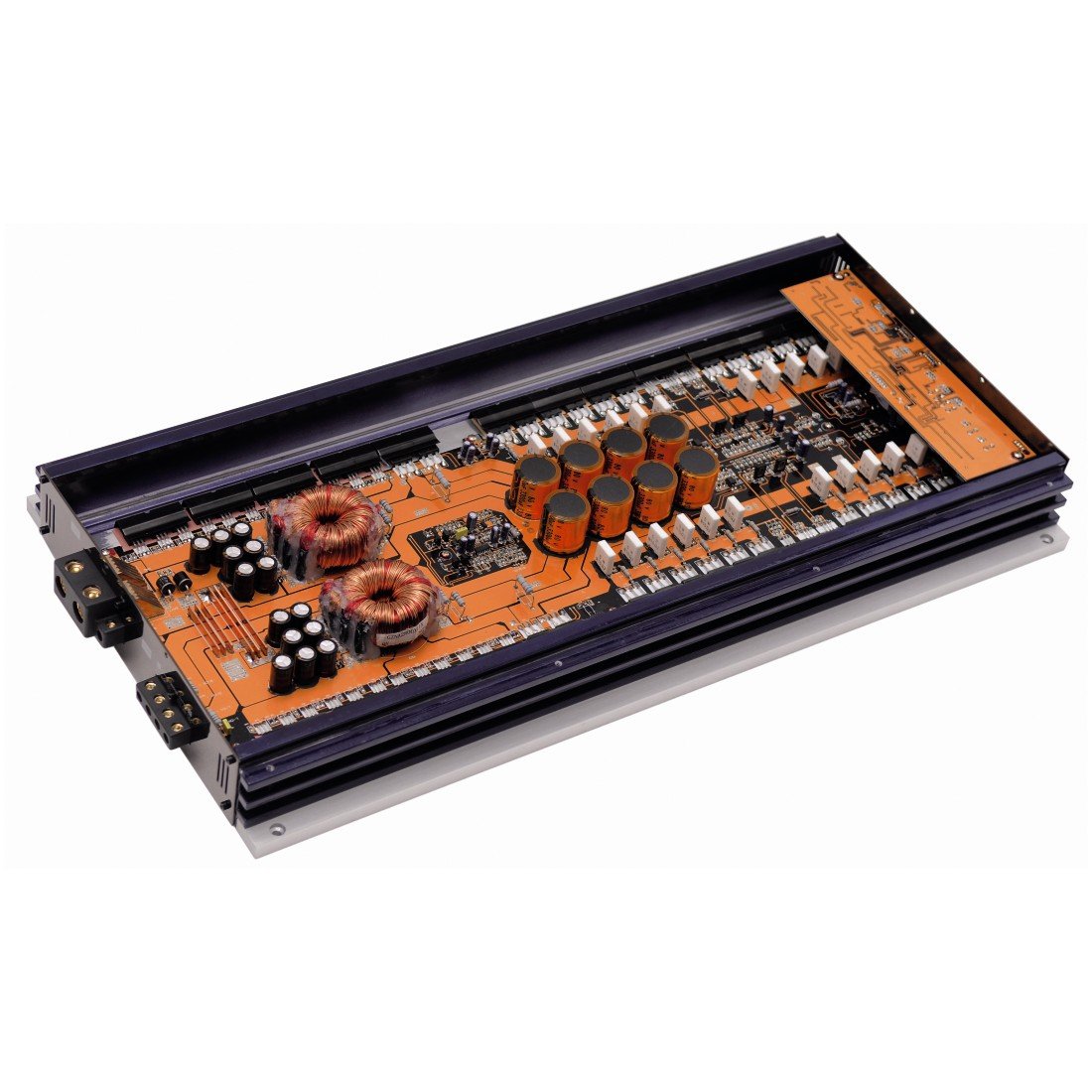
Foto 2: Ime view of the Ground Zero GZNA 2800XII amplifier with the top cover removed, revealing the circuit board. The orange PCB is densely populated with high-quality components, including large toroidal transformers, numerous capacitors, and power transistors, indicating a high-current, high-power design for stable and efficient operation.
4. Ntọala na nwụnye
Nrụnye kwesịrị ekwesị dị oke mkpa maka ịrụ ọrụ na ogologo ndụ nke gị amplifier. Always disconnect the vehicle's battery negative terminal before starting any electrical work.
4.1. Ebe Nkwanye
- Họrọ ebe kpọrọ nkụ, ikuku na-abata nke ọma, ebe anwụ na-anaghị apụta kpọmkwem na ebe okpomọkụ na-esi apụta.
- Hụ na ikuku zuru oke na gburugburu amplifier's heatsink fins for proper cooling.
- Ugwu ahụ amplifier securely to a solid surface using appropriate hardware.
4.2. Njikọ ike
- Power Cable (B+): Run a heavy-gauge power cable directly from the positive terminal of the vehicle's battery to the amplifier's B+ terminal. Install an in-line fuse holder with an appropriate fuse (refer to specifications) within 18 inches (45 cm) of the battery.
- Ground Cable (GND): Jikọọ eriri ala dị arọ site na eriri ala dị arọ amplifier's GND terminal to a clean, unpainted metal point on the vehicle chassis. The ground cable should be as short as possible, ideally less than 3 feet (1 meter).
- Remote Turn-On Cable (REM): Connect a smaller gauge wire from the amplifier's REM terminal to the remote turn-on output of your head unit. This signal turns the ampgbanyụọ ma gbanyụọ ihe na-eme ka ihe na-agbapụta ọkụ site na sistemụ ọdịyo ụgbọ ala gị.
4.3. Ntinye akara
- Connect RCA cables from your head unit's pre-out outputs to the ampNjikọ ntinye RCA nke lifier.
- Ensure proper channel matching (Left to Left, Right to Right).
4.4. Mbupute nkwu okwu
- Jikọọ ọkà okwu gị na amplifier's speaker output terminals. Observe correct polarity (+ to + and - to -).
- Ensure the speaker impedance matches the amplifier's recommended load.
5. Ntuziaka ọrụ
Ozugbo amplifier is correctly installed, follow these steps for initial setup and operation:
- Ike izizi: Reconnect the vehicle's battery. Turn on your head unit. The amplifier should power on, indicated by an LED indicator.
- Ntọala Uru: Malite na amplifier's gain control set to minimum. Play a familiar piece of music at a moderate volume on your head unit. Slowly increase the amplifier's gain until you hear distortion, then back off slightly. The gain control is not a volume control; it matches the amplifier's input sensitivity to the head unit's output.
- Ntọala crossover: Hazie nke amplifier's crossover filters (if available) according to your speaker type and system configuration. For subwoofers, use a Low-Pass Filter (LPF). For full-range speakers, use a High-Pass Filter (HPF).
- Imezicha nke ọma: Make small adjustments to the gain and crossover settings to achieve balanced and clear sound.
6. Nlekọta
The Ground Zero GZNA 2800XII amplifier requires minimal maintenance to ensure long-term performance.
- Nhicha: Periodically wipe the exterior of the amplifier with a soft, dry cloth to remove dust. Do not use harsh chemicals or abrasive cleaners.
- Nyocha: Regularly check all wiring connections for tightness and signs of corrosion. Ensure proper ventilation around the ampna -emegharị ihe.
- Zenarị ihe mgbochi: Edokwala ihe n'elu amplifier that could block airflow to the heatsink.
7. Nchọpụta nsogbu
Ọ bụrụ na ị nwere nsogbu na ndụ gị amplifier, rụtụ aka na nsogbu na azịza ndị a na-ahụkarị:
| Nsogbu | Ihe nwere ike ime | Ngwọta |
|---|---|---|
| Amplifier anaghị agbanye | No power, blown fuse, faulty ground, no remote signal | Check power cable connection, replace fuse, verify ground connection, check remote turn-on wire. |
| Enweghị mmepụta ụda | No input signal, speaker wires disconnected, gain too low, amplifier na-echebe mode | Check RCA connections, verify speaker wiring, adjust gain, check for protect light (if lit, refer to manual or contact support). |
| Ụda agbagọ | Gain set too high, poor ground, damaged speakers, incorrect crossover settings | Reduce gain, improve ground connection, inspect speakers, adjust crossover settings. |
| Excessive noise (hiss, whine) | Poor grounding, signal cable interference, faulty RCA cables | Ensure solid ground connection, route signal cables away from power cables, try different RCA cables. |
If the problem persists after attempting these solutions, please contact Ground Zero customer support or a qualified car audio technician.
8. Nkọwapụta
The following are the technical specifications for the Ground Zero GZNA 2800XII 2-Channel Ampntughari:
| Njirimara | Nkọwapụta |
|---|---|
| Nọmba nlereanya | 00113441 |
| ASIN | B003TSD3VI |
| Koodu Akụkọ Mba Nile | 04037072004311 |
| Ọnụọgụ nke ọwa | 2 |
| Ike Nwepu kacha | 2800 Watt |
| Nrụ ọrụ Voltage | Volt 14.4 (Nha aha) |
| Ụdị nkwụnye | Ntighari |
| Akụkụ ngwugwu | 70 x 36 x 12 cm (27.5 x 14.2 x 4.7 inch) |
| Ibu ngwugwu | 5.44 n'arọ (12 lbs) |
9. Akwụkwọ ikike na nkwado
Ground Zero products are manufactured to high-quality standards. For specific warranty information, please refer to the warranty card included with your product or visit the official Ground Zero website. In case of technical issues or questions not covered in this manual, please contact your authorized Ground Zero dealer or customer support for assistance.


