
Okwu mmalite
Daalụ maka ịzụrụasing the Optimus F-1760 16-inch Wave Oscillating Stand Fan. This manual provides important information regarding the safe operation, assembly, maintenance, and troubleshooting of your fan. Please read these instructions thoroughly before use and retain them for future reference.

Image: The Optimus F-1760 stand fan positioned in a bedroom, showcasing its design and size relative to furniture.
Ntuziaka nchekwa dị mkpa
Mgbe ị na-eji ngwa eletriki eme ihe, a ga-agbasorịrị mkpachapụ anya bụ isi mgbe niile iji belata ihe egwu ọkụ, ujo eletrik na mmerụ ahụ n'ahụ mmadụ, gụnyere ihe ndị a:
- Gụọ ntuziaka niile tupu i jiri fan a.
- Use this fan only as described in this manual. Other uses not recommended may cause fire, electric shock, or injury to persons.
- To protect against electrical shock, do not place fan in window, immerse unit, plug or cord in water or spray with liquids.
- Nleba anya dị mkpa mgbe ụmụaka na-eji ngwa ọ bụla ma ọ bụ nso.
- Unplug fan from outlet when not in use, when moving fan from one location to another, and before cleaning.
- Do not operate fan in the presence of explosive and/or flammable fumes.
- Etinyekwala fan ma ọ bụ akụkụ ọ bụla n'akụkụ ọkụ mepere emepe, isi nri ma ọ bụ ngwa ndị ọzọ na-ekpo ọkụ.
- Do not operate fan with a damaged cord or plug, or after the fan malfunctions or has been dropped or damaged in any manner.
- Zere kọntaktị na akụkụ ndị na-akpụ akpụ.
- Iji kwupu njikọ, jide plọg wee si na mpụta mgbidi. Ya adịla mgbe ọ na-akụ na eriri.
- Na-eji mgbe niile n'elu ala kpọrọ nkụ, dị larịị.
- Edogidela ma ọ bụ kpalie fan n'elu mgbidi ma ọ bụ n'uko ụlọ.
- Arụla ọrụ na-enweghị grills nke ọma na ebe.
- This product employs overload protection (fuse). A blown fuse indicates an overload or short-circuit situation. If the fuse blows, unplug the product from the outlet. Replace the fuse as per the servicing instructions (follow product marking for proper fuse rating) and check the product. If the replacement fuse blows, a short-circuit may be present and the product should be discarded or returned to an authorized service facility for examination and/or repair.
Ntọala na Mgbakọ
The Optimus F-1760 fan requires minimal assembly. Ensure all components are present and undamaged before proceeding.
- Mgbakọ ntọala: Attach the weighted base legs to the main pole. Ensure they are securely fastened to provide stability. The base is designed to be sturdy, with weights at the ends of the feet.
- Ndozi elu: The fan's height can be adjusted. Loosen the height adjustment knob on the pole, extend or retract the pole to the desired height, and then securely tighten the knob.
- Mgbakwunye isi Fans: Ensure the fan head is securely attached to the top of the pole. The motor housing and fan blade are plastic, while the grill is metal.
- Nkwanye: Place the fan on a dry, level surface. Ensure there is adequate space around the fan for proper air circulation and oscillation.
Ntuziaka ọrụ
The Optimus F-1760 fan offers multiple control options and features for customized comfort.
Ogwe njikwa
The fan features a 4-position push-button switch on the pole for basic operation.
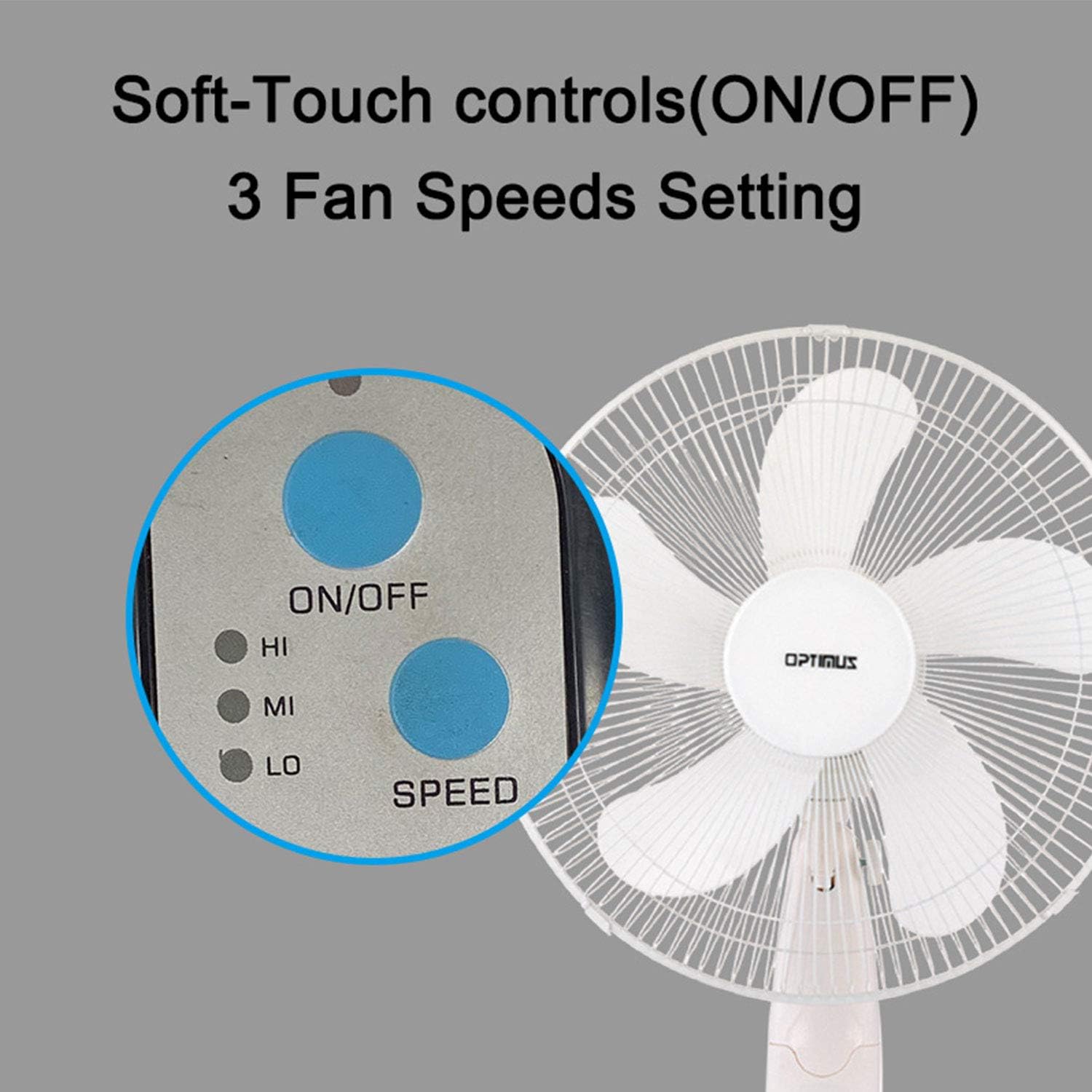
Image: The fan's soft-touch control panel, showing buttons for ON/OFF and SPEED, with indicators for High (HI), Medium (MI), and Low (LO) fan speeds.
- Gbanyụọ/gbanyụọ: Pịa ka ịgbanwuo ma ọ bụ gbanyụọ fan.
- Ntọala ọsọ: Select from Low, Medium, or High speeds. The 3-speed, energy-saving, whisper-quiet operation motor provides efficient airflow.
Njikwa anya
The fan comes with a remote control for convenient operation from a distance. (Batteries not included).

Image: The remote control for the fan, featuring buttons for Mode, Time, Speed, and ON/OFF functions.
- Gbanyụọ/gbanyụọ: Gbanyụọ ma ọ bụ gbanyụọ fan.
- Ọsọ: Cycles through the three fan speeds (Low, Medium, High).
- Edị: Selects between different wind modes.
- OGE: Activates and sets the shut-off timer.
Ụdị ifufe
The fan offers three distinct wind modes to suit your preference:

Image: The fan's control panel highlighting the MODE button and indicators for Normal, Natural, and Sleep wind modes.
- Ụdị nkịtị: The fan blows at a constant speed based on your selected setting.
- Ụdị eke: The fan speed fluctuates to mimic a natural breeze.
- Modera Modera: The fan operates at a lower, quieter speed, ideal for sleeping, with gentle speed variations.
Mgbanwe
The F-1760 features unique wave oscillation for comprehensive air distribution.

Image: A diagram illustrating the fan's capability for both vertical (up/down) and horizontal (left/right) wave oscillation, providing wider air coverage.
- Up/Down & Left/Right Wave Oscillating: Activates a unique oscillation pattern that moves the fan head both horizontally and vertically, distributing air throughout the room.
- To stop oscillation, press the oscillation button again.
Ọrụ ngụ oge
Tọọ onye ofufe ka ọ gbanyụọ na-akpaghị aka ka oge akọwapụtara.

Image: The fan's control panel showing the TIME button and indicators for 1 hour (1H), 2 hours (2H), and 4 hours (4H) timer settings. The fan can be programmed for up to 7 hours.
- The timer can be set for 1, 2, 4, or up to 7 hours. Press the TIME button repeatedly to cycle through the desired duration.
Nlekọta na nhicha
Ịsacha mgbe niile na-enyere aka ịnọgide na-arụ ọrụ nke ọma na fan ma na-agbatị ndụ ya.
- Tupu ihicha: Always unplug the fan from the electrical outlet before cleaning.
- Nchacha mpụta: Jiri nwayọọ, damp ákwà iji hichaa elu mpụta nke fan ahụ. Ejila ihe nhicha ma ọ bụ ihe mgbaze.
- Grill Cleaning: The metal grill can be cleaned with a soft brush or vacuum cleaner to remove dust. For thorough cleaning, the grill may need to be carefully removed.
- Nchacha agụba: If necessary, the fan blades can be cleaned. Ensure the fan is completely off and unplugged. The care instructions specify "Hand Wash" for components.
- Nchekwa: Mgbe a naghị eji ya ogologo oge, chekwaa fan ahụ n'ebe dị jụụ, nke kpọrọ nkụ, ọkacha mma na nkwakọ ngwaahịa mbụ ya.
Nchọpụta nsogbu
| Nsogbu | Ihe nwere ike ime | Ngwọta |
|---|---|---|
| Onye ofufe anaghị agbanwuo. | No power supply. Blown fuse. | Ensure the fan is plugged into a working outlet. Check the fuse in the plug and replace if necessary (refer to safety instructions for fuse replacement). |
| Fan operates but air movement is weak. | Low speed setting. Dust accumulation on blades/grill. | Increase the fan speed. Clean the fan blades and grills as per maintenance instructions. |
| Njikwa anya anaghị arụ ọrụ. | Dead batteries. Obstruction between remote and fan. | Replace batteries in the remote control. Ensure a clear line of sight between the remote and the fan's receiver. |
| Fan changes speed automatically or unexpectedly. | Interference from other remote controls (e.g., TV remote). | This fan may respond to frequencies from other remote controls. Try operating the fan manually or repositioning the fan/other devices to minimize interference. |
| Fan makes clicking noises during oscillation. | Normal operation of oscillation gears. | A slight clicking noise from the oscillation gears can occur during normal operation. If the noise is excessive or new, ensure the fan head is securely attached. |
| Fan feels unstable. | Base not properly assembled or tightened. Uneven surface. | Ensure all base components are securely fastened and the fan is placed on a firm, level surface. |
Nkọwapụta
- Aha nlereanya: F-1760
- Akara: Optimus
- Dayameta Fan: 16 sentimita asatọ
- Nhazi Fan Eletriki: Ugbo ala
- Isi mmalite ike: Igwe ọkụ eletrik
- Wattage: 60 watt
- Voltage: 6 volts
- Number nke pupụtara 3
- Ntọala ọsọ: 3 RPM (Low, Medium, High)
- Usoro njikwa: Ime, pịa bọtịnụ
- Atụmatụ pụrụ iche: Up/Down & Left/Right Wave Oscillating, Adjustable Height, Timer Function (up to 7 hours), Wind Modes (Normal, Natural, Sleep)
- Ojiji ime ụlọ/n'èzí: Ime ụlọ
- Ibu ihe: 9.9 pound
- Ngwa gụnyere: Product, Manual
Ozi akwụkwọ ikike
This Optimus F-1760 fan comes with a Akwụkwọ ikike dị afọ 1 from the date of purchase. This warranty covers defects in materials and workmanship under normal use. It does not cover damage resulting from misuse, accident, alteration, or unauthorized repair. Please retain your proof of purchase for warranty claims.
Nkwado ndị ahịa
For technical assistance, warranty claims, or questions regarding your Optimus F-1760 fan, please contact Optimus customer service. Refer to the product packaging or the official Optimus websaịtị maka ozi kọntaktị kacha ugbu a.