
1. Okwu mmalite
Thank you for choosing the Domo DO9089W Digital Kitchen Scale. This manual provides essential information for the safe and efficient operation, maintenance, and troubleshooting of your new kitchen scale. Please read these instructions carefully before first use and keep them for future reference.
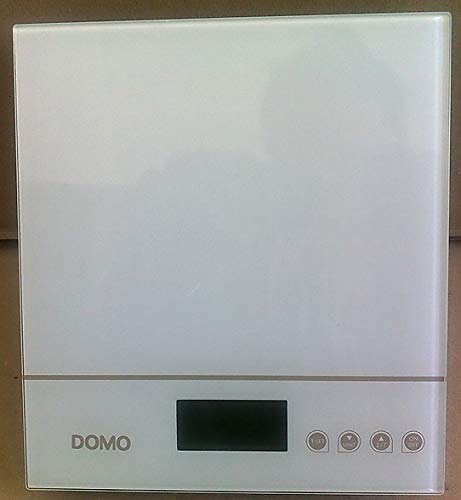
Foto 1: Domo DO9089W Digital Kitchen Scale. This image shows the compact design of the scale with its glass weighing platform and LCD display.
2. Ntuziaka nchekwa
- Ejila ọnụ ọgụgụ ahụ n'ime mmiri ma ọ bụ mmiri mmiri ndị ọzọ.
- Jiri mgbasa ozi hichaa nha nhaamp naanị akwa . Ejila ihe nhicha abrasive.
- Place the scale on a firm, flat, and stable surface for accurate measurements.
- Ebufeela ọnụ ọgụgụ ahụ karịa ikike ya kacha nke 5 kg.
- Keep the scale away from extreme temperatures, direct sunlight, and high humidity.
- Ngwa a bụ maka naanị ụlọ.
3. Ihe ngwugwu
Chọpụta na ihe niile dị na ngwugwu:
- 1 x Domo DO9089W Digital Kitchen Scale
- Akwụkwọ ntuziaka onye ọrụ 1 x (akwụkwọ a)
- Batteries (may or may not be included, check packaging)
4. Nhazi
4.1. Ntinye batrị
- Chọta ebe batrị dị n'okpuru ọnụ ọgụgụ.
- Mepee mkpuchi nke batrị batrị.
- Insert the required 3V batteries (typically 2x CR2032, check compartment for exact type and polarity). Ensure correct polarity (+/-).
- Mechie mkpuchi nke batrị batrị nke ọma.
4.2. Ntinye
Place the scale on a hard, flat, and level surface. Uneven surfaces can affect weighing accuracy.
5. Ntuziaka ọrụ
5.1. Gbanyụọ / gbanyụọ
- Iji gbanye: Pịa Gbanye/ Gbanyụọ button. The LCD display will show '0g' or '0lb'.
- Iji gbanyụọ: Pịa ma jide Gbanye/ Gbanyụọ button for a few seconds, or the scale will automatically shut off after a period of inactivity.
5.2. Ihe atụ
- Ensure the scale is on and displays '0g' or '0lb'.
- Place the item to be weighed directly onto the glass weighing platform.
- The weight will be displayed on the large LCD screen.
5.3. Tare Function (Zeroing)
Ọrụ tari na-enye gị ohere ịtụ ọtụtụ ihe n'ime otu akpa ma ọ bụ ibelata ibu nke akpa.
- Debe akpa efu n'elu ikpo okwu na-atụ. Ngosipụta ga-egosi ibu ya.
- Pịa NA-EGO button (often labeled 'T' or integrated with the ON/OFF button). The display will reset to '0g'.
- Add the ingredient to the container. The display will show only the weight of the ingredient.
- Repeat the tare process for additional ingredients.
5.4. Ntugharị nkeji
To switch between weighing units (e.g., grams, pounds, ounces), press the UNIT or MODE button (if available). The current unit will be indicated on the LCD display.
5.5. Mkpuchi akpaaka
The scale is equipped with an automatic shut-off feature to conserve battery life. It will turn off after a period of inactivity, typically around 60-120 seconds.
6. Nlekọta na nhicha
- Jiri nke nta hichapụ ọnụ ọgụgụ damp akwa . Ejila kemịkalụ ma ọ bụ ihe nchacha ọcha.
- Do not allow water to enter the interior of the scale.
- Wepu batrị ma ọ bụrụ na agaghị eji ọ̀tụ̀tụ̀ ahụ mee ogologo oge iji gbochie ntapu.
7. Nchọpụta nsogbu
| Nsogbu | Ihe nwere ike ime | Ngwọta |
|---|---|---|
| Ọkwa anaghị agbanye | Batrị nwụrụ anwụ ma ọ bụ arụnyere na ezighi ezi. | Dochie batrị ọhụrụ, na-ahụ na polarity ziri ezi. |
| Inaccurate readings / Cannot zero | Scale on an uneven surface; Overloaded; Internal error. | Place scale on a flat, stable surface. Ensure weight is within 5 kg limit. Try removing batteries for 10 seconds and reinserting. |
| Ngosipụta na-egosi 'Err' ma ọ bụ 'O-Ld' | Ọkọlọtọ bujuru oke. | Remove items from the scale immediately. Do not exceed 5 kg. |
| Buttons unresponsive or sensitive | Moisture or debris on buttons; Software glitch. | Ensure buttons are clean and dry. Remove batteries for a few seconds to reset the scale. |
8. Nkọwapụta
| Njirimara | Nkọwapụta |
|---|---|
| Nọmba nlereanya | 9089LỌ XNUMXW |
| Ụdị | DOMO |
| Ike kacha | 5 n'arọ |
| Izi ezi | 1 g |
| Ụdị ngosi | LCD |
| Ihe onwunwe | Ikpo okwu na-atụ iko |
| Akụkụ (L x W x H) | 18 x 18 x 4 cm |
| Ibu | Ihe dịka 762 g |
| Isi Iyi Ike | 3V batteries (type may vary, check compartment) |
| Mkpuchi akpaaka | Ee |
9. Akwụkwọ ikike na nkwado
Ngwaahịa a na-abịa na a Akwụkwọ ikike nke ọnwa 24 for the appliance itself. For items equipped with batteries, the batteries are guaranteed for 6 months. This warranty covers manufacturing defects under normal use. It does not cover damage resulting from misuse, accidents, unauthorized modifications, or normal wear and tear.
For warranty claims or technical support, please contact your retailer or the DOMO customer service department. Please have your proof of purchase and model number (DO9089W) ready.