
Technics SL-PD807
Technics SL-PD807 MASH 5 Disc CD Player User Manual
Model: SL-PD807
Okwu mmalite
Daalụ maka ịzụrụasing the Technics SL-PD807 MASH 5 Disc CD Player. This manual provides detailed instructions for the proper setup, operation, and maintenance of your new audio component. Please read this manual thoroughly before using the unit to ensure optimal performance and longevity.
The SL-PD807 features a 5-disc carousel changer, allowing for extended playback without interruption, and incorporates MASH (Multi-stage Noise Shaping) D/A conversion for high-quality audio reproduction.
Ozi nchekwa dị mkpa
- Isi mmalite ike: Ensure the unit is connected to an AC 120V, 60Hz power supply.
- Igwe ikuku: Ekpuchila oghere ikuku. Hapụ ohere zuru oke gburugburu ngwaọrụ ahụ ka ikuku ikuku dị mma iji gbochie oke okpomọkụ.
- Mmiri: Ewepụla unit ahụ na mmiri ozuzo ma ọ bụ mmiri. Edokwala ihe jupụtara na mmiri mmiri, dị ka vases, na unit.
- Nhicha: Wepụ ihe mkpuchi ahụ na ihe mkpuchi mgbidi tupu ị hichaa ya. Jiri ákwà kpọrọ nkụ hichaa ya.
- Ije ozi: Anwala ịrụzi ngalaba a n'onwe gị. Nye ndị ọrụ ruru eru ọrụ niile.
Ihe ngwugwu
Biko lelee ma ihe niile dị na ngwugwu ahụ:
- Technics SL-PD807 MASH 5 Disc CD Player
- Ụdọ ọkụ
- RCA Audio Cables
Note: A remote control is not included with this unit.
Melite
1. Iwepu ngwongwo
Carefully remove the CD player and all accessories from the packaging. Retain the packaging materials for future transport or storage.
2. Ntinye
Place the CD player on a stable, level surface away from direct sunlight, heat sources, and excessive dust or vibrations. Ensure there is sufficient space around the unit for proper ventilation.

Foto 1: N'ihu view of the Technics SL-PD807 CD Player with included RCA cables.
3. Njikọ
Connect the CD player to your amplifier or receiver using the supplied RCA audio cables.
- Connect one end of the RCA audio cables (red and white plugs) to the 'LINE OUT' jacks on the rear of the SL-PD807.
- Connect the other end of the RCA audio cables to an available 'CD IN' or 'AUX IN' input on your amplifier/receiver. Match the red plug to the 'R' (right) input and the white plug to the 'L' (left) input.
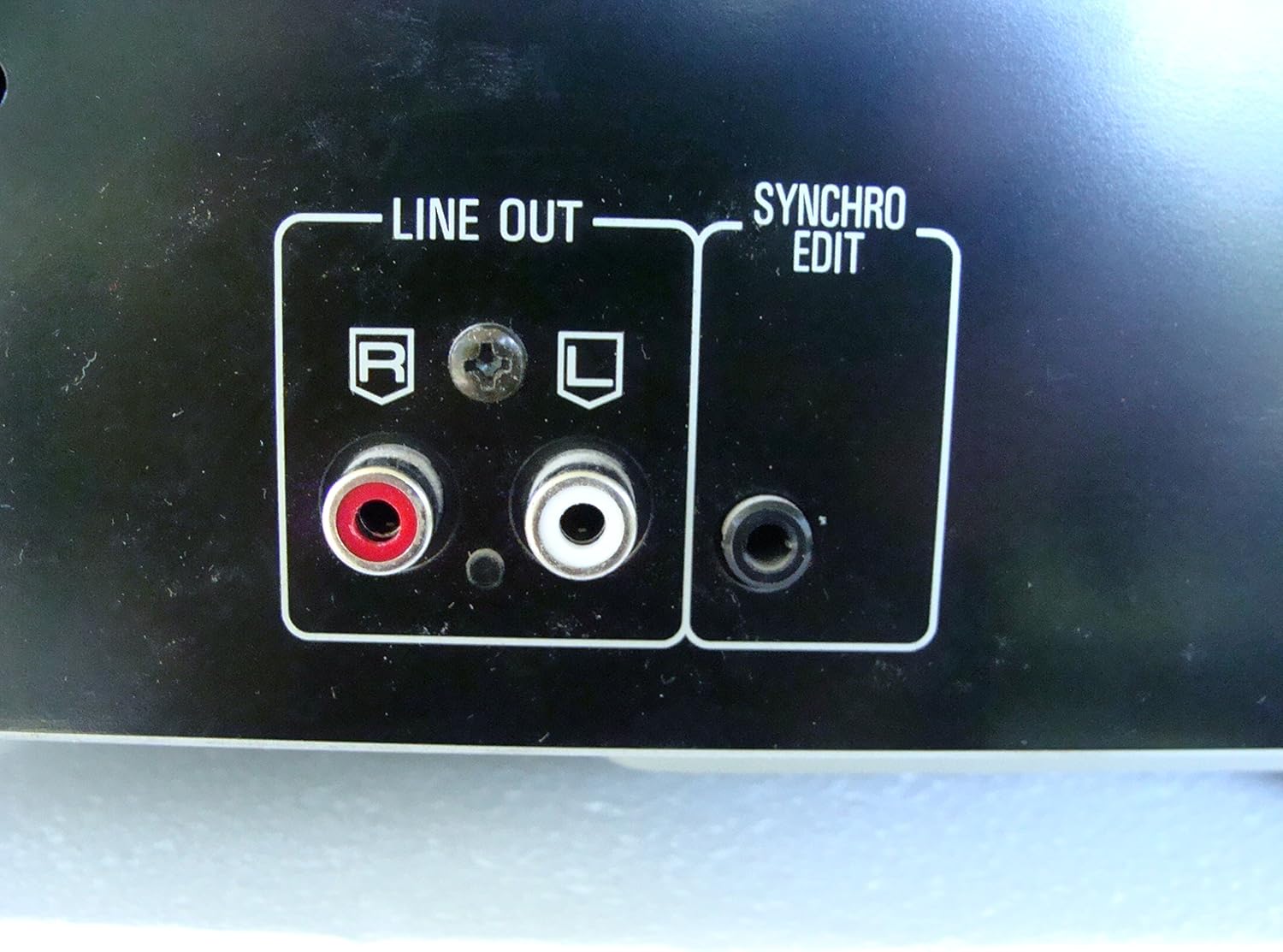
Foto 2: Rear panel connections, highlighting the 'LINE OUT' (RCA) and 'SYNCHRO EDIT' ports.
- Plug the power cord into the AC inlet on the rear of the CD player, then plug the other end into a standard AC wall outlet.
Ntuziaka ọrụ
1. Gbanyụọ / gbanyụọ
Pịa IKE button located on the front left of the unit to turn the CD player on or off.
2. Loading Discs
The SL-PD807 features a 5-disc carousel. Press the Mepee/mechie button to open the disc tray. Place up to five CDs onto the numbered disc slots with the label side facing up. Press Mepee/mechie ọzọ imechi tray.

Foto 3: Front panel controls including disc tray, display, and playback buttons.
3. Basic playback
- Gwuo: Pịa KWURU bọtịnụ (►) iji malite ịkpọ egwu.
- Kwụsị: Pịa Kwụsịtụ button (⏸) to temporarily stop playback. Press again to resume.
- Kwụsị: Pịa KWỤSỊ button (■) to stop playback.
- Ikwu egwu: Pịa MAKA buttons (⏭︎ / ⏮︎) to skip to the next or previous track.
- Chọọ: Jidesie ike Chọọ buttons (⏪︎ / ⏩︎) to fast forward or rewind within a track.
4. Disc Exchange
You can exchange discs while another disc is playing. Press the Wepu diski button to rotate the carousel to an empty slot or a disc you wish to remove/replace. The currently playing disc will continue to play until you select a new disc to play.
5. Ụdị ọkpụkpọ
- Egwuregwu enweghị usoro: Pịa AZỤ button to play tracks on the current disc or all loaded discs in a random order.
- Egwuregwu mmemme: Jiri ihe Mmemme button to create a custom playback sequence of tracks from the loaded discs. Refer to the on-screen display for programming steps.
- Tinyegharịa egwuregwu: Pịa Tinyegharịa button to repeat the current track, current disc, or all discs.
Nlekọta
1. Ichacha Unit
Wipe the exterior of the unit with a soft, dry cloth. For stubborn stains, slightly dampen the cloth with water and a mild detergent, then wipe dry. Do not use abrasive cleaners, benzene, thinner, or alcohol, as these can damage the finish.

Foto 4: Top surface of the unit, illustrating areas that may require cleaning or show wear.
2. Disc Care
- Jikwaa diski ndị ahụ n'akụkụ ha iji zere mkpịsị aka n'elu ebe a na-egwuri egwu.
- Keep discs clean. Wipe from the center outwards with a soft, lint-free cloth if necessary.
- Debe diski n'ime akpa ha iji chebe ha pụọ na uzuzu na ọkọ.
Nchọpụta nsogbu
If you experience problems with your CD player, please consult the following table before seeking service.
| Nsogbu | Ihe nwere ike ime | Ngwọta |
|---|---|---|
| Enweghị ike | Ejikọghị eriri ọkụ na nchekwa. | Lelee njikọ eriri ọkụ na unit na oghere mgbidi. |
| Enweghị ụda | RCA audio cables not connected correctly. Ampahọrọghị ntinye lifier/nnata. | Ensure RCA cables are securely connected to both the CD player and amponye ndu. Họrọ ndenye ziri ezi na gị amponye na-anata ihe. |
| Disc does not play / Skipping | Disc is dirty or scratched. Disc is inserted incorrectly. | Clean the disc with a soft, lint-free cloth. Ensure the disc is placed label-side up in the tray. Try another disc. |
| Carousel does not rotate | Obstruction in the disc tray. | Ensure no foreign objects are obstructing the carousel mechanism. |
Nkọwapụta
The following are the technical specifications for the Technics SL-PD807 MASH 5 Disc CD Player:
| Njirimara | Nkọwapụta |
|---|---|
| Aha Nlereanya | SL-PD807 |
| Onye nrụpụta | Teknụzụ |
| Ike diski | 5 diski |
| Ihe achọrọ ike | AC 120V, 60Hz, 13W |
| Akụkụ ngwugwu | 17 x 17 x 5 sentimita asatọ |
| Ibu Ibu | 15.02 pound |
| Teknụzụ Njikọta | Auxiliary, Infrared |
| Njirimara Pụrụ Iche | Mgbochi Mwụpụ |

Foto 5: Product label displaying model number and power specifications.
Akwụkwọ ikike na nkwado
For information regarding warranty coverage and customer support for your Technics SL-PD807 CD Player, please refer to the warranty card included with your purchase or visit the official Technics website. If you require further assistance, please contact Technics customer service.
Ask a question about this manual
Ask about setup, troubleshooting, compatibility, parts, safety, or missing instructions. Manuals+ will review the question and use this page’s manual context to help answer it.