
KLH KL-300i
KLH AUDIO KL-300i Nostalgia 5-n-1 System
Model: KL-300i
Okwu mmalite
Daalụ maka ịzụrụasing the KLH AUDIO KL-300i Nostalgia 5-n-1 System. This integrated audio system combines classic and modern audio playback capabilities, including a turntable, CD player, cassette player, AM/FM radio, and an iPod dock. This manual provides essential information for setting up, operating, and maintaining your system to ensure optimal performance and longevity.
Ozi nchekwa
Biko gụọ ntuziaka nchekwa niile nke ọma tupu ị jiri ngwaahịa a. Debe akwụkwọ ntuziaka a maka ntụaka n'ọdịnihu.
- Isi mmalite ike: Connect the unit only to an AC power outlet of the specified voltage.
- Igwe ikuku: Hụ na ikuku na-abata nke ọma. Ekpuchila oghere ikuku.
- Mmiri na mmiri: Ewepụla unit ahụ na mmiri ozuzo ma ọ bụ mmiri. Edokwala ihe jupụtara na mmiri mmiri, dị ka vases, na unit.
- Okpomọkụ: Etinyela ihe dị n'akụkụ ebe okpomọkụ dị ka radiator, ihe ndekọ okpomọkụ, stovu, ma ọ bụ ngwaọrụ ndị ọzọ (gụnyere amplifiers) nke na-emepụta okpomọkụ.
- Nhicha: Wepụ ihe mkpuchi ahụ na ihe mkpuchi mgbidi tupu ị hichaa ya. Jiri naanị ákwà kpọrọ nkụ.
- Ije ozi: Anwala ịnye ngwaahịa a n'onwe gị. Tụtụ aka n'aka ndị ọrụ ruru eru.
Ihe ngwugwu
Hụ na ihe niile edepụtara n'okpuru dị na ngwugwu ahụ:
- KLH AUDIO KL-300i Main Unit
- Njikwa anya
- USB Input inyeaka
- AM/FM Antenna Wire
- Akwụkwọ ntuziaka (akwụkwọ a)
Ngwaahịa gafereview
Familiarize yourself with the various components and controls of your KLH AUDIO KL-300i system.
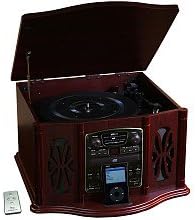
This image displays the KLH AUDIO KL-300i Nostalgia 5-n-1 System. The unit features a dark wood finish. The top lid is open, revealing a turntable. Below the turntable, the front panel includes controls for the CD player, AM/FM radio tuner, and an iPod dock. A small remote control is visible to the left of the main unit.
Njikwa akụkụ ihu:
- Bọtịnụ ike: Gbanyụọ ma ọ bụ gbanyụọ unit ahụ.
- Nhọrọ ọrụ: Switches between Phono, CD, Radio, iPod, and Aux modes.
- Mpịakọta Mpịakọta: Na-edozi ọkwa olu nna ukwu.
- Njikwa CD Player: Play/Pause, Stop, Skip Forward/Backward.
- Tuner redio: AM/FM band selector, Tuning knob.
- iPod Dock: Connector for iPod devices.
- Jack Aux-In: Ntinye 3.5mm maka ngwaọrụ ọdịyo mpụga.
- Jack ekweisi: Mmepụta 3.5mm maka ige ntị nkeonwe.
Ogwe elu:
- Ntughari: For playing vinyl records.
- Ihe mkpuchi: Protects the turntable when not in use.
Ogwe Akụkụ:
- Ogbe Cassette: For playing audio cassette tapes.
Melite
Follow these steps for initial setup of your audio system.
- Nkwanye: Place the unit on a stable, flat surface away from direct sunlight, heat sources, and excessive dust or moisture. Ensure there is adequate space around the unit for ventilation.
- Jikọọ Antenna: For optimal AM/FM radio reception, connect the supplied antenna wire to the antenna terminal on the rear of the unit. Extend the wire fully for better reception.
- Njikọ ike: Ikwunye AC ike ụdọ n'ime a ọkọlọtọ mgbidi tinyekwa.
- Ike izizi: Press the Power button on the front panel to turn on the unit.
Ntuziaka ọrụ
Ọrụ izugbe:
- Gbanyụọ/ Gbanyụọ: Pịa bọtịnụ ike ka ịgbanwuo ma ọ bụ gbanyụọ unit ahụ.
- Nhọrọ ọrụ: Use the Function Selector knob or buttons to choose your desired audio source (Phono, CD, Radio, iPod, Aux).
- Ndozi olu: Gbanwee bọtịnụ olu iji mee ka ọkwa ụda dịkwuo elu ma ọ bụ belata.
Ọrụ ntụgharị:
- Lift the lid of the unit.
- Tinye ihe ndekọ vinyl na efere a na-atụgharị.
- Select the appropriate speed (33 1/3, 45, or 78 RPM) using the speed selector switch. For 45 RPM records, place the included adapter on the spindle if needed.
- Gently lift the tonearm and position the stylus over the desired starting groove of the record.
- Lower the tonearm slowly onto the record. Playback will begin automatically.
- To stop playback, gently lift the tonearm and return it to its rest.
Ihe ọkpụkpọ CD arụ ọrụ:
- Press the Function Selector to CD mode.
- Pịa bọtịnụ Wepụ iji mepee tray CD ahụ.
- Place a CD with the label side facing up into the tray.
- Press the Eject button again to close the tray. The CD will begin playing automatically or display the track count.
- Use the Play/Pause, Stop, and Skip buttons to control playback.
Cassette Player Operation:
- Insert a cassette tape into the cassette slot on the side of the unit.
- Pịa bọtịnụ Play ka ịmalite ịkpọghachi.
- Use the Fast Forward (FF) button to advance the tape quickly.
- To stop playback, press the Stop/Eject button. Pressing it halfway will eject the tape.
Ọrụ redio AM/FM:
- Press the Function Selector to Radio mode.
- Select either AM or FM band using the band selector switch.
- Rotate the Tuning knob to search for radio stations.
- Adjust the antenna wire for best reception.
iPod Dock Operation:
- Press the Function Selector to iPod mode.
- Carefully place your compatible iPod device onto the iPod dock connector.
- Use your iPod's controls to select and play music. Audio will be routed through the KLH AUDIO system's speakers.
Aux-In Operation:
- Press the Function Selector to Aux mode.
- Connect an external audio device (e.g., MP3 player, smartphone) to the Aux-In jack on the front panel using the supplied 3.5mm auxiliary cable.
- Play audio from your external device. The sound will be played through the KLH AUDIO system's speakers.
Ojiji njikwa anya:
The remote control primarily operates the CD player functions (Play, Pause, Stop, Skip). Note that the remote cannot turn the unit on or off.
Nlekọta
Proper care will ensure the longevity of your system.
- Na-ehicha Ngalaba: Jiri ákwà dị nro ma kpọọ nkụ hichaa mpụta nke ngwaọrụ ahụ. Ejila ihe nhicha, wax, ma ọ bụ ihe mgbaze.
- Nlekọta Stylus: Handle the turntable stylus with extreme care. Clean the stylus periodically with a soft brush, brushing from back to front.
- Nlekọta CD/Kaseti: Keep CDs and cassette tapes clean and free of dust. Store them in their cases when not in use.
Nchọpụta nsogbu
If you experience issues with your system, refer to the following common problems and solutions.
| Nsogbu | Ihe nwere ike ime | Ngwọta |
|---|---|---|
| Enweghị ike | Ejinyeghị eriri ọkụ na nchekwa. | Lelee njikọ eriri ọkụ eletrik na unit na oghere mgbidi. |
| Enweghị ụda | Olu dị oke ala; Ahọpụtaghị ọrụ na-ezighi ezi; Ekweisi ejikọrọ. | Increase volume; Select correct function; Disconnect headphones. |
| Turntable anaghị agba agba | Unit not powered on; Belt dislodged. | Ensure unit is on; Contact service if belt issue suspected. |
| Ogbenye Redio nnabata | A naghị agbatị ma ọ bụ tinye eriri ahụ n'ọnọdụ kwesịrị ekwesị. | Extend and adjust the antenna wire for better signal. |
| CD anaghị egwu | CD inserted incorrectly; CD is scratched or dirty. | Ensure CD is label-side up; Clean or replace CD. |
Nkọwapụta
| Njirimara | Nkọwapụta |
|---|---|
| Isi Iyi Ike | AC 120V ~ 60Hz |
| Akụkụ (W x D x H) | Approx. 17" x 17" x 10.5" (43.2 cm x 43.2 cm x 26.7 cm) |
| Ọsọ nke ntụgharị | 33 1/3, 45, 78 RPM |
| Ugboro ugboro nke Redio | AM: 530-1710 kHz, FM: 88-108 MHz |
| ndakọrịta CD | CD, CD-R/RW |
| iPod Dock | Compatible with older generation iPods (30-pin connector) |
Akwụkwọ ikike na nkwado
This product is covered by a limited manufacturer's warranty. For specific warranty terms and conditions, please refer to the warranty card included with your purchase or contact KLH customer support. If you require technical assistance or have questions not covered in this manual, please contact KLH customer service through their official websaịtị ma ọ bụ ozi kọntaktị enyere na ngwaahịa gị.
Ask a question about this manual
Ask about setup, troubleshooting, compatibility, parts, safety, or missing instructions. Manuals+ will review the question and use this page’s manual context to help answer it.