
Okwu mmalite
The TC Electronic G-System is a comprehensive, high-quality floor-based guitar system designed to provide a complete and integrated solution for guitar effects, control, and management. It combines two DSP sections to deliver top-tier effects, analog loops, amplifier switching capabilities, and floor control. The unit also offers 9VDC power outputs for external pedals, ensuring a high level of integration within your guitar rig.
The G-System offers flexibility in setup, allowing it to be used as a single floor unit or separated into a 19-inch rackmount processor with a dedicated floor control board. Users can customize effect routing, tailor the footswitch layout, and choose from over 25 different on-board effects to suit their specific needs.

Figure 1: TC Electronic G-System Floor Unit Overview
Atụmatụ igodo
- Nhazi Mmetụta agbakwunyere: Over 25 built-in effects, including Filter, Compressor, Modulation, Pitch, Delay, and Reverb.
- Nhazi agbanwe agbanwe: Can be used as a standalone floor unit or separated into a 19-inch rackmount processor with a floor control board.
- External Pedal Integration: Four switchable mono-loops for integrating external effect pedals into the signal chain.
- Amplifier Switching: Built-in capabilities for controlling ampọwa mmiri ọkụ.
- Mpụta ike: Provides 9VDC power outputs for powering up to 9 external effects pedals.
- Seamless Preset Changes: Features fast and smooth preset changes with delay spill-over functionality.
- Ngwa ngwa-Enyi na Enyi: Intuitive footswitches and encoders for easy navigation and parameter editing.
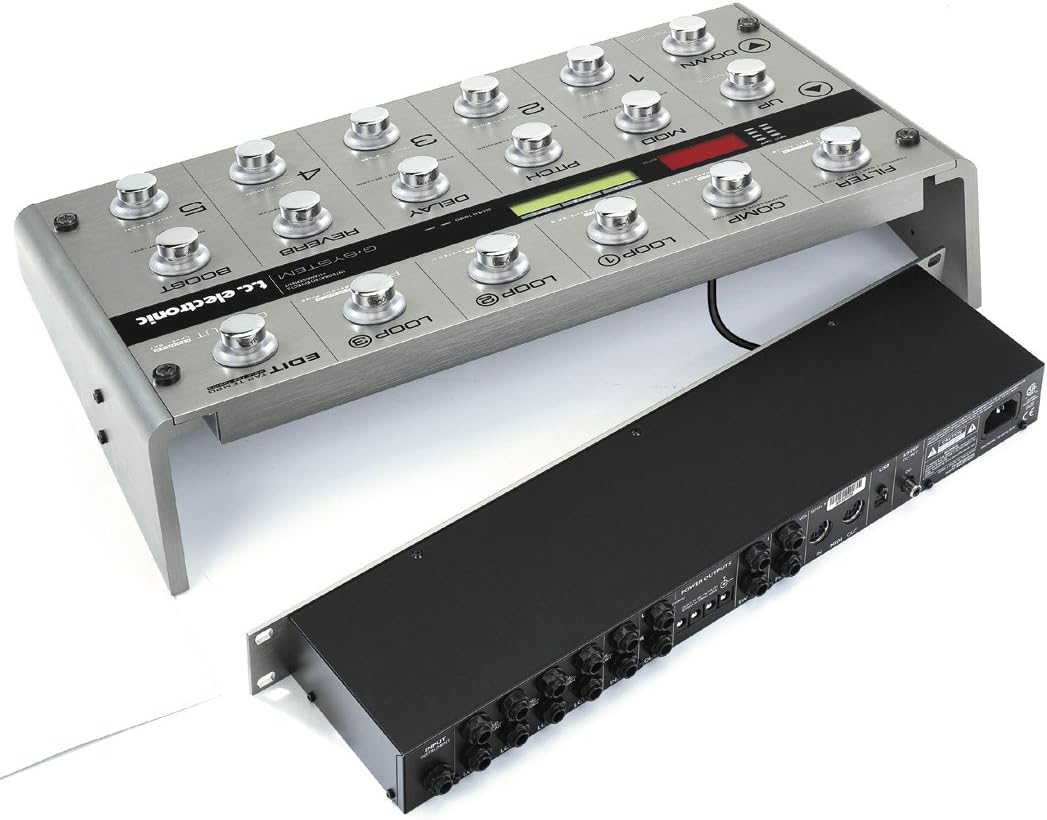
Figure 2: G-System Floor Unit and Rackmount Processor
Melite
Proper setup of your G-System is crucial for optimal performance. The unit offers versatile configuration options to integrate seamlessly with your existing guitar rig.
Ndobe anụ ahụ
- Floor Unit Configuration: Place the G-System floor unit on a stable surface where it can be easily accessed by foot.
- Rackmount Configuration: If using the rackmount processor separately, install it in a standard 19-inch equipment rack. Connect the floor control board to the rack unit using a standard CAT5 cable (not included).
Njikọ
Refer to the rear panel diagram for all input and output connections.

Figure 3: G-System Rackmount Processor Rear Panel Connections
- Ntinye gita: Connect your guitar to the 'INPUT INSTRUMENT' jack.
- AmpNjikọ liifier: Connect the 'OUTPUT 1' and 'OUTPUT 2' (L/R) jacks to your amplifier's input or effects return.
- External Effects Loops: Use the 'LOOP 1' through 'LOOP 4' Send/Return jacks to integrate your favorite external pedals. These loops are typically used for drive/distortion pedals.
- Ike: Connect the included power cable to the 'AC IN' port and a suitable power outlet.
- USB: The USB port can be used for software updates and communication with a computer.
- MIDI: MIDI IN/OUT ports allow for external MIDI control or synchronization.
- Mmepụta S/PDIF: For digital audio output to a DAW or other digital devices.
Powering External Pedals
The G-System provides dedicated 9VDC power outputs for your external pedals. Connect your pedals to these outputs using appropriate power cables.

Figure 4: G-System with External Pedals
Na-arụ ọrụ
The G-System is designed for intuitive operation, allowing quick access to effects and presets.
Nsoro ụzọ
- UP/DOWN Footswitches: Navigate through presets or menu options.
- MENU MODE Footswitch: Access the main menu for deeper editing and system settings.
- ENTER/RETURN Footswitch: Confirm selections or return to the previous screen.
Nhọrọ atọrọ
The five footswitches (1-5) directly select presets within the current bank. The G-System holds 100 factory presets and 200 user memories, organized in banks of five.
Effect Control and Editing
The G-System features dedicated footswitches and encoders for controlling individual effects and parameters.
- Effect Footswitches: Engage or bypass individual effects such as MOD (Modulation), PITCH, DELAY, REVERB, FILTER, and COMP (Compressor).
- Encoders (A, B, C): Adjust parameters displayed on the LCD screen. The function of these encoders changes based on the selected effect or menu.
- LOOP Footswitches: Engage or bypass the external effects loops.
- Kpatụ TEMPO: Set the tempo for time-based effects by tapping this footswitch.
- kwalite: Activate the pre-set boost level for solos or emphasis.
Ịchekwa atọrọ atọ
To save your customized settings, hold down one of the footswitches (1-5) labeled 'HOLD TO STORE' until the save menu appears. Follow the on-screen prompts to store your preset.
Nlekọta
To ensure the longevity and optimal performance of your TC Electronic G-System, follow these maintenance guidelines:
- Nhicha: Regularly wipe the unit with a soft, dry cloth. Avoid using abrasive cleaners, solvents, or waxes, as these can damage the finish and internal components.
- Ọnọdụ gburugburu: Operate and store the G-System in a clean, dry environment. Avoid exposure to extreme temperatures, high humidity, direct sunlight, or excessive dust.
- Igwe ikuku: Hụ na oghere ikuku dị na unit ahụ anaghị egbochi iji gbochie oke okpomọkụ.
- Mmelite femụwe: Periodically check the official TC Electronic website for firmware updates. Updates can provide new features, improvements, and bug fixes. Firmware can typically be updated via the USB port.
- Njikwa USB: Ensure all cables are securely connected and not under undue stress. Avoid bending cables sharply or placing heavy objects on them.
Nchọpụta nsogbu
If you encounter issues with your G-System, consider the following troubleshooting steps:
Enweghị ụda ma ọ bụ ọdịyo na-akwụsị akwụsị
- Lelee njikọ: Ensure all guitar, amplifier, and effects loop cables are securely plugged in and in the correct jacks.
- Ịnye ọkụ: Verify that the G-System is receiving power and the power cable is firmly connected.
- Ọkwa olu: Check the input and output levels on the G-System, as well as your amplifier's volume.
- Bypassed Effects: Ensure that the desired effects or loops are engaged and not bypassed.
- External Pedals: If using external pedals in the loops, bypass them one by one to identify if a specific pedal is causing the issue.
Unexpected Effect Behavior
- Preset Check: Verify that you are on the intended preset and that its parameters are set correctly.
- Ntọala zuru ụwa ọnụ: Some settings can affect all presets. Check the global settings menu for any unintended configurations.
- Tọgharia Factory: As a last resort, a factory reset can restore the unit to its original settings. Consult the full manual on the TC Electronic website for instructions on performing a factory reset, as this will erase all user presets.
Ihe ngosi
- Ntughari: Adjust the display contrast in the system settings if the screen is difficult to read.
- okirikiri ike: Turn the unit off, wait a few seconds, and turn it back on.
For more detailed troubleshooting or issues not covered here, please refer to the comprehensive manual available on the official TC Electronic websaịtị ma ọ bụ kpọtụrụ nkwado ndị ahịa ha.
Nkọwapụta
| Njirimara | Nkọwapụta |
|---|---|
| Nọmba nlereanya | 963000011 |
| Ibu Ibu | 17.2 pound (7.8 n'arọ) |
| Akụkụ ngwaahịa | 20.2 x 10.5 x 4.1 sentimita (51.3 x 26.7 x 10.4 cm) |
| Ngwa dakọtara | Gita |
| Ngwaọrụ Akụrụngwa | USB, MIDI |
| Ụdị mgbaàmà | Analog, Digital (S/PDIF) |
| Isi Iyi Ike | Igwe ọkụ eletrik |
| Voltage | 100V (AC) |
| Ampoge | 0.2 ndeamps |
| On-board Effects | 25+ (Filter, Comp, Mod, Pitch, Delay, Reverb, etc.) |
| External Loops | 4 switchable mono-loops |
| Mpụta ike | 9VDC for external pedals |
Akwụkwọ ikike na nkwado
For detailed warranty information, product registration, and technical support, please visit the official TC Electronic website. You can find comprehensive FAQs, downloadable manuals, and contact information for customer service there.
Ndị ọchịchị Websaịtị: www.tcelectronic.com


