
1. Okwu mmalite
This manual provides comprehensive instructions for the setup, operation, maintenance, and troubleshooting of your COBY CR-A78 AM/FM Digital Alarm Clock with Time Projector. Please read this manual thoroughly before using the device to ensure proper function and to maximize your user experience. Keep this manual for future reference.
2. Ngwaahịa gafereview
The COBY CR-A78 is a versatile digital alarm clock featuring an AM/FM radio tuner and a unique time projection function. It is designed to provide reliable timekeeping, alarm functions, and radio entertainment, with the added convenience of projecting the current time onto a wall or ceiling.
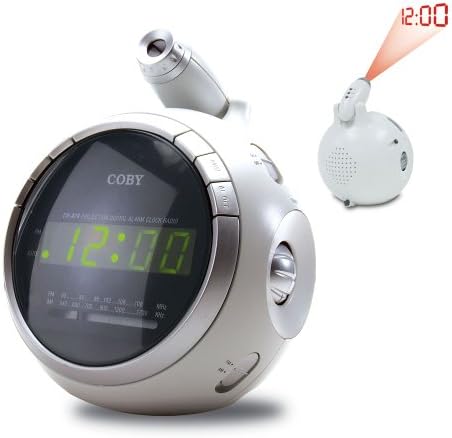
Foto nke 2.1: N'ihu view of the COBY CR-A78 digital alarm clock, showing the green LED display and the adjustable time projector. An inset image illustrates the time '12:00' being projected onto a surface.
3. Atụmatụ
- AM/FM Digital Tuner: For listening to your favorite radio stations.
- Large Green LED Display: Provides clear visibility of the time.
- Integrated Time Projector: Projects the current time onto a wall or ceiling for easy viewing.
- Ọrụ Mkpu abụọ: Tọọ mkpu abụọ nọọrọ onwe ha maka oge teta dị iche iche.
- Ọrụ Sooze: Allows for a temporary pause of the alarm.
- Oge ụra: Fall asleep to music with an automatic shut-off feature.
- Ndabere batrị: Maintains time and alarm settings during power outages (requires 9V battery, not included).
4. Ihe ngwugwu
- COBY CR-A78 AM/FM Digital Alarm Clock
- Ada Ada AC
- Akwụkwọ ntuziaka (akwụkwọ a)
5. Nhazi
5.1. Njikọ ike
- Insert the small end of the AC power adapter into the DC IN jack located on the back of the unit.
- Plug the other end of the AC power adapter into a standard wall outlet (AC 120V, 60Hz).
- The unit will power on, and the display will flash, indicating it is ready for time setting.
5.2. Nwụnye ndabere batrị
A 9-volt battery (not included) can be installed to provide backup power for the clock and alarm settings during a power interruption.
- Locate the battery compartment cover on the bottom of the unit.
- Remove the cover by sliding it off.
- Connect a 9-volt battery to the battery connector inside the compartment, observing polarity (+ and -).
- Place the battery into the compartment and replace the cover securely.
6. Ntuziaka ọrụ
6.1. Isetịpụ Oge
- Pịa ma jide Oge setịpụrụ button until the hour digits begin to flash.
- Pịa Awa bọtịnụ ugboro ugboro ka ịhazie elekere. Lelee ihe ngosi PM maka ntọala AM/PM ziri ezi.
- Pịa nkeji bọtịnụ ugboro ugboro ka ịhazie nkeji.
- Pịa Oge setịpụrụ bọtịnụ ọzọ iji kwado wee pụọ na ọnọdụ nhazi oge.
6.2. Ịtọlite mkpu
The CR-A78 features two independent alarms, Alarm 1 and Alarm 2.
- Pịa ma jide Mkpu 1 Nhazi (ma ọ bụ Mkpu 2 Nhazi) button until the alarm hour digits flash.
- Pịa Awa bọtịnụ ka ịtọọ oge oti mkpu chọrọ.
- Pịa nkeji button ka ịtọọ mkpu mkpu nkeji.
- Pịa Mkpu 1 Nhazi (ma ọ bụ Mkpu 2 Nhazi) button again to confirm the alarm time.
- Iji mee ka mkpu ahụ rụọ ọrụ, mịpụ ya Mkpuchi 1 GBANYE/ Gbanyụọ (ma ọ bụ Mkpuchi 2 GBANYE/ Gbanyụọ) switch to the 'ON' position. Select 'BUZZER' for a beeping alarm or 'RADIO' to wake to the radio.
6.3. Iji Ọrụ Snooze
Mgbe oti mkpu dara, pịa URUA button. The alarm will temporarily stop and sound again after approximately 9 minutes. To turn off the alarm completely, press the MGBANYERE/ Gbanyụọ gbanwee gaa na 'GBANYỤ'.
6.4. Ọrụ redio (AM/FM)
- Pịa Mgbanyụ/ Gbanyụọ redio bọtịnụ ka ịgbanwuo redio.
- Malite AM/FM switch to select the desired band.
- Tugharia ihe NKWUKWU knob to find your desired station.
- Gbanwee olu site na iji Mpịakọta isi.
- Ka ịgbanyụọ redio, pịa Mgbanyụ/ Gbanyụọ redio bọtịnụ ọzọ.
6.5. Using the Time Projector
- Locate the projector lens on top of the unit.
- Pịa AKWỤKWỌ/ Gbanyụọ ọrụ button to activate the time projection.
- Rotate the projector lens to adjust the focus of the projected time.
- Adjust the angle of the projector arm to direct the time onto your desired surface (wall or ceiling).
- Pịa AKWỤKWỌ/ Gbanyụọ ọrụ button again to turn off the projection.
7. Nlekọta
- Nhicha: Jiri akwa dị nro dị nro hichaa mpụta nke unit ahụ. Ejila ihe nchacha abrasive ma ọ bụ ihe mgbaze.
- Nlekọta anya anya: Gently wipe the projector lens with a soft, lint-free cloth if it becomes dusty.
- Nkwanye: Debe ihe ahụ n'elu ebe dị larịị, nke na-adịghị anya site na ìhè anyanwụ kpọmkwem, ebe okpomọkụ na oke mmiri.
- Ngbanwe batrị: Replace the 9-volt backup battery annually or if the unit experiences frequent power outages to ensure continuous backup functionality.
8. Nchọpụta nsogbu
| Nsogbu | Ihe nwere ike ime | Ngwọta |
|---|---|---|
| Unit anaghị agbanye ọkụ. | AC adapter not properly connected. | Ensure the AC adapter is securely plugged into the unit and a working wall outlet. |
| Oti mkpu anaghị ada ụda. | Agbaghị mkpu ma ọ bụ ahazighị ya nke ọma. | Verify the alarm time is set correctly and the ALARM ON/OFF switch is in the 'ON' position (BUZZER or RADIO). |
| Nnabata redio adịghị mma. | Antenna not extended or unit too close to interference. | Extend the FM wire antenna fully. For AM, rotate the unit for best reception. Move away from other electronic devices. |
| Oge a tụrụ anya ya na-adịghị mma. | Projector focus not adjusted. | Rotate the projector lens to adjust the focus until the time is clear. |
| Oge/ntọala furu efu mgbe ike ou gasịrịtage. | Batrị ndabere anwụọla ma ọ bụ na etinyereghị ya. | Install a fresh 9-volt battery or replace the existing one. |
9. Nkọwapụta
| Njirimara | Nkọwapụta |
|---|---|
| Ụdị | Coby |
| Nlereanya | CR-A78 |
| Ụdị ngosi | LED dijitalụ (Akwụkwọ ndụ akwụkwọ ndụ) |
| Redio Tuner | AM/FM Analog |
| Isi Iyi Ike | AC 120V, 60 Hz |
| Ndabere batrị | Batrị 1 x 9V (anaghị etinye ya) |
| Akụkụ ngwaahịa (L x W x H) | 12.7 x 10.16 x 15.24 cm (5 x 4 x 6 inch) |
| Ibu ngwaahịa | 567g (1.25 lbs) |
| Agba | Ọlaọcha |
10. Akwụkwọ ikike na nkwado
For warranty information or technical support, please refer to the documentation provided at the time of purchase or contact Coby customer service. Keep your purchase receipt as proof of purchase for any warranty claims.