
Coby CT-P9040 SVR
Coby CT-P9040 5.8 GHz Analog Cordless Phone User Manual
Model: CT-P9040 SVR
Okwu mmalite
This manual provides comprehensive instructions for the setup, operation, and maintenance of your Coby CT-P9040 5.8 GHz Analog Cordless Phone. Please read this manual thoroughly before using your phone to ensure proper functionality and to prevent damage.
Ọdịnaya ngwugwu na akụrụngwa
Tupu ịmalite, hụ na akụrụngwa niile dị na ngwugwu:
- Ekwentị enweghị eriri
- Ngalaba ntọala
- Ada Ada AC
- Ụdọ ekwentị
- Ngwungwu batrị enwere ike ịchaji
- Akwụkwọ ntuziaka (akwụkwọ a)
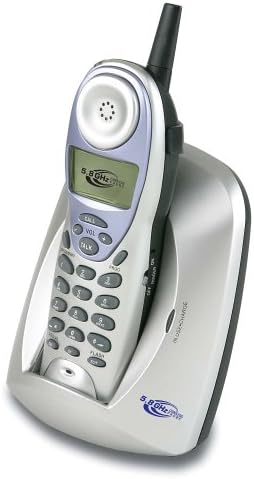
Image: The Coby CT-P9040 cordless phone, showing the handset docked in its silver base unit. The handset features a display screen, numeric keypad, and function buttons. The base unit has a charging cradle for the handset.
Ntuziaka nhazi
1. Ntinye batrị
- Chọta ebe batrị dị n'azụ ekwentị.
- Mepee mkpuchi nke batrị batrị.
- Connect the rechargeable battery pack connector to the jack inside the compartment.
- Place the battery pack into the compartment and close the cover securely.
2. Njikọ nke Isi
- Connect one end of the telephone line cord to the "LINE" jack on the back of the base unit.
- Connect the other end of the telephone line cord to a standard telephone wall jack.
- Connect the AC power adapter to the "DC IN" jack on the back of the base unit.
- Tinye ihe nkwụnye ike AC n'ime oghere eletriki nkịtị.
3. Nchaji mbụ
Place the handset in the base unit's charging cradle. Ensure the "IN CHARGE" indicator light on the base unit illuminates, indicating proper charging. For optimal battery performance, charge the handset for at least 12-14 hours before initial use.
Ntuziaka ọrụ
Ịkpọ oku
- Pick up the handset from the base unit or press the KWURU bọtịnụ.
- Gee ntị maka ụda ọkpụkpọ.
- Kpọọ nọmba ekwentị ịchọrọ.
- Ka ịkwụsị oku a, pịa KWURU button again or place the handset back in the base unit.
Na-aza oku
Mgbe ekwentị na-ada, bulie handset ma ọ bụ pịa KWURU bọtịnụ ịza oku.
Ọrụ Redial
Ka ịkpọgharịa nọmba ikpeazụ akpọrọ, pịa AH RR. bọtịnụ na handset.
Mgbanwe olu
Mgbe a na-akpọ oku, jiri ya VOL + na na Vol - buttons on the handset to adjust the earpiece volume.
Ọrụ Flash
Pịa FLASH button to use call waiting or transfer calls if supported by your telephone service provider.
Storing Phone Numbers (Speed Dial)
Your phone can store up to 10 numbers for frequently called contacts. Refer to the detailed instructions in the full manual for programming speed dial entries.
Nlekọta na nlekọta
- Keep the phone away from heat sources, direct sunlight, and moisture.
- Clean the phone's surfaces with a soft, damp akwa . Ejila ihe nchacha abrasive ma ọ bụ ihe mgbaze.
- Gbaa mbọ hụ na kọntaktsị chajị na ekwentị na ngalaba ntọala dị ọcha ka idowe chaja nke ọma.
- If the phone will not be used for an extended period, remove the battery from the handset.
Nchọpụta nsogbu
| Nsogbu | Ihe nwere ike ime | Ngwọta |
|---|---|---|
| Enweghị ụda ọkpụkpọ | Akwụsịla eriri ekwentị. | Gbaa mbọ hụ na ejikọrọ eriri ahịrị ekwentị ahụ nke ọma na ngalaba ntọala yana jakị mgbidi. |
| Ekwentị anaghị akwụ ụgwọ | Handset not properly seated in cradle or dirty charging contacts. | Reseat the handset in the base unit. Clean the charging contacts on both the handset and base unit with a dry cloth. |
| Ogo ụda adịghị mma / Static | Interference from other electronic devices or out of range. | Move the base unit away from other electronic devices (e.g., microwaves, Wi-Fi routers). Move closer to the base unit. |
| Enweghị ike ịkpọ/nata oku | Power adapter disconnected or battery low. | Check if the AC power adapter is securely plugged in. Ensure the handset battery is fully charged. |
Nkọwapụta
- Ụdị: CT-P9040 SVR
- Ugboro: 5.8 GHz Analog
- Ọwa: 40 Channel Auto Scan
- Ebe nchekwa: 10-number speed dial storage
- Ọrụ: Flash, Redial, Pause, Tone/Pulse Switch
- Jack ekweisi: Built-in 2.5mm
- Ịkwanye: Desk and Wall Mountable
- Akụkụ (L x W x H): 5 x 8 x 4 sentimita asatọ
- Arọ: 1.8 pound
- Agba: Ọlaọcha
- NJ onye ọkpụkpọ: Akwadoghi
- Ọrụ multiline: Ịrụ otu Ahịrị
Akwụkwọ ikike na nkwado
For warranty information and technical support, please refer to the warranty card included with your product or visit the official Coby websaịtị. Debe nnata nzụta gị dị ka ihe akaebe nke ịzụrụ maka nkwupụta ikike.
For further assistance, you may contact Coby customer service. Contact details are typically available on the manufacturer's websaịtị ma ọ bụ na nkwakọ ngwaahịa.
Ask a question about this manual
Ask about setup, troubleshooting, compatibility, parts, safety, or missing instructions. Manuals+ will review the question and use this page’s manual context to help answer it.