
1. Okwu mmalite
The rolls PB23 Phantom Power Adapter is designed to provide 48VDC phantom power to condenser microphones. Its advanced 100kHz switching power supply ensures a clean, noise-free audio signal. Equipped with output pull-down resistors, the PB23 is compatible with a wide range of mixers, making it an essential tool for professional audio setups.
2. Ngwaahịa gafereview
2.1 Atụmatụ
- Dedicated PB23 Phantom Power Adapter for single microphone use.
- Provides stable 48VDC phantom power.
- Utilizes a 100kHz switching regulator for consistent voltage performance and minimal audio noise.
- Features output pull-down resistors for broad mixer compatibility.
- Compact and durable aluminum construction.
2.2 Ngwa na njikwa
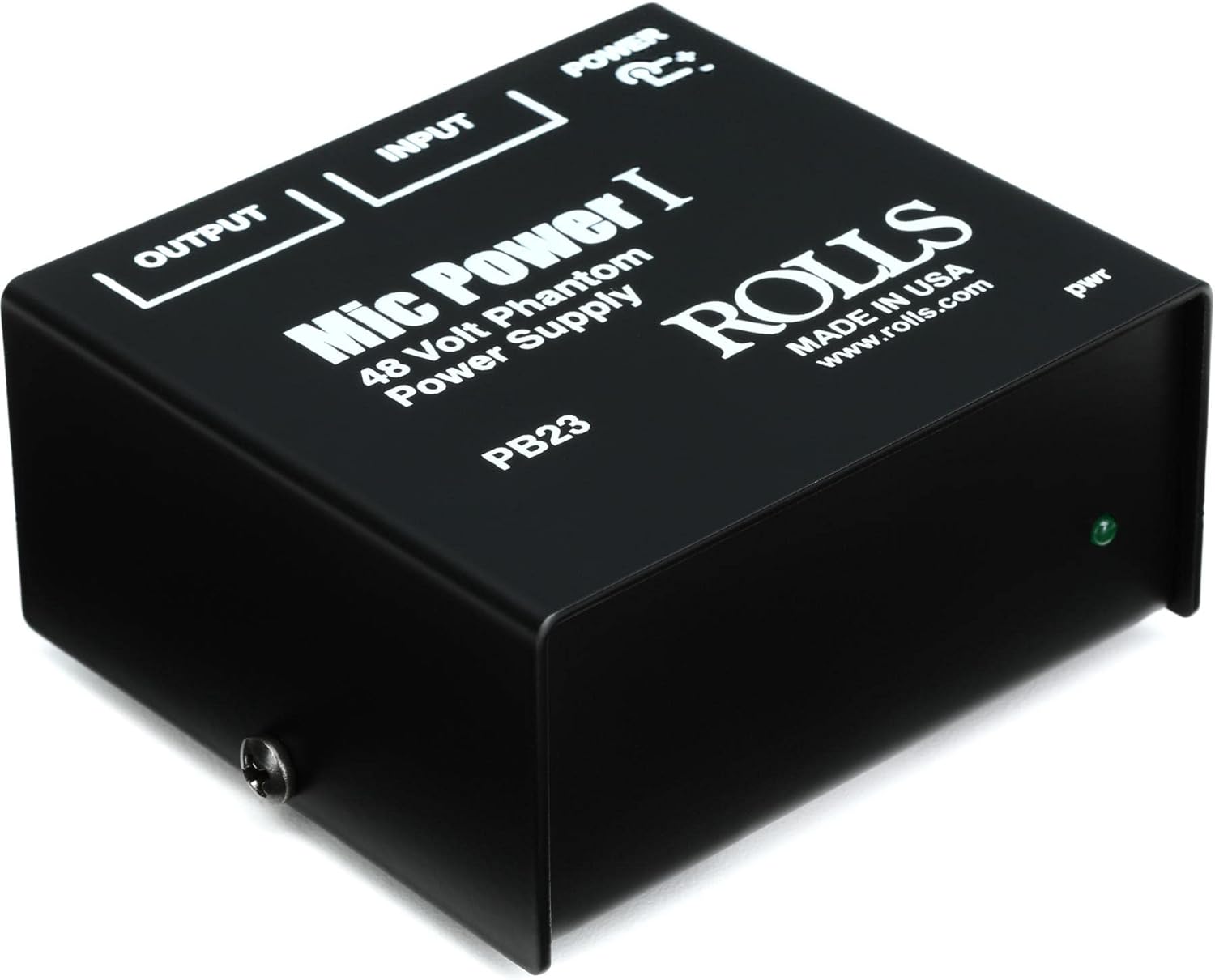
Image: The rolls PB23 Phantom Power Adapter. The top panel clearly labels the "INPUT" and "OUTPUT" XLR ports, along with a "POWER" indicator. The model number "PB23" and brand "ROLLS" are prominently displayed. A small green "pwr" LED is visible on the front right side, indicating power status.
- INPUT (XLR Female): Connects to the microphone requiring phantom power.
- MMEPỤTA (XLR Nwoke): Connects to the mixer or audio interface.
- POWER Indicator (LED): Illuminates when the unit is receiving power and operating.
- Ntinye ike DC: Port for connecting the external power adapter (not visible in this view, typically on the rear or side).
3. Kedu ihe dị na Igbe ahụ
Upon opening your rolls PB23 package, you should find the following items:
- 1 x rolls PB23 1-Channel Phantom Power Adapter
- 1 x AC Power Adapter (for powering the PB23 unit)
Note: If any items are missing or damaged, please contact rolls customer support immediately.
4. Ntuziaka Nhazi
Follow these steps to correctly set up your PB23 Phantom Power Adapter:
- Jikọọ igwe okwu: Plug your condenser microphone's XLR cable into the Ntinye (XLR Female) port on the PB23.
- Connect to Mixer/Interface: Connect an XLR cable from the Mpụta (XLR Male) port of the PB23 to an available XLR input on your mixer, audio interface, or preampna -emegharị ihe.
- Njikọ Ike: Plug the included AC power adapter into the DC power input jack on the PB23. Then, plug the AC power adapter into a standard electrical outlet.
- Nyochaa ike: The "pwr" LED indicator on the PB23 will illuminate green, confirming that the unit is powered on and providing 48V phantom power.
- Audio Check: Your microphone is now ready for use. Perform an audio check through your mixer/interface to ensure proper signal flow.
Important: Always make connections before applying power to avoid potential damage to your equipment.
5. Ntuziaka ọrụ
The rolls PB23 is designed for simple, plug-and-play operation. Once connected as described in the Setup Guide, it automatically provides the necessary 48V phantom power to your condenser microphone.
- The unit operates continuously when powered. There is no on/off switch on the PB23 itself; power is controlled by connecting or disconnecting the AC adapter from the wall outlet.
- Ensure your mixer's input gain is set appropriately for the microphone being used.
- The PB23 is designed to power a single microphone. Do not attempt to connect multiple microphones to one PB23 unit using Y-cables or similar configurations.
6. Nlekọta
To ensure the longevity and optimal performance of your rolls PB23 Phantom Power Adapter, follow these simple maintenance guidelines:
- Nhicha: Use a soft, dry cloth to wipe down the exterior of the unit. Avoid using liquid cleaners, solvents, or abrasive materials, as these can damage the finish or internal components.
- Nchekwa: Mgbe a naghị eji ya ruo ogologo oge, kwụpụ ihe nkwụnye ọkụ eletrik ahụ ma debe ya n'ebe dị jụụ ma kpọọ nkụ, ebe anwụ na-anaghị apụta kpọmkwem ma ọ bụ oke okpomọkụ.
- Ijikwa: Handle the unit with care. Avoid dropping it or subjecting it to strong impacts, which can damage internal circuitry.
- Igwe ikuku: Ensure the unit has adequate ventilation and is not covered, to prevent overheating.
7. Nchọpụta nsogbu
If you encounter issues with your PB23, refer to the following table for common problems and their solutions:
| Nsogbu | Ihe nwere ike ime | Ngwọta |
|---|---|---|
| No power indicator light (pwr LED off) | Ejikọghị ihe nkwụnye ike ma ọ bụ nwee nsogbu; ihe nkwụnye ọkụ anaghị arụ ọrụ. | Ensure power adapter is securely connected to the PB23 and a working electrical outlet. Test the outlet with another device. |
| Enweghị ụda sitere na igwe okwu | Incorrect connections; faulty microphone or cables; mixer input issues. | Verify all XLR cables are correctly connected (Mic to PB23 Input, PB23 Output to Mixer Input). Test microphone and cables with another setup if possible. Check mixer input settings. |
| Mkpọtụ mkpọtụ ma ọ bụ mkpọtụ | Ground loop; faulty cable; interference. | Ensure all equipment is properly grounded. Try different XLR cables. Move the PB23 away from other electronic devices that might cause interference. |
| Weak or distorted signal | Microphone not receiving full phantom power; faulty microphone. | Confirm the pwr LED is on. Test with a different condenser microphone if available to rule out microphone issues. |
8. Nkọwapụta
| Njirimara | Uru |
|---|---|
| Nọmba nlereanya | PB23 |
| Mpụta ike Phantom | 48VDC |
| Ugboro ngbanwe | 100kHz |
| Ụdị njikọ | 3 Pin XLR (Input/Output) |
| Akụkụ ngwaahịa | 3 x 1.25 x 5 sentimita asatọ |
| Ibu Ibu | 13.8 ounces (ihe dị ka 0.86 lbs) |
| Ihe onwunwe | Aluminom |
| Agba | Nwa |
| Onye nrụpụta | na-apụta |
9. Akwụkwọ ikike na nkwado
9.1 Ozi akwụkwọ ikike
rolls products are designed for reliability and performance. This product is covered by a limited manufacturer's warranty against defects in materials and workmanship. The specific duration and terms of the warranty may vary by region and purchase date. Please retain your proof of purchase for warranty claims.
9.2 Nkwado ndị ahịa
For technical assistance, troubleshooting, or warranty service, please contact rolls customer support. You can typically find contact information on the official rolls websaịtị (www.rolls.com) or through your authorized dealer.
When contacting support, please be prepared to provide your product model (PB23), serial number (if applicable), and a detailed description of the issue.